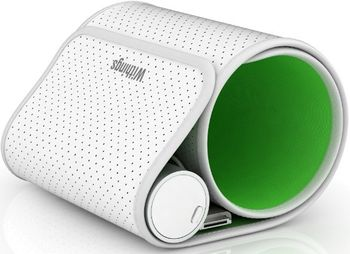
Withings Blood Pressure Monitor
 Withings · Model Blood Pressure Monitor
Comparisons with benchmark values (OMS). Automatic data saving. Exports of curves and results. Instant Measurement - Simply connect the Withings monitor to your iOS device. The Withings application runs automatically and makes the measurement available with a single action. Clear Results - Detailed results are displayed, and the application will indicate the recommended values, using all the display qualities of the iOS device. Automatic Saving - All results are saved for a precise monitoring of your health. There’s no need to note down results, calculate averages and transmit them. The Withings monitor does all this for you. Health Monitored From Your Pocket - Automatically traced curves facilitate the detection of trends in the blink of an eye. Morning/ evening values and subsequent average values are clearly displayed for effective monitoring. Online connection. Private website secured by password. Monitoring blood pressure and pulse. Comparisons with benchmark values (OMS). Web browser supported: Internet Explorer, Firefox, Chrome, Safari Data sharing. The option of sharing data in a secure way. Ability to make your graphs accessible on a webpage. Ability to automatically publish your weight on Twitter.
Key tips
- ·A no-signal/flatline alarm gets checked on the patient first, not the monitor - rule out a real clinical event before troubleshooting.
- ·Recalibrate NIBP against a reference manometer, not just a self-test pass.
- ·Reused patient cables (SpO2, ECG leads) are a common source of intermittent-fault complaints - swap the cable before the module.
Typical Failure Modes
Compiled for this model from its own documentation and established engineering knowledge for this equipment class - not from a verified service record. Confirm against the manufacturer's service manual.
NIBP will not measure or is inaccurate
HighSymptoms: Times out, cuff will not inflate or hold pressure, readings implausible or fail against a reference.
Root cause: Internal pump or valve, a cuff / hose leak, or pressure-transducer / calibration drift.
Cuff / hose fault
MediumSymptoms: Slow inflation, air leak, will not hold, artefact-heavy readings.
Root cause: Split cuff bladder, a cracked hose, or a loose connector.
Motion / artefact rejection poor
MediumSymptoms: Frequent retries or error on moving patients (common on ABPM).
Root cause: Algorithm limits plus a marginal cuff fit or transducer noise.
Battery / power fault
MediumSymptoms: Short run time, will not power on or hold a 24 h ABPM study.
Root cause: Aged battery.
Data download / clock fault (ABPM)
LowSymptoms: Study will not download, timestamps wrong.
Root cause: Download cable / dock or the internal clock battery.
Serviceable Parts & Consumables
Serviceable items for this model, compiled from its documentation and engineering knowledge for this equipment class. Service class and relative cost are estimates, not manufacturer figures; no part numbers are given. Confirm intervals and pricing against the manufacturer.
Cuff and hose set
Class Frequent wear itemRel. cost $R&R Easy
Internal NIBP pump
Class Major service partRel. cost $$R&R Moderate
NIBP valve block
Class Major service partRel. cost $$R&R Moderate
Battery
Class Frequent wear itemRel. cost $R&R Easy
Pressure transducer / main board
Class Major service partRel. cost $$$R&R Difficult
| Part | Service class | Relative cost | R&R difficulty |
|---|---|---|---|
| Cuff and hose set | Frequent wear item | $ | Easy |
| Internal NIBP pump | Major service part | $$ | Moderate |
| NIBP valve block | Major service part | $$ | Moderate |
| Battery | Frequent wear item | $ | Easy |
| Pressure transducer / main board | Major service part | $$$ | Difficult |
Relative cost: $ lowest · $$$$ highest service-part cost for this equipment class. Not a price.
PM Checklist
Preventive-maintenance tasks typical of this equipment class. Perform to the manufacturer's procedure and your facility's policy - this is general reference, not a schedule for this specific unit.
- ·Routine cable and lead-wire inspection for fraying/wear
- ·Battery conditioning cycle
- ·NIBP calibration check against a reference manometer
- ·ECG / SpO2 accuracy verification against a patient simulator
- ·Annual electrical safety test
Troubleshooting Approach
A starting sequence for this model, compiled from its documentation and engineering knowledge for this equipment class. Follow the manufacturer's service documentation for the actual procedure.
Symptom: NIBP inaccurate or times out
- Leak-test the cuff and hose (occlude and watch for pressure decay).
- Run the device's pressure-calibration verification against a calibrated manometer.
- Confirm correct cuff size and placement.
- Verify against a NIBP simulator.
- Refer the pump / valve / transducer for service if it persists.
Symptom: Fails a 24 h ABPM study
- Fit fresh batteries and confirm capacity.
- Check the cuff and hose for leaks.
- Confirm the programmed schedule and that the study downloads.
- Replace the battery / clock cell.
- Verify against a simulator before re-issuing.
Typical Location
Where this class of equipment is typically deployed - general reference, not this unit's own placement record.
- ICU / CCU
- Emergency Department
- OR / PACU
- General med-surg floors
- Step-down units
- Telemetry units
Documents & Manuals
Safety & Recalls
Synced live from the FDA openFDA API.
- RECALL
A software bug eliminated the initial ECG activation and review of the ECG under a physician. However, the device is only cleared for use under the care of a physician.
- RECALL
Device could not meet the requirements for systolic pressure
Related calculators
From BioLab, for work done with this kind of equipment.
Troubleshoot this device with Bio
Describe a symptom or error code. Bio answers from this device's own documented error codes, failure modes, parts, and guides.
Ask Bio