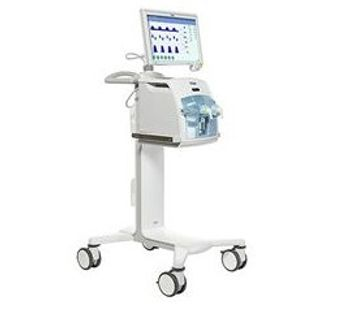
Draeger Babylog VN500
 Dräger · Model Babylog VN500
Workstation Functions Configuration to suit your needs Downloadable screenshots for training, research and knowledge transfer Fast, standard configuration of all Babylog VN500 devices via USB Ability to connect the C500 Cockpit display to an overhead projector 3 RS-232 data ports for information sharing to central database systems Configurable User Interface and Monitoring Tools Individual monitoring views that can be determined by the user Standardised, intuitive and user-friendly graphical user interface Online help including context-sensitive help functions Extended monitoring functions and smart data visualizations Decision-Making Tools that Decrease Cognitive Workload Smart Pulmonary View provides a graphical display of the compliance and resistance, including spontaneous breathing Trending, measured parameters, waveforms and loops Advanced Respiratory Care Original Drager leak adaptation and leak compensation technology to maintain sensitive triggering and volume targets PC-MMV can be used for weaning and promotes spontaneous breathing and automatically adapts support in line with patient needs Integrated non-invasive ventilation and high-flow oxygen therapy.
Key tips
- ·Never disable a low-pressure/circuit-disconnect alarm while troubleshooting - silence it, don't disable it.
- ·Verify the O2 supply source and pressure before assuming an internal fault.
- ·Circuit type must match the patient population (adult/pediatric/neonatal) - a mismatched circuit invalidates delivered volumes.
Typical Failure Modes
Compiled for this model from its own documentation and established engineering knowledge for this equipment class - not from a verified service record. Confirm against the manufacturer's service manual.
Fails the pre-use self-test / circuit check
HighSymptoms: Self-test fault, circuit-leak or compliance-check failure, will not be released for use.
Root cause: Patient-circuit / expiratory-valve leak, a flow-sensor fault, an O2-cell fault, or an internal pneumatic fault.
Flow / volume delivery inaccurate
HighSymptoms: Delivered tidal volume or flow does not match the setting, or fails the annual verification.
Root cause: Flow-sensor drift / contamination, an inspiratory / expiratory valve fault, or a blender / proportioning-valve fault.
O2 / air supply or blender fault
MediumSymptoms: Low-supply alarm, FiO2 not matching the setting, O2-cell reads wrong.
Root cause: Wall / cylinder supply issue, an inlet filter / regulator fault, the blender, or an aged O2 cell.
PEEP not held / high circuit pressure
MediumSymptoms: PEEP drifts, auto-PEEP, high-pressure alarms, poor exhalation.
Root cause: Worn or wet expiratory valve / diaphragm, or a blocked exhalation path.
Battery / power fault
MediumSymptoms: Short internal-battery run time, will not charge, transfers to battery unexpectedly.
Root cause: Aged internal battery or a power-supply fault.
Turbine / compressor fault (turbine units)
MediumSymptoms: Noisy operation, cannot meet flow demand, turbine / compressor alarm.
Root cause: Worn turbine / compressor.
Serviceable Parts & Consumables
Serviceable items for this model, compiled from its documentation and engineering knowledge for this equipment class. Service class and relative cost are estimates, not manufacturer figures; no part numbers are given. Confirm intervals and pricing against the manufacturer.
Flow sensor(s)
Class Frequent wear itemRel. cost $$R&R Fairly easy
Expiratory valve / diaphragm
Class Frequent wear itemRel. cost $$R&R Fairly easy
O2 cell / sensor
Class Frequent wear itemRel. cost $$R&R Easy
Internal battery
Class Periodic replacementRel. cost $$R&R Fairly easy
Inlet filters / water traps
Class Frequent wear itemRel. cost $R&R Easy
Turbine / compressor (turbine units)
Class Major service partRel. cost $$$$R&R Difficult
| Part | Service class | Relative cost | R&R difficulty |
|---|---|---|---|
| Flow sensor(s) | Frequent wear item | $$ | Fairly easy |
| Expiratory valve / diaphragm | Frequent wear item | $$ | Fairly easy |
| O2 cell / sensor | Frequent wear item | $$ | Easy |
| Internal battery | Periodic replacement | $$ | Fairly easy |
| Inlet filters / water traps | Frequent wear item | $ | Easy |
| Turbine / compressor (turbine units) | Major service part | $$$$ | Difficult |
Relative cost: $ lowest · $$$$ highest service-part cost for this equipment class. Not a price.
PM Checklist
Preventive-maintenance tasks typical of this equipment class. Perform to the manufacturer's procedure and your facility's policy - this is general reference, not a schedule for this specific unit.
- ·Daily pre-use check: self-test, circuit integrity, alarm function
- ·Scheduled circuit and inspiratory filter replacement per manufacturer interval
- ·Flow and pressure sensor calibration verification
- ·Battery load test and runtime check
- ·Annual full PM and electrical safety test
Troubleshooting Approach
A starting sequence for this model, compiled from its documentation and engineering knowledge for this equipment class. Follow the manufacturer's service documentation for the actual procedure.
Symptom: Fails the pre-use self-test
- Run the self-test with the exact circuit and humidifier that will be used.
- Leak-test the circuit and the expiratory valve; fit fresh flow sensors and an O2 cell if due.
- Repeat the self-test.
- Calibrate the O2 cell and flow sensors per the manual.
- Remove from service and refer an internal pneumatic fault to the OEM / biomed.
Symptom: Delivered volume or FiO2 wrong
- Verify tidal volume / flow with a calibrated gas-flow analyser and FiO2 with an analyser at the wye.
- Calibrate the flow sensors and O2 cell.
- Inspect the inspiratory / expiratory valves.
- Check the air / O2 supply pressures and inlet filters.
- Refer the blender / proportioning valve for service if the mix is still wrong.
Typical Location
Where this class of equipment is typically deployed - general reference, not this unit's own placement record.
- ICU / CCU
- Emergency Department
- Operating Room (anesthesia-adjacent)
- NICU
- Respiratory Therapy department
- Patient transport
Documents & Manuals
Related calculators
From BioLab, for work done with this kind of equipment.
Troubleshoot this device with Bio
Describe a symptom or error code. Bio answers from this device's own documented error codes, failure modes, parts, and guides.
Ask Bio