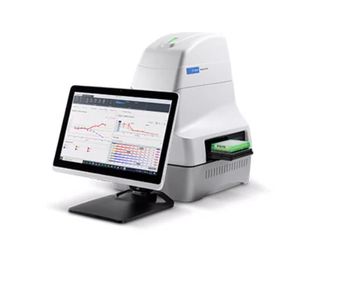
Agilent Technologies Seahorse XF Pro
 Agilent Technologies · Model Seahorse XF Pro
Live cell, real-time analysis of cellular energy metabolism platform in 96-well format Multiple parameters reported from each assay well, including OCR, PER or ECAR, and ATP product rates Excellent OCR precision at low rates, providing confidence when working with quiescent cell types, such as naïve T cells High-sensitivity analysis of as few as 5,000 cells per well using the custom 96-well plate Compatible with XF Pro M plate to reduce edge effect Four-port injection system with automated mixing feature for assessing immediate cellular responses to substrates, inhibitors, and other compounds in real time Verified instrument performance to ensure intraplate and interplate data consistency Wide operation environment temperature of 4 to 30 °C, allowing the analyzer to maintain internal assay temperature of 16 to 42 °C Advanced Pro Controller software for easy assay protocol creation with user guided interface Data Quality View in Wave Pro software for automated flagging of outliers.
Key tips
- ·When no category-specific guidance fits, default to the manufacturer's own service manual and the general troubleshooting method in the Engineer's Guide.
- ·Run an incoming and annual electrical safety test regardless of how niche the device is.
Typical Failure Modes
Compiled for this model from its own documentation and established engineering knowledge for this equipment class - not from a verified service record. Confirm against the manufacturer's service manual.
Out of calibration / accuracy suspect
HighSymptoms: Readings disagree with a reference standard, verification check outside tolerance.
Root cause: Normal drift - the instrument needs its scheduled factory / accredited calibration (at least every 12 months).
Will not power on / battery fault
MediumSymptoms: Dead unit, short battery life, will not charge.
Root cause: Depleted or aged battery, or a power / charger fault.
Test lead / probe / adapter fault
MediumSymptoms: Open or intermittent readings, connection errors, a specific function fails.
Root cause: Worn or broken test leads, mains adapters, patient-lead adapters, or a sensor cable.
A measurement / simulation function fails
MediumSymptoms: One parameter (leakage, insulation, ECG / SpO2 / IBP simulation, defib / pacer energy, ventilator flow / pressure, light / dose) errors or is out of range while others work.
Root cause: An internal source / measurement circuit fault on that channel.
PC / software communication fault
LowSymptoms: The automation / logging software will not connect.
Root cause: USB cable / port or driver.
Serviceable Parts & Consumables
Serviceable items for this model, compiled from its documentation and engineering knowledge for this equipment class. Service class and relative cost are estimates, not manufacturer figures; no part numbers are given. Confirm intervals and pricing against the manufacturer.
Test-lead / adapter set
Class Periodic replacementRel. cost $$R&R Easy
Battery
Class Periodic replacementRel. cost $$R&R Easy
Calibration (factory / accredited)
At least every 12 months per the manufacturer.
Class Frequent wear itemRel. cost $$R&R Easy
Communication cable
Class Periodic replacementRel. cost $R&R Easy
| Part | Service class | Relative cost | R&R difficulty |
|---|---|---|---|
| Test-lead / adapter set | Periodic replacement | $$ | Easy |
| Battery | Periodic replacement | $$ | Easy |
| Calibration (factory / accredited) At least every 12 months per the manufacturer. | Frequent wear item | $$ | Easy |
| Communication cable | Periodic replacement | $ | Easy |
Relative cost: $ lowest · $$$$ highest service-part cost for this equipment class. Not a price.
PM Checklist
Preventive-maintenance tasks typical of this equipment class. Perform to the manufacturer's procedure and your facility's policy - this is general reference, not a schedule for this specific unit.
- ·Follow the manufacturer's PM schedule
- ·Perform incoming and annual electrical safety testing per facility biomedical program
Troubleshooting Approach
A starting sequence for this model, compiled from its documentation and engineering knowledge for this equipment class. Follow the manufacturer's service documentation for the actual procedure.
Symptom: Accuracy suspect / verification fails
- Confirm the calibration is within date.
- Verify against a known reference (a decade box, a reference meter, a second analyzer).
- Check the test leads / adapters for damage and reseat them.
- If a single function is out, note it for the calibration lab.
- Send the unit for its scheduled calibration if it is due or fails verification.
Symptom: A function fails or will not power on
- Fit fresh batteries / confirm the charger.
- Swap in a known-good lead / adapter set.
- Test the failing function into a known load / source.
- Update the firmware if available.
- Return the unit for a persistent internal fault.
Typical Location
Where this class of equipment is typically deployed - general reference, not this unit's own placement record.
- Varies by device - check the unit's own manual for facility placement guidance
Documents & Manuals
No documents available for this device yet.
Related calculators
From BioLab, for work done with this kind of equipment.
Troubleshoot this device with Bio
Describe a symptom or error code. Bio answers from this device's own documented error codes, failure modes, parts, and guides.
Ask Bio