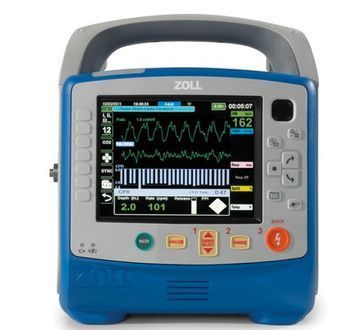
Zoll X Series

Unequaled CPR support: CPR Dashboard™ displays CPR quality in real time, and See-Thru CPR® can help you minimize the length of pauses Advanced communication: Integrated WiFi, Bluetooth®, and USB capabilities for data uploads and cell modem communication Welch Allyn NIBP with Sure BP® and SmartCuf®: , the gold standard for noninvasive blood pressure measurement Split-screen capability: Simultaneously view a dynamic multi-lead ECG while reviewing a static 12-lead ECG report Multiple-trace capability: Display up to four waveforms of your choice or all 12 ECG leads simultaneously Masimo rainbow® SET pulse CO-Oximetry: Accurate measurements of Sp02, SpCO, and SpMet are assured SurePower™ II high-capacity lithium-ion battery: Six hours of continuous run time.
Key tips
- ·Never skip the daily/shift ready-check - a defibrillator found dead during a code is a real, repeated root-cause finding.
- ·Pads and batteries have real expiration dates - check them on every PM, not just at annual service.
- ·Verify energy-delivery accuracy with a real defibrillator analyzer, not just a self-test pass.
Typical Failure Modes
Compiled for this model from its own documentation and established engineering knowledge for this equipment class - not from a verified service record. Confirm against the manufacturer's service manual.
Error message on the display
HighSymptoms: A named error (e.g. "ALARM SILENCE SHORT", defib / ECG / SpO2 / NIBP faults) on the display, function inhibited.
Root cause: The X Series Service Manual lists each error and the technician action - a stuck key, a module fault, a cable, or a board.
Defibrillation energy delivery fault
HighSymptoms: Will not charge, charges slowly, or delivered energy fails the analyser test.
Root cause: HV charging circuit, capacitor, or the therapy-cable / paddle path.
Battery will not hold charge / not recognised
HighSymptoms: Short run time, low-battery early, battery-fault indication.
Root cause: Aged SurePower battery pack, or a charging-system fault.
Parameter fault (ECG / SpO2 / NIBP / EtCO2 / IBP)
MediumSymptoms: Noisy or absent trace, no reading, NIBP times out, EtCO2 will not zero.
Root cause: Worn patient cable / sensor, or a parameter-module fault.
Printer / connectivity fault
LowSymptoms: No or faint strip; case data will not transmit (Wi-Fi / Bluetooth / cellular).
Root cause: Print head / paper, or the wireless module / configuration.
Serviceable Parts & Consumables
Serviceable items for this model, compiled from its documentation and engineering knowledge for this equipment class. Service class and relative cost are estimates, not manufacturer figures; no part numbers are given. Confirm intervals and pricing against the manufacturer.
SurePower battery pack
Class Periodic replacementRel. cost $$$R&R Easy
Therapy cable / paddles
Class Periodic replacementRel. cost $$$R&R Easy
ECG patient cable / SpO2 / EtCO2 / IBP accessories
Class Periodic replacementRel. cost $$R&R Easy
NIBP cuff and hose
Class Frequent wear itemRel. cost $R&R Easy
Front panel / key membrane
Class Major service partRel. cost $$R&R Moderate
| Part | Service class | Relative cost | R&R difficulty |
|---|---|---|---|
| SurePower battery pack | Periodic replacement | $$$ | Easy |
| Therapy cable / paddles | Periodic replacement | $$$ | Easy |
| ECG patient cable / SpO2 / EtCO2 / IBP accessories | Periodic replacement | $$ | Easy |
| NIBP cuff and hose | Frequent wear item | $ | Easy |
| Front panel / key membrane | Major service part | $$ | Moderate |
Relative cost: $ lowest · $$$$ highest service-part cost for this equipment class. Not a price.
PM Checklist
Preventive-maintenance tasks typical of this equipment class. Perform to the manufacturer's procedure and your facility's policy - this is general reference, not a schedule for this specific unit.
- ·Daily/shift visual and self-test check (AAMI EQ56 daily-ready standard)
- ·Battery and pad expiration-date tracking
- ·Energy-delivery accuracy test against a defibrillator analyzer
- ·Paddle/cable continuity check
- ·Annual full PM
Error Codes
Extracted directly from this unit's own service manual.
ALARM SILENCE SHORTAlarm Silence/Reset key is stuck. Replace the front panel. BLUETOOTH PHONE UNAVAILABLE The X Series unit was unable to establish a Wide Area Network connection. None of the Bluetooth phones paired with the device were detected. To correct the problem, verify the following: The Bluetooth device is paired with the X Series unit. The phone is on and near enough to the device to permit communication. The phone is configured to allow data connection requests (if the phone has such a configuration setting). CELLULAR CONNECT FAILURE The X Series unit was unable to establish a Wide Area Netwo
CO2 CAL FAILURECalibration failed. Retry calibration or continue with old calibration. Replace the CO2 module.
CO2 CAL REMINDERCalibration reminder. Calibrate the CO 2 module soon.
CO2 CAL REQUIREDCalibration due. Calibrate the CO 2 module.
CO2 CHECK FLOWExhaust port blocked. Check for exhaust port occlusion. If problem persists, replace the CO 2 module.
CO2 COM ERROR CODECommunication failure. Check communication cables. If problem persists, replace the CO 2 module.
CO2 DEVICE FAILUREMalfunction or device failure. Replace the CO 2 module. Error Message Explanation Technical Action
CO2 NO FILTERLINENo filterline is detected. If FilterLine is connected and problem persists, replace FilterLine. If problem still persists, replace the CO 2 module.
DEFIB CAP LEAKAGECapacitor bank cannot hold a charge. Replace the capacitor bank module.
DEFIB CHARGE ERROROver voltage was detected. If problem persists, replace the defibrillator board module. DEFIB CHARGE TIMEOUT FAIL The battery did not produce enough current to charge capacitor. Charge the battery. If voltages are okay (from battery and aux), replace the defibrillator board module.
DEFIB DEVICE FAILUREOne of the following issues occurred: Device could not charge up the self-test energy. Discharge circuit failed to discharge voltage within specified time duration. Device failed to deliver correct self-test energy. Check communication cables. If problem persists, replace defibrillator board module.
DEFIB DISCHARGE TEMPDevice is in a hot environment or the discharge circuit is always on. Move device to cooler area. If problem persists, replace the defib board module. DEFIB FATAL CHARGE ERROR Charging error. Replace the defibrillator board module. Error Message Explanation Technical Action X Series Error Messages 9650-001356-01 Rev. D X Series Service Manual 53
DEFIB FIRE FAILUREHigh impedance or low impedance (short). Replace pads. If problem persists, check internal connections. If problem still persists, replace the defibrillator board module.
DEFIB LOW BATTERYBattery is too low to charge defibrillator. Charge the battery. Check battery contacts and clean if necessary. DEFIB NO ENERGY DELIVERED High impedance. No defib energy was delivered. Replace pads. If problem persists, check internal connections. If problem still persists, replace the defibrillator board module. DEFIB PACER DEVICE FAILURE One of the following issues occurred: Error was detected on the defib/pacer board. Interface self-test communication failed. Pacer interface self-test failed. Communication with pacer hardware failed after startup. Check communication cables. If p
DEFIB PHASE FAILUREPhase I or phase II waveform dropout. Replace the defibrillator board module. DEFIB USING DEFAULT CALIBRATION Calibration data lost. Replace the defibrillator board module.
ECG DEVICE FAILUREECG software detected a problem with the ECG data that is most likely a hardware issue. Replace the main board. FP DEFIB CHARGE SHORT Keys are stuck. Replace the front panel. FP DEFIB ENERGY DOWN SHORT Defib energy Select Down (Decrease) key is stuck. Replace the front panel. FP DEFIB ENERGY UP SHORT Defib energy Select Up (Increase) key is stuck. Replace the front panel.
FP DEFIB FIRE SHORTA key or a front panel button is stuck. Replace the front panel. Error Message Explanation Technical Action
HW SHUTDOWNVoltage threshold exceeded the minimum working threshold of the device. There is no warning. Charge the battery.
IBP DEVICE FAILUREIBP software detected a problem with the IBP data that is most likely a hardware issue. Replace the main board. IBP PROBE1/PROBE2/ PROBE3 SHORTED An A/D value was detected that indicated the probe was shorted. Replace the problematic IBP probe. If the problem persists, replace the right side panel. IBP PROBE1/PROBE2/ PROBE3 CIRCUIT FAILURE An unsupported probe was inserted or there is a circuit problem. Unplug the problematic probe, power cycle. If problem persists, replace main board.
NAMESERVICE FAILUREThe reports server hostname could not be resolved via DNS. To correct the problem, verify the following: The server DNS name is entered correctly and completely in the reports configuration. The DNS server(s) are correctly configured (if using a Wi-Fi profile where static IP information was configured). The DHCP server on the Wi-Fi network provides valid and correct DNS information in its response (if using a Wi-Fi profile with DHCP). If using any form of cellular connectivity, retry the operation.
NAV PAD DOWN SHORTDown/Counterclockwise Navigation key is stuck. Replace the front panel.
NAV PAD SELECT SHORTSelect key is stuck. Replace the front panel.
NAV PAD UP SHORTUp/Clockwise Navigation key is stuck. Replace the front panel. Error Message Explanation Technical Action X Series Error Messages 9650-001356-01 Rev. D X Series Service Manual 55
NIBP AIR LEAKMajor air leak or could not reach target pressure. Attempt to identify problems with the hose and/or cuff by doing the following: Check the hose connection to the device. Make sure that the hose is tightly screwed onto the NIBP connector. Ensure that the cuff is appropriately wrapped and is not too loose. Inspect the cuff and hose for leaks. Inspect the O-ring on the NIBP hose connector. Consider replacing the cuff and/or hose. If the problem persists, perform the following procedure: “NIBP Leak Test” on page 40: Inspect internal NIBP tubing for leaks.
NIBP ARTIFACTUnable to determine blood pressure. Check connections; restrict patient movement. Attempt to identify and eliminate the source of artifact. If problem persists, replace the NIBP module. NIBP COMMUNICATION FAILURE There is a communication problem with the NIBP module. Ensure that the J32 connection is secure. If error persists, replace the NIBP module.
NIBP EQUIPMENT CHECKDevice is unable to obtain a reading. Check the hose and cuff connections. If problem persists, perform one or more of the following procedures in Chapter 1: NIBP Leak Test NIBP Deflation Test NIBP Inflation Test
NIBP KINKED HOSEThe cuff inflation was too rapid. There may be kinked tubing or another air obstruction. Check the external NIBP hose for kinks. If problem persists, check the routing of the NIBP tubing inside the device. Error Message Explanation Technical Action
NIBP LOW VOLTAGEInsufficient voltage is supplied to the NIBP module. Check the module voltage in the NIBP Test screen. Inspect the unit or water ingress. If evidence of water ingress is found, allow the water to evaporate while periodically checking the module voltage. If problem persists, replace the NIBP module. NIBP MAX PRESSURE EXCEEDED Pressure limit exceeded. If problem persists, do the following: Check the calibration via the “NIBP Calibration Check” on page 37. Check the routing of the NIBP tubing inside the device for kinks or obstructions. If the NIBP module is out of calibration, replace the
NIBP WEAK PULSEToo few pulses are detected during the reading attempt. Tighten the cuff and ensure appropriate placement. Error Message Explanation Technical Action X Series Error Messages 9650-001356-01 Rev. D X Series Service Manual 57
PACER CURRENT FAULTLack of pacer current. Replace the defibrillator board module.
PACER DEVICE FAILUREGeneration of pacer pulse failed. Replace the defibrillator board module.
PRINTER OFFLINEPrinter module is off-line. If it remains off line, try checking the connectors or power to the printer. If problem persists, replace the printer module.
PRINTER OUT OF PAPERIf there is paper in the device, probably a paper sensor problem. Replace the printer module.
PRINTER PLATEN OPENIf printer door is closed, probably a problem with the micro switch. Replace the printer module. PS DEFIB CHARGE SHORT One of the paddle set keys are stuck. Replace the paddle set or MFC.
PS DEFIB ENERGY DOWNPaddle set keys are stuck. Replace the paddle set or MFC. PS DEFIB ENERGY DOWN SHORT Paddle set energy down select button is stuck. Replace the paddles.
PS DEFIB ENERGY UPPaddle set keys are stuck. Replace the paddle set or MFC.
PS DEFIB FIRE SHORTPaddle set keys are stuck. Replace the paddle set or MFC. PS DEFIB RECORDER SHORT One of the paddle set keys are stuck. Replace the paddle set or MFC. QUICK ACCESS SW 1(to SW 7) SHORT One of the quick access keys (key 1 to key 7) is stuck. Replace the front panel.
SCREEN CYCLE SHORTDisplay/home key is stuck. Replace the front panel. Error Message Explanation Technical Action
SERVER UNREACHABLEAlthough a WAN connection was established, the reports server connection could not be established or the connection was lost during a transfer. Retry the operation. SERVICE ERROR <CODE> While communicating with the remote server, there was an error. Retry the operation.
SNAPSHOT SHORTSnapshot key is stuck. Replace the front panel.
SPO2 COM ERROR CODECommunication error. Check communication cables. If problem persists, replace the SpO2 module.
SPO2 DEVICE FAILURECommunication failure or device malfunction. Check the SpO2 communication cables. If problem persists, replace the SpO 2 module.
SPO2 SENSOR FAILUREDefective sensor or sensor error. Replace the SpO 2 sensor. SPO2 UNKNOWN RECOVERY NUM Recovery error. Replace the SpO 2 sensor. SW SHUTDOWN WARNING Indication that the battery has reached the software shutdown capacity. Charge the battery. TEMP1 (or TEMP2) CIRCUIT FAILURE The software detected an out-of-range A/D converter. Remove probe then power cycle. If problem persists, replace the main board. Error Message Explanation Technical Action X Series Error Messages 9650-001356-01 Rev. D X Series Service Manual 59
TEMP DEVICE FAILURETemp software detected a problem with the temperature data that is most likely a hardware issue. Replace the main board. TEMP PROBE1 (or PROBE2) SHORTED An A/D value was detected that indicated the probe was shorted. Replace the temperature probe or adapter cable. If problem persists, replace the right side panel.
TRANSMISSION FAILEDThe communication operation failed. This message displays until a new operation is started. To correct the problem, verify the following: Wireless communication is enabled on the X Series unit. The Wi-Fi settings are correct in the Communications setup menu. The ZOLL server is configured correctly. Your cellular device is configured correctly. The X Series unit is within range of the wireless server. WAN CONNECTION UNAVAILABLE The X Series unit was unable to establish a WAN connection. To correct the problem, verify the following: Wireless communication is enabled on the X Se
Troubleshooting Approach
A starting sequence for this model, compiled from its documentation and engineering knowledge for this equipment class. Follow the manufacturer's service documentation for the actual procedure.
Symptom: Error message on the display
- Note the exact error text.
- Look it up in the X Series Service Manual error-message table and follow the Technical Action column.
- For a stuck-key error (e.g. ALARM SILENCE SHORT), replace the front panel.
- Power-cycle to clear transient faults.
- If the error is not listed or persists, contact ZOLL Technical Service.
Symptom: Defib / battery problem
- Fully charge an in-date SurePower pack and check its status.
- Verify defib energy with a defibrillator analyser at several levels.
- Swap in a second known-good battery.
- Confirm the charger brings the pack to full.
- Remove from service and refer to ZOLL if energy delivery or self-test fails.
Technical Specs
- Height
- 10.4 cm
- Length
- 8.9 cm
- Weight
- 12 lbs
- Defibrillator Type
- External, Automated (AED)
- Width
- 7.9 cm
Typical Location
Where this class of equipment is typically deployed - general reference, not this unit's own placement record.
- Crash carts (every unit)
- Emergency Department
- ICU
- OR
- Code-blue response areas
Documents & Manuals
- Zoll X Series Configuration GuideUser Manual · External
- Zoll X Series Interpretive Algorithm Physician's GuideUser Manual · External
- Zoll X Series Operator's GuideUser Manual · External
- Zoll X Series User GuideUser Manual · External
- Zoll X Series BrochureBrochure · External
- Zoll X Series Technical SpecificationDocument · External
Troubleshoot this device with Bio
Describe a symptom or error code. Bio answers from this device's own documented error codes, failure modes, parts, and guides.
Ask Bio