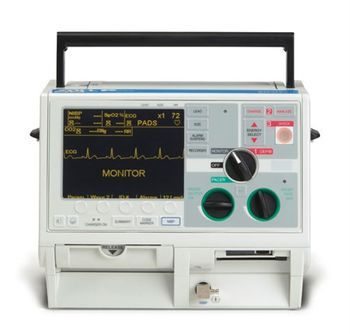
Zoll M Series

The smallest, lightest, brightest defibrillator unit in its class makes for easy handling and optimal viewing while the built-in AC power and battery charger doesn’t add size or weight. The ZOLL Uniform Operating System features consistent, straightforward controls; intuitive menus lessen training costs, minimize operator confusion, and reduce the chance for error. ZOLL’s proprietary Rectilinear BiphasicTM waveform with its lower energy and current and the 40-msec Rectilinear Pacing waveform provides superior efficacy while optimizing patient safety. ZOLL’s patented external Pacing offers superior capture at lower mean thresholds, reducing muscle artifact and ensuring more patient comfort and better patient tolerance. Offers defibrillator event documentation via internal memory, as well as removable PCMIA cards for easy data transfer and archiving. Coupled with CodeNet®, ZOLL’s unique PDA-based data management system, the M Series communication capability makes record keeping a breeze. A wide variety of defibrillator electrodes and paddles are designed to meet your every need, and pre-connection capability and common connectors help reduce stress in critical situations. Now available with Real CPR Help®. ZOLL’s M Series defibrillator upgrades provide maximum performance and flexibility in every product with add-ons designed to perform to your exacting standards. 12-Lead ECG is available in standard analog for fax transmission or digitally for real-time transition with virtually any available communication technology. Pulse Oximetry / SpO2 uses Masimo SET® signal processing technology for accurate measurements in the presence of motion, high ambient light and low perfusion and when pacing. EtCO2 features Respironics® Novametrix End Tidal CO2 monitoring with interchangeable mainstream or sidestream sensor options to accommodate all patients. Non-invasive Blood Pressure (NIBP) defibrillator monitor offers single, stat, or fully automated functions for optimal patient assessment no matter the circumstances. Invasive Blood Pressure (IBP) is also available.
Key tips
- ·Never skip the daily/shift ready-check - a defibrillator found dead during a code is a real, repeated root-cause finding.
- ·Pads and batteries have real expiration dates - check them on every PM, not just at annual service.
- ·Verify energy-delivery accuracy with a real defibrillator analyzer, not just a self-test pass.
Typical Failure Modes
Compiled for this model from its own documentation and established engineering knowledge for this equipment class - not from a verified service record. Confirm against the manufacturer's service manual.
Fails the delivered-energy / discharge test
HighSymptoms: Delivered energy outside tolerance on the analyser, will not charge, or charges slowly.
Root cause: HV capacitor / charging-circuit ageing, or an output-relay fault.
Battery will not hold charge / fails readiness
HighSymptoms: Short standby, readiness indicator shows service, unit fails the self-test on battery.
Root cause: Aged battery pack or a charging fault.
Therapy cable / pads or paddles fault
MediumSymptoms: "Check pads", "connect electrodes", no ECG through pads, poor paceing capture.
Root cause: Worn therapy cable, expired pads, or a paddle / connector fault.
ECG / SpO2 / NIBP / CO2 parameter fault (defib-monitors)
MediumSymptoms: A monitoring parameter drops or is implausible.
Root cause: Patient cable / sensor or the parameter module.
Recorder / data fault
LowSymptoms: No printout, event data will not transfer.
Root cause: Thermal recorder or the data / Wi-Fi interface.
Serviceable Parts & Consumables
Serviceable items for this model, compiled from its documentation and engineering knowledge for this equipment class. Service class and relative cost are estimates, not manufacturer figures; no part numbers are given. Confirm intervals and pricing against the manufacturer.
Battery pack
Class Periodic replacementRel. cost $$R&R Easy
Therapy / defib cable
Class Periodic replacementRel. cost $$R&R Fairly easy
Multifunction pads
Class Frequent wear itemRel. cost $R&R Easy
HV / charging board
Class Major service partRel. cost $$$$R&R Difficult
Thermal recorder / print head
Class Periodic replacementRel. cost $$R&R Fairly easy
| Part | Service class | Relative cost | R&R difficulty |
|---|---|---|---|
| Battery pack | Periodic replacement | $$ | Easy |
| Therapy / defib cable | Periodic replacement | $$ | Fairly easy |
| Multifunction pads | Frequent wear item | $ | Easy |
| HV / charging board | Major service part | $$$$ | Difficult |
| Thermal recorder / print head | Periodic replacement | $$ | Fairly easy |
Relative cost: $ lowest · $$$$ highest service-part cost for this equipment class. Not a price.
PM Checklist
Preventive-maintenance tasks typical of this equipment class. Perform to the manufacturer's procedure and your facility's policy - this is general reference, not a schedule for this specific unit.
- ·Daily/shift visual and self-test check (AAMI EQ56 daily-ready standard)
- ·Battery and pad expiration-date tracking
- ·Energy-delivery accuracy test against a defibrillator analyzer
- ·Paddle/cable continuity check
- ·Annual full PM
Error Codes
Extracted directly from this unit's own service manual.
ADJUST ECGUnit is in sync mode and heart rate is < 20 BPM. Or, QRS size set too small for proper synchronization.
ANALYSIS HALTEDECG analysis halted due to user interaction such as: Lead/size change Analyze button was pressed again Impedance fault Charging error detected in auto defib mode
ANALYSIS RESTARTEDThis is a user prompt issued simultaneously with ECG TOO LARGE or ECG TOO SMALL. Device detected ECG signals out of range, automatically adjusted ECG size and is now restarting its shockable rhythm analysis sequence. M Series Service Manual 59
AUDIO FAULT 136Audio DSP hardware error. Replace audio board. Replace system board.Turn unit off and back on again. AUDIO NOT RECORDING Audio is not recording. Install PCMCIA card. Replace system board.
AUDIO QUEUE FULLIndicates that the audio output queue is full. Additional voice prompts can't be queued at this time. None.
BATT HIGH CURRENTBattery is charged and battery current is >.1 A or: Battery is not charged and battery current is > 1.6 A. Unplug from A/C. Remove the battery for 20 seconds. Reconnect all above. If the problem persists, replace battery and or charger.
BATT HIGH VOLTAGEBattery voltage > 15.5 v. Replace battery and or charger
BATT LOW CURRENTBattery is not charged and battery current is <.35 A. Replace battery and or charger.
BATT LOW VOLTAGEBattery voltage < 9.5 v. Replace battery and or charger.
BATT OVERCHARGECharger on for > 4 hours. Replace battery and or charger. M Series Service Manual 60
BRIDGE SHORTCurrent higher than expected was detected during the Biphasic bridge test or immediately following a discharge. Ensure pads/paddles are used properly. Attempt to clear the message by turning the Selector switch to off then back to the desired operating modes. Replace bridge or high voltage module.
BRIDGE TEST FAILEDBiphasic module not operating properly while charging. Charge again. Attempt to clear the message by turning the Selector switch to OFF, then back to the desired operating mode. Replace bridge or high voltage module.
CABLE FAULT(Auto defib mode only.) Incorrect A/D reading for paddle ID (similar to PADDLE FAULT). Replace paddle set, universal cable and/or system board.
CANNOT CHARGECannot charge when charge button pressed. Replace high voltage module or capacitor.
REPLACE CARDWrite errors during manual or semi-automated modes. May have configuration card installed or write protection on. M Series Service Manual 61
CARD FULLMemory Card Full.
CHECK CO 2 SENSOREtCO 2 Sensor is unplugged or defective. Check that sensor cable is plugged in and seated properly. Check that sensor is not exposed to excessive heat. If problem persists, replace the sensor.
CHECK CO 2 ADAPTERAirway adapter is removed, occluded or adapter zeroing needs to be performed or was performed incorrectly. Replace/Clean airway adapter. Zeroing performed automatically.
CHECK MEMORY CARDNo card detected during manual or semi-automated modes.
CHECK PADSMessage displayed in conjunction with either POOR PAD CONTACT or DEFIB PAD SHORT. Ensure pads are coupled to patient. Check /replace pads and universal cable. Replace system board.
CHECK PATIENTBackground ECG analysis detects shockable rhythm.
CHECK PULSEAlternate message for NO SHOCK ADVISED message.Message also shown after delivering third shock when auto analyze 3 times option is enabled.
CHECK RECORDERProduced when paper tray is empty, paper jams or recorder door is opened. Replace paper sensor board, system interconnect board, and/or system board. M Series Service Manual 62
CHECK SPO 2 SITELow or no perfusion in monitored finger or toe.
CHECK SPO 2 SENSORReposition SpO 2 sensor on patient.
CLOCK FAULT 11Real time clock oscillator failure. Replace system board.
CLOCK FAULT 12Real time clock back-up power supply failure. Found oscillator stopped at power-up, but oscillator now running when the system is running. (Oscillator only runs when main power is applied). Replace system board.
CLOCK FAULT 13One of the set time units (seconds, minutes, year, etc.) is out of range. Replace system board.
CO 2 COMM ERRORNo or invalid communication from the EtCO2 module. Replace EtCO 2 module and or system board.
DEFIB DISABLEDUser prompt issued simultaneously with other faults if defib is disabled. Possible configuration problem. Replace high voltage module. Call ZOLL Technical Support.
DEFIB FAULT 71More than 50 internal dumps occurred in less than 20 minutes. Turn the unit to OFF and back on. If fault persists, replace high voltage module. M Series Service Manual 63
DEFIB FAULT 72General defib error. Turn the unit to OFF and back on. If fault persists, replace high voltage module.
DEFIB FAULT 76Capacitor voltage too high for selected energy. Replace high voltage module or capacitor.
DEFIB FAULT 77Capacitor voltage > than absolute rated max. Replace high voltage module or capacitor.
DEFIB FAULT 78Unable to charge defib cap. Replace high voltage module or capacitor.
DEFIB FAULT 79Defibrillator charging too slowly. Replace high voltage module or capacitor.
DEFIB FAULT 804 defibrillator faults detected within 20 second period. Replace high voltage module or capacitor.
DEFIB FAULT 81Discharge switch in undefined state. Replace high voltage module or capacitor.
DEFIB FAULT 84“Upper” discharge transistor shorted (measured via applicable A/D channel). Replace high voltage module.
DEFIB FAULT 85“Lower” discharge transistor shorted (measured via applicable A/D channel). Replace high voltage module.
DEFIB FAULT 86One discharge switch closed during power up test. Replace paddles, control board or system board.
DEFIB FAULT 87Both discharge switches closed during power up test. Replace paddles, control board or system board. M Series Service Manual 64
DEFIB FAULT 94Processor fault causing safety monitor port to be non-functional. Replace system board, high voltage module or capacitor.
DEFIB FAULT 95Safe or shutdown line is not functional. Replace high voltage module.
DEFIB FAULT 96XPATREL or XPAT_ENABLE is faulted or one of the discharge transistors has shorted. Replace high voltage module.
DEFIB FAULT 108VMON voltage is less than the target energy during charging. Replace high voltage module or capacitor.
DEFIB FAULT 109Defib capacitor voltage is greater than selected energy when defibrillator is charging or ready. Replace high voltage module or capacitor.
DEFIB FAULT 111Defib capacitor voltage has exceeded the absolute maximum acceptable voltage. Replace high voltage module, capacitor, and or system board.
DEFIB NOT CHARGEDDischarge button is pressed but the unit is not charged.
DEFIB PAD SHORTMeasured impedance between high voltage leads of MFC. Ensure pads are coupled to patient. Check /replace pads or universal cable. Replace system board.
DISABLE SYNCSync mode active when analyze pressed in defib.
DISCHARGE FAULTDefib capacitor voltage is not decreasing. Replace high voltage module, capacitor, and/ or system board. M Series Service Manual 65
ECG FAULT 4Communication fault between ECG processor and main processor. Turn off unit and then turn on to reset. If fault persists, replace system board.
ECG FAULT 5ECU RAM test failure, or ROM checksum test failure. Turn off unit and then turn on to reset. If fault persists, replace system board.
ECG LEAD OFFOne or more ECG leads are not properly connected when leads are selected as input. Check cable and patient connection. Change electrodes. Prepare patient’s skin.
ECG TOO LARGEECG signal too large for accurate shockable rhythm analysis. Reduce ECG size.
ECG TOO SMALLECG signal too small for accurate shockable rhythm analysis. Increase ECG size.
ECG V1 LEAD OFFChest lead V1 is not properly attached to patient. Reattach V lead. Check cable.
ECG V2 LEAD OFFChest lead V2 is not properly attached to patient. Reattach V lead. Check cable.
ECG V3 LEAD OFFChest lead V3 is not properly attached to patient. Reattach V lead. Check cable.
Troubleshooting Approach
A starting sequence for this model, compiled from its documentation and engineering knowledge for this equipment class. Follow the manufacturer's service documentation for the actual procedure.
Symptom: Fails the delivered-energy / discharge test or charges slowly
- Run the full delivered-energy test at several settings into a defib analyser.
- Test synchronised cardioversion and, if fitted, pacing capture and output.
- Inspect the therapy cable and paddles / pads connector.
- If energy is out of tolerance or charge time is long, remove from service.
- Refer the HV / charging board and capacitor to the OEM.
Symptom: Fails readiness / self-test or dies on battery
- Fit a fully charged battery and repeat the self-test.
- Run a battery capacity / calibration cycle.
- Check the charger, the charging contacts and the auto-test log.
- Replace the battery pack when capacity is low.
- Record a passing readiness self-test before returning to service.
Symptom: "Check pads / connect electrodes" or no ECG through pads
- Fit fresh, in-date pads and confirm the connector seats fully.
- Swap the therapy cable.
- Check ECG through pads and through the 3/5-lead cable on a simulator.
- Inspect the pads port for damage.
- Replace the therapy cable; refer the front end if both paths fail.
Symptom: A monitoring parameter (ECG / SpO2 / NIBP / CO2) drops or is implausible
- Reseat and swap the patient cable / sensor for that parameter.
- Verify against a simulator.
- Check the parameter module connection.
- Update the device software if a known issue applies.
- Refer the parameter module as isolated.
Technical Specs
- Defibrillator Type
- External, Automated (AED)
Typical Location
Where this class of equipment is typically deployed - general reference, not this unit's own placement record.
- Crash carts (every unit)
- Emergency Department
- ICU
- OR
- Code-blue response areas
Documents & Manuals
Troubleshoot this device with Bio
Describe a symptom or error code. Bio answers from this device's own documented error codes, failure modes, parts, and guides.
Ask Bio