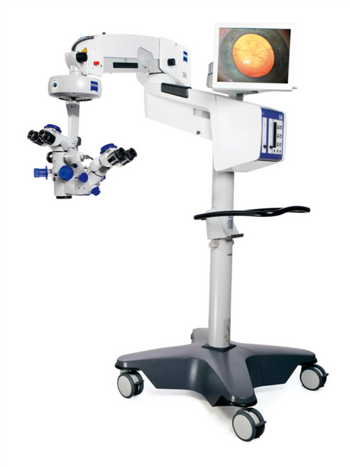
ZEISS OPMI Lumera T
 ZEISS · Model OPMI Lumera T
See the most minute structures during surgery Identify the details of the retina See overlays of the live image in the eyepiece with the External Data Injection System (EDIS) Manage depth of field with the push of a button View structures in the eye in natural colors.
Typical Failure Modes
Compiled for this model from its own documentation and established engineering knowledge for this equipment class - not from a verified service record. Confirm against the manufacturer's service manual.
Illumination failure or dim / uneven light
HighSymptoms: No or dim light, sudden loss during a procedure, colour shift, uneven field.
Root cause: Xenon lamp module at end of life, its igniter / power supply, or (LED models) the LED engine / driver.
Suspension / AutoBalance / swing-arm drift
HighSymptoms: Head drifts, AutoBalance fails, arm will not hold after draping or an accessory change.
Root cause: Balance drive or the magnetic brakes; re-balance after any accessory change.
Motorised zoom / focus / XY fault
MediumSymptoms: Zoom, focus or XY will not run or is erratic from the handgrips, mouth switch or foot control.
Root cause: Drive motor, a control, or cabling.
System error in the data-injection / touchscreen display
HighSymptoms: Error message in the eyepiece data injection or on the touchscreen, function inhibited.
Root cause: An internal subsystem fault - acknowledge via the handgrip pushbutton or touchscreen; if it will not clear, service is required.
Integrated video / fluorescence / digital-visualisation fault
LowSymptoms: No or poor video, fluorescence mode not working, digital (Artevo) image fault.
Root cause: Camera / fluorescence module or a video / processing fault.
Serviceable Parts & Consumables
Serviceable items for this model, compiled from its documentation and engineering knowledge for this equipment class. Service class and relative cost are estimates, not manufacturer figures; no part numbers are given. Confirm intervals and pricing against the manufacturer.
Xenon lamp module (or LED engine)
Class Frequent wear itemRel. cost $$R&R Moderate
Balance drive / magnetic brake assembly
Class Major service partRel. cost $$$$R&R Expert-level
Zoom / focus motor assembly
Class Major service partRel. cost $$$R&R Difficult
Wireless foot-control panel
Class Major service partRel. cost $$$R&R Fairly easy
Touchscreen assembly
Class Major service partRel. cost $$$R&R Difficult
| Part | Service class | Relative cost | R&R difficulty |
|---|---|---|---|
| Xenon lamp module (or LED engine) | Frequent wear item | $$ | Moderate |
| Balance drive / magnetic brake assembly | Major service part | $$$$ | Expert-level |
| Zoom / focus motor assembly | Major service part | $$$ | Difficult |
| Wireless foot-control panel | Major service part | $$$ | Fairly easy |
| Touchscreen assembly | Major service part | $$$ | Difficult |
Relative cost: $ lowest · $$$$ highest service-part cost for this equipment class. Not a price.
Troubleshooting Approach
A starting sequence for this model, compiled from its documentation and engineering knowledge for this equipment class. Follow the manufacturer's service documentation for the actual procedure.
Symptom: No or dim light
- Switch to the onboard spare lamp if the model has one.
- Unplug, let the lamp cool and replace the lamp module.
- Check the igniter / power-supply output and the mains fuse.
- Confirm the lamp is seated.
- Verify even, full-brightness illumination.
Symptom: Head will not hold position / system error
- Re-balance / run AutoBalance for the current accessory load - never over the operating field.
- Acknowledge any data-injection / touchscreen error via the handgrip pushbutton or touchscreen.
- If the error will not clear, attach an out-of-order sign and contact the ZEISS service representative.
- For a drive fault, set the emergency switch to manual mode and operate zoom/focus by hand.
- Do not use for surgery until cleared.
Documents & Manuals
No documents available for this device yet.
Troubleshoot this device with Bio
Describe a symptom or error code. Bio answers from this device's own documented error codes, failure modes, parts, and guides.
Ask Bio