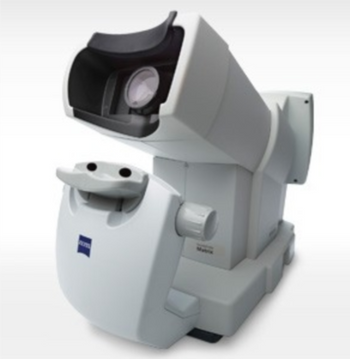
ZEISS Matrix 800
 ZEISS · Model Matrix 800
Connects to office networks, EHRs and FORUM®. Frequency Doubling Technology – detects damage to the M-cells, a subset of ganglion cells. Large, age-related normative database. Fast and easy to use –no darkened room required. No trial lenses or eye patches required. Fits in any practice –compact and portable. Offers reports similar to those of the Humphrey HFA, the World Standard of Care.
Key tips
- ·Verify laser output with a real power meter, not the unit's own display - the display can drift independently of true output.
- ·Take "the image looks a little off" reports seriously - optical alignment drift is usually gradual, not sudden.
Typical Failure Modes
Compiled for this model from its own documentation and established engineering knowledge for this equipment class - not from a verified service record. Confirm against the manufacturer's service manual.
Optical / illumination fault
MediumSymptoms: Dim, uneven or no illumination; poor or hazy view; slit / filters not working.
Root cause: Bulb / LED at end of life, a power-supply fault, or contaminated optics.
Alignment / positioning-stage fault
MediumSymptoms: Joystick or slide binds, will not hold position, chin-rest / head-rest drive faults.
Root cause: Worn stage bearings / slides or a positioning-drive fault.
Measurement / capture fault
MediumSymptoms: Reading errors (tonometer / autorefractor / lensmeter), no or poor image capture (fundus / OCT), calibration fails.
Root cause: Sensor / camera fault, a calibration issue, or contaminated measurement optics.
Printer / PC / connectivity fault
LowSymptoms: No printout, images / data will not save or transfer.
Root cause: Built-in printer, the PC, or the network / EMR interface.
Motorised table / chin-rest fault (where fitted)
LowSymptoms: Instrument table or chin-rest will not raise / lower.
Root cause: Table / chin-rest actuator or its switch.
Serviceable Parts & Consumables
Serviceable items for this model, compiled from its documentation and engineering knowledge for this equipment class. Service class and relative cost are estimates, not manufacturer figures; no part numbers are given. Confirm intervals and pricing against the manufacturer.
Illumination bulb / LED module
Class Frequent wear itemRel. cost $$R&R Fairly easy
Positioning-stage bearings / slides
Class Major service partRel. cost $$R&R Moderate
Measurement sensor / camera module
Class Major service partRel. cost $$$R&R Moderate
Built-in printer / paper
Class Periodic replacementRel. cost $R&R Fairly easy
Chin-rest / table actuator
Class Major service partRel. cost $$R&R Moderate
| Part | Service class | Relative cost | R&R difficulty |
|---|---|---|---|
| Illumination bulb / LED module | Frequent wear item | $$ | Fairly easy |
| Positioning-stage bearings / slides | Major service part | $$ | Moderate |
| Measurement sensor / camera module | Major service part | $$$ | Moderate |
| Built-in printer / paper | Periodic replacement | $ | Fairly easy |
| Chin-rest / table actuator | Major service part | $$ | Moderate |
Relative cost: $ lowest · $$$$ highest service-part cost for this equipment class. Not a price.
PM Checklist
Preventive-maintenance tasks typical of this equipment class. Perform to the manufacturer's procedure and your facility's policy - this is general reference, not a schedule for this specific unit.
- ·Optical alignment / calibration check
- ·Lamp or laser output verification
- ·Annual full PM
Error Codes
Extracted directly from this unit's own service manual.
115Not enough data for Overview found.
Select a patient with enough data. A minimum of 2 visual fields of the same test type are required for an overview plot. A minimum of two visual fields of the same test type are required for an overview plot
123Please limit input to CHARACTER_LIMIT characters.
Delete characters until the number of characters used is less than or equal to the number specified.
148The default folder DEFAULT_FOLDER_NAME contents will be merged but the default folder cannot be deleted. Continue?
Merging any folder with the Main (default) folder causes this message. Select Continue.
151Invalid folder name entered. Please enter a valid folder name.
Empty folder name field. Enter folder name.
160Invalid file name entered. Please enter a valid file name.
Empty file name field when saving Overview analysis plot as JPEG. Enter valid file name.
167WARNING! Are you sure you want to permanently delete the selected test from the database?
User confirmation needed. Deleting tests from the database is permanent. Unrecoverable if not available from a prior backup.
168WARNING! Selected test will be permanently deleted from the database. Continue?
User confirmation needed. Deleting tests from the database is permanent. Unrecoverable if not available from a prior backup.
175Patient not found in database. Add New Patient?
User confirmation needed. The automatic search feature did not find a patient with the name entered in the database – either new patient or a data entry error.
176Unable to run test during calibration.
Wait until calibration is completed. All testing operations are disabled during calibration. Check Calibration status in Help (F6) Calibration screen. Calibration takes approximately 15 minutes to complete. SW error if message doesn't go away when calibration is completed. (restart).
192Sample test is not present on the system. Function unavailable.
• The file /root/GUI/printSample.fdt2 is missing • The file /root/GUI/printSample.fdt2 could not be loaded for various file I/O reasons. Try again. If problem persists, send customer update (from web site?) which includes necessary file. If after upgrade, problem still is present may need service but if this is the case, the customer should be seeing other issues with the system as well.
196What would you like to do with these tests?
If the user highlighted the tests and selects the Edit test option on the F3 screen The user decides to either move the selected tests to a different folder OR move the test association to another patient.
197Are you sure you want to reassign these NUMBER_OF_TESTS tests?
If the user highlighted the tests and selects the Reassign Test option. The user decides to reassign the selected tests to another patient.
202The character AN_INVALID_CHARACTER cannot be used as a text delimiter.
While in the Save As Dialog box, the user attempts to assign a delimiter which is invalid. Invalid characters include: (the double quote, ") Specify a different delimiter. Reboot and try again. If persistent, use a predefined delimiter and report error to developers.
238This operation is not available. Because the network host was not available the file write test could not be attempted.
Verify that the Matrix and the shared PC are connected to the network. If both are connected make sure file and print sharing are enabled on the PC are turned on and that the appropriate folders and printers have been shared.
239Please enter a name for the printer. Give the printer selected a reference name.
240Please enter a valid hostname or IP address
Ask the operator to enter a shared network computer host name or ip address (computer1.cznet.org, 128.115.68.2). This message is no longer used. Enter in a hostname (mypc.domain.com) or IP address (128.68.24.2).
241Please select a path for the printer.
Asks the operator to specify the location of the network shared printer. This message is no longer used. The printer is now selected graphically. Enter the path to the network shared printer (//mycomputer.domain.com/HP6920).
262The device is busy and cannot safely be removed.
The storage device is currently being used for read or write operation. Wait for the operation to complete before trying to remove the storage device. If this situation persists, try rebooting the Matrix. The period of time required to wait will depend on the operation performed. Backup or export of a large number of patients and tests will take a long time.
513Overview Software Error! Function not available.
Software implementation error. An error has occurred during SW processing. Report event to Service. New software may be required.
515Overview plot Software Error! Function not available.
Software implementation error. An error has occurred during SW processing. Report event to Service. New software may be required.
540Test parameter SW Error! Test cancelled.
SW implementation error. This error indicates a defect in the SW processing has occurred. Contact Service.
552Database backup not found on media.
The database backup could not be found. Make sure the media is connected to the device and database files are on the selected storage media. For a restore, the files are placed in a directory named SN<serial number of the Matrix>.
576Printer Error! Unable to print System Information!
Numerous printer errors: • Not connected • No paper in tray • Non-approved printer • No ink Verify the printer attached to the system is an approved printer. Perform the print sample test from the Diagnostics screen. If problem persists, cycle the printer power or Shut Down and reboot the Matrix instrument. If problem still persists, try a different approved printer.
584Unable to retrieve login credentials for __________________
Try again. Check network.
593Failure to export exam to DICOM archive
Check DICOM archive. Check DICOM configuration in System Settings.
619.2Critical Error! Factory calibration needed. Select 'Shut Down' and then cycle power to restart your instrument and restore normal operation. If problem persists, contact Customer Service
User attempted to perform the pattern test 'Set Pattern' from the Advanced Diagnostics screen. This operation could not complete because their system needs to be factory calibrated. SW detected a problem that requires Shut Down and restart to clear. Service will be needed if this issue is chronic and prevents normal operation of the system.
619.3Critical Error! Factory calibration needed. Select 'Shut Down' and then cycle power to restart your instrument and restore normal operation. If problem persists, contact Customer Service. See Help F6.
User attempted to perform an 'Ambient Light Level' check from the Advanced Diagnostics screen. This operation could not complete because their system needs to be factory calibrated. SW detected a problem that requires Shut Down and restart to clear. Service will be needed if this issue is chronic and prevents normal operation of the system.
619.4Critical Error! Factory calibration needed. Select 'Shut Down' and then cycle power to restart your instrument and restore normal operation. If problem persists, contact Customer Service. See Help F6.
User attempted to perform a 'Monitor Brightness' check from the Advanced Diagnostics screen. This operation could not complete because their system needs to be factory calibrated. SW detected a problem that requires Shut Down and restart to clear. Service will be needed if this issue is chronic and prevents normal operation of the system.
702Unable to connect to DICOM server. Check DICOM archive. Check DICOM configuration in System Settings.
704One or more patients could not be imported.
Some of the patients could not be imported from the serial EMR application. Check the EMR connection and setup.
Troubleshooting Approach
A starting sequence for this model, compiled from its documentation and engineering knowledge for this equipment class. Follow the manufacturer's service documentation for the actual procedure.
Symptom: Optical / illumination fault (dim, uneven, no illumination; slit / filters not working)
- Replace the bulb / LED module with the correct type and wattage.
- Check the power supply and the brightness / rheostat control.
- Clean the illumination and viewing optics per the manual.
- Confirm the slit, filters and apertures operate.
- Replace the power supply if output is still low.
Symptom: Alignment / positioning-stage fault (joystick or slide binds, chin-rest drive)
- Check the stage ways for debris or dried grease.
- Inspect the stage bearings / slides for wear.
- Check the chin-rest / table actuator and its switch.
- Re-lubricate or replace the stage / drive kit.
- Confirm smooth motion and that it holds position.
Symptom: Measurement or capture fault (reading errors, calibration fails, poor image capture)
- Run the instrument self-test / calibration.
- Clean the measurement window / objective.
- Verify against a model eye / test target where one exists.
- Confirm patient positioning and fixation.
- Refer the sensor / camera module if calibration will not hold.
Symptom: Printer / PC / connectivity fault
- Check the built-in printer and paper.
- Confirm the PC, network and EMR interface settings.
- Restart the software and the instrument.
- Send a test result.
- Escalate a persistent interface fault to the OEM.
Technical Specs
- Height
- 17 in
- Length
- 22 in
- Weight
- 30
- Width
- 12 in
Typical Location
Where this class of equipment is typically deployed - general reference, not this unit's own placement record.
- Eye clinic / ophthalmology suite
- Operating Room (ophthalmic surgery)
Documents & Manuals
Troubleshoot this device with Bio
Describe a symptom or error code. Bio answers from this device's own documented error codes, failure modes, parts, and guides.
Ask Bio