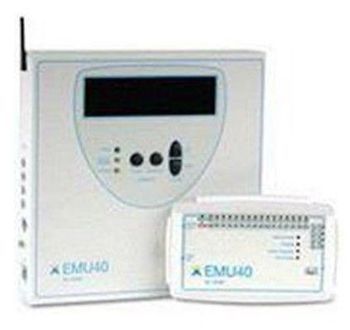
XLTEK EMU40EX
 XLTEK · Model EMU40EX
A revolution in patient care Xltek's breakthrough EMU40EX amplifier – featuring Bluetooth® wireless technology – offers both continuous patient monitoring and data security. Patient surveillance is of prime importance in epilepsy monitoring. With the EMU40EX's innovative extended-range Bluetooth wireless technology, patients can move freely about the clinical area while still being monitored. EEG data is recorded on flash memory in the wearable unit and uploaded when the patient plugs back in, guaranteeing no data is lost or compromised. The Bluetooth connection from the patient's breakout box to the EMU40EX base unit is strictly point-to-point. Data cannot be intercepted or received by any other Bluetooth-enabled device in the area. Setting the industry standard Designed specially for EMU facilities, the EMU40EX can also be used for clinical EEG and some in-lab Sleep studies. It offers 40 clearly marked AC channels that allow for full 10-20 electrode placement. In addition, oxygen saturation and pulse rate channels are available from the integrated oximeter. Plus, there are 4 extra DC channels available on the base unit. Lastly, a photic-stimulator interface and a patient-event-switch interface complete the EEG functionality. The EMU40EX is suitable for a variety of fixed and portable applications. It can be fixed to a wall or mounted on a variety of carts, with unique quick-disconnect options allowing to move the unit easily and safely where you need it. From a range of channel inputs to extended-range wireless monitoring, this innovative amplifier has all the features needed for brain monitoring in an EMU.
Key tips
- ·Electrode impedance drives data quality more than almost any other single factor - check it before assuming an amplifier fault.
- ·Pre-case verification of intraoperative monitoring equipment isn't optional - a mid-case failure has direct surgical-decision consequences.
Typical Failure Modes
Compiled for this model from its own documentation and established engineering knowledge for this equipment class - not from a verified service record. Confirm against the manufacturer's service manual.
Noisy / high-impedance channels
HighSymptoms: Mains hum, drift or flat channels, persistently high electrode impedance, poor recording quality.
Root cause: Electrode / lead-wire wear, the electrode box (headbox) inputs, or poor skin prep / environment.
Headbox / amplifier fault
MediumSymptoms: A block of channels dead or saturated regardless of electrode, calibration / bio-cal fails.
Root cause: Headbox amplifier or its cable to the acquisition unit.
Amplifier-to-PC link / acquisition fault
MediumSymptoms: Recording drops, amplifier not detected, data gaps.
Root cause: USB / fibre / network link or a driver.
Photic stimulator / video / audio fault (diagnostic EEG/PSG)
LowSymptoms: Photic strobe not firing, no synchronised video, no audio.
Root cause: Photic lamp / trigger, the video camera, or the audio path.
PSG sensor fault (airflow / effort / SpO2 / limb)
LowSymptoms: A PSG channel (thermistor, pressure, RIP belt, SpO2, PLM) flat or noisy.
Root cause: Worn PSG sensor or its cable.
Serviceable Parts & Consumables
Serviceable items for this model, compiled from its documentation and engineering knowledge for this equipment class. Service class and relative cost are estimates, not manufacturer figures; no part numbers are given. Confirm intervals and pricing against the manufacturer.
Electrode lead set / headbox leads
Class Frequent wear itemRel. cost $$R&R Easy
Headbox / amplifier
Class Major service partRel. cost $$$R&R Moderate
Amplifier link cable / interface
Class Periodic replacementRel. cost $$R&R Fairly easy
Photic stimulator lamp (diagnostic)
Class Periodic replacementRel. cost $$R&R Fairly easy
PSG sensor set (airflow / effort / SpO2)
Class Frequent wear itemRel. cost $$R&R Easy
| Part | Service class | Relative cost | R&R difficulty |
|---|---|---|---|
| Electrode lead set / headbox leads | Frequent wear item | $$ | Easy |
| Headbox / amplifier | Major service part | $$$ | Moderate |
| Amplifier link cable / interface | Periodic replacement | $$ | Fairly easy |
| Photic stimulator lamp (diagnostic) | Periodic replacement | $$ | Fairly easy |
| PSG sensor set (airflow / effort / SpO2) | Frequent wear item | $$ | Easy |
Relative cost: $ lowest · $$$$ highest service-part cost for this equipment class. Not a price.
PM Checklist
Preventive-maintenance tasks typical of this equipment class. Perform to the manufacturer's procedure and your facility's policy - this is general reference, not a schedule for this specific unit.
- ·Electrode / lead impedance check
- ·Amplifier calibration
- ·Annual electrical safety test
Troubleshooting Approach
A starting sequence for this model, compiled from its documentation and engineering knowledge for this equipment class. Follow the manufacturer's service documentation for the actual procedure.
Symptom: Noisy or high-impedance channels
- Check and re-prep electrode sites; confirm impedances are balanced and low.
- Swap the affected leads and try different headbox inputs.
- Run the bio-calibration / calibration signal.
- Address mains interference (route cables, check the ground).
- Replace the lead set or headbox as isolated.
Symptom: Amplifier not detected / recording drops
- Reseat the amplifier-to-PC link at both ends.
- Restart the acquisition software and amplifier.
- Try a different port / cable.
- Update the driver / firmware if indicated.
- Replace the link cable or refer the amplifier.
Typical Location
Where this class of equipment is typically deployed - general reference, not this unit's own placement record.
- Neurology / EEG lab
- ICU (continuous EEG monitoring)
- Operating Room (intraoperative monitoring)
Documents & Manuals
No documents available for this device yet.
Related calculators
From BioLab, for work done with this kind of equipment.
Troubleshoot this device with Bio
Describe a symptom or error code. Bio answers from this device's own documented error codes, failure modes, parts, and guides.
Ask Bio