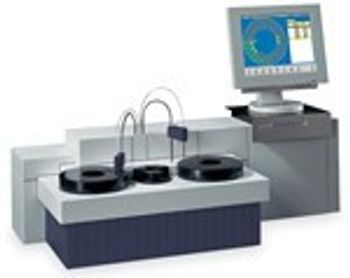
Vital Scientific Vitalab Flexor E
 Vital Scientific · Model Vitalab Flexor E
Reagent volume is up to 30% less than most similar systems: giving you substantial savings on reagent. Reusable long-life cuvette-rotor. High reliability and limited need for maintenance parts. Optional Concentrated Waste System. Kinetic measurement with linearity check. Bichromatic end point measurement with or without bichromatic reagent blank and/or sample blank correction. Two point measurement. Graphic plot of all measuring points. Automatic rerun with sample reduction. Non-linear calibration curves. All positions can contain 5 ml primary tubes or sample cups. Sample volume 1 - 30 µl per test, programmable in steps of 0.1 µl. Sample probe with level detection and integrated mixer. Up to 15 different controls can be defined, 3 per test. Westgard rules. Levy-Jennings plots.
Key tips
- ·Run QC controls before trusting any repair - an analyzer that passes self-test can still report clinically wrong results.
- ·Rule out a reagent lot change before opening the instrument - it can look exactly like a hardware fault.
- ·Centrifuge rotors have a hard retirement age/cycle limit regardless of visible condition - don't eyeball it.
Typical Failure Modes
Compiled for this model from its own documentation and established engineering knowledge for this equipment class - not from a verified service record. Confirm against the manufacturer's service manual.
Assay / QC failure across a channel or the whole system
HighSymptoms: Controls out of range, calibration fails, flagged results, drift over a shift.
Root cause: Reagent or cuvette issue, lamp ageing, a probe / mixer / wash-station fault, or ISE-module problems.
Sample / reagent probe clog or crash
MediumSymptoms: Short aspiration, no dispense, clot detection, probe-position error.
Root cause: Clogged or bent probe, or a clot in the sample.
Cuvette / reaction-rotor fault
MediumSymptoms: High cuvette blanks, non-uniform results by position, rotor-drive error.
Root cause: Worn / scratched cuvettes or a wash fault, or a rotor-drive fault.
ISE module fault (Na / K / Cl)
MediumSymptoms: Electrolyte results biased or noisy, ISE calibration fails.
Root cause: Aged ISE electrodes / reference, or a pinch-valve / tubing fault.
Water / vacuum / pressure system fault
MediumSymptoms: Multiple station alarms, priming failures, poor wash.
Root cause: Water / DI supply quality, a pump, or a vacuum / pressure regulator.
Serviceable Parts & Consumables
Serviceable items for this model, compiled from its documentation and engineering knowledge for this equipment class. Service class and relative cost are estimates, not manufacturer figures; no part numbers are given. Confirm intervals and pricing against the manufacturer.
Sample / reagent probes
Class Periodic replacementRel. cost $$R&R Moderate
Photometer lamp
Class Frequent wear itemRel. cost $$R&R Moderate
Reaction cuvettes / segment
Class Frequent wear itemRel. cost $$R&R Easy
ISE electrodes (Na / K / Cl) & reference
Class Frequent wear itemRel. cost $$R&R Fairly easy
Peristaltic / pinch-valve tubing
Class Frequent wear itemRel. cost $R&R Moderate
| Part | Service class | Relative cost | R&R difficulty |
|---|---|---|---|
| Sample / reagent probes | Periodic replacement | $$ | Moderate |
| Photometer lamp | Frequent wear item | $$ | Moderate |
| Reaction cuvettes / segment | Frequent wear item | $$ | Easy |
| ISE electrodes (Na / K / Cl) & reference | Frequent wear item | $$ | Fairly easy |
| Peristaltic / pinch-valve tubing | Frequent wear item | $ | Moderate |
Relative cost: $ lowest · $$$$ highest service-part cost for this equipment class. Not a price.
PM Checklist
Preventive-maintenance tasks typical of this equipment class. Perform to the manufacturer's procedure and your facility's policy - this is general reference, not a schedule for this specific unit.
- ·Daily QC controls run and reviewed
- ·Calibration verification per assay
- ·Routine cleaning and decontamination
- ·Scheduled reagent-path and pump-tubing maintenance
Error Codes
Extracted directly from this unit's own service manual.
NO REAGENT TAKENFilling level of the reagent bottle is too high (e.g. filling level is near screw-cap). Foam is being produced.
REAGENT PIPETTING STOPPEDThe reagent needle could not be cleaned and therefore stopped pipetting. Make sure HCI is installed on the reagent rotor and its bottle is not empty.
LAMP UNDERRANGEA counter overrange (> 29 000) is detected during a measurement. Refer to hardware error LAMP FAILURE.
LAMP OVERRANGEA counter underrange (< 10) is detected during a measurement. Refer to hardware error LAMP FAILURE. LAMP UNDERRANGE REF CHANNEL A counter overrange (> 29 000) for the reference detector is detected during a measurement. Refer to hardware error LAMP FAILURE. LAMP OVERRANGE REF CHANNEL A counter underrange (< 10) for the reference detector is detected during a measurement. Refer to hardware error LAMP FAILURE.
E02 SYSTEM EMERGENCY HALTFor example the ISE arm was accidentally touched during measurement. The analyzer immediately interrupts all operations. Eliminate the error if possible and select S HIFT+F6 SYSTEM RESET. The analyzer then asks you on the screen, whether the interrupted measurements, the results of which were cancelled, should be repeated.
E05 NO CLEAN CUVETTEIf no clean cuvette is available on the cuvette rotor, (e.g. caused by a vacuum error), the wash arm with the dry block does not move down to the bottom of the cuvette to prevent contamination of the dry block. Thus no clean cuvette is available in the analyzer. Eliminate the error if possible (for example, clean and dry the rotor manually, install a new one or refill it) and select SHIFT +F6 SYSTEM RESET. If the error occurs again, inform the service technician. E07 SYSTEM RESET INCOMPLETE Due to further errors the system reset was incomplete. Eliminate the error if possible and select S HIFT
E11 WASTE FULLThe WASTE FULL signal is "high" for 1 second (or longer). Empty the waste container. Check if the waste container floating switch is working properly and replace/repair it, if necessary. Check the wiring. Service personnel only: Check if the waste full signal detection signal is present on the system board. When the signal is present, malfunctioning of the system board may cause the problem.
E12 WATER RUNNING OUTThe upper level detector detects "No water" in the water container, although the pump is switched on for a period longer than 25 seconds. Check if there is enough system liquid in the water container and refill, if necessary. Check if the water tubing is leaking or blocked and repair or replace defective tubes, if necessary. Check if the filter in the system liquid container is blocked and replace it, if necessary. If the waste container has been empty, hold the water container and the pump unit at a higher level, to assure that the water can reach the analyser more easily. Service personnel o
E13 LAMP FAILUREA counter over range signal is detected during a measurement. The signal counter over range signal is generated when the photocell signal is too low. When the blank data values are incorrect too, the gain setting of an input amplifier is wrong or an input amplifier is defective (on the photometer board). Select F1 C HECK AGAIN. If the error occurs again, check if the lamp is working and replace it, if necessary. Inform the service technician. Service personnel only: Check if the lamp voltage is present and well adjusted. Adjust or repair the voltage supply, if necessary. Check if the selected
E14 CUVETTES TEMP ERRORSelect F1 C HECK AGAIN. Inform the service technician if the error occurs again. E15 REAGENT NEEDLE TEMP ERROR Select F1 C HECK AGAIN. Inform the service technician if the error occurs again. E16 CONCENTRATED WASTE FULL (only if the optional container is installed) The CONC. WASTE FULL signal is "high" for 1 second (or longer). Empty the optional concentrated waste container. Check if the concentrated waste container floating switch is working properly. Check the wiring. Special functions
E17 INSUFFICIENT WATERThe lower level detector detects "No water" in the water container. Check if there is enough system liquid in the container and refill if necessary. Check if the liquid tubing is leaking or if it is blocked and repair if necessary. Check if the filter in the container is blocked and replace if necessary. Service personnel only: Check if the system liquid level detection circuit is working correctly and repair if necessary. E20 SAMPLE SYR. POS. ERROR E21 SAMPLE SYR. POS. ERROR Press either F5 SPECIFIC R ESET or select SHIFT +F6 S YSTEM R ESET. Inform the service technician if the error occurs a
E22 SAMPLE VALVE ERRORPress either F5 SPECIFIC R ESET or select SHIFT +F6 S YSTEM R ESET. Inform the service technician if the error occurs again. E23 REAG. SYR. POS. ERROR E24 REAG. SYR. POS. ERROR Press either F5 SPECIFIC R ESET or select SHIFT +F6 S YSTEM R ESET. Inform the service technician if the error occurs again.
E25 REAG. VALVE ERRORPress either F5 SPECIFIC R ESET or select SHIFT +F6 S YSTEM R ESET. Inform the service technician if the error occurs again. E30 PIPETTOR 14V FAILED E31 PIPETTOR 30V FAILED Inform the service technician. E35 SAMPLE SYR. RESET FAILED E36 REAGENT SYR. RESET FAILED Press either F5 SPECIFIC R ESET or select SHIFT +F6 S YSTEM R ESET. Inform the service technician if the error occurs again. E37 PIPETTOR COMMUNICATION ERROR Press either F5 SPECIFIC R ESET or select SHIFT +F6 S YSTEM R ESET. Inform the service technician if the error occurs again. Special functions
E43 FILTER ERRORPress either F5 SPECIFIC R ESET or select SHIFT +F6 S YSTEM R ESET. Inform the service technician if the error occurs again.
E103 SAMPLE DISC ERRORPress either F5 (Specific Reset) or select SHIFT +F6 S YSTEM R ESET. E115 REAGENT DISC RESET FAILED Press either F5 (Specific Reset) or select SHIFT +F6 S YSTEM R ESET. E116 SAMPLE DISC RESET FAILED Press either F5 (Specific Reset) or select SHIFT +F6 S YSTEM R ESET. E117 REAG. / SAMP. DISCS COMMUN. ERROR Press either F5 (Specific Reset) or select SHIFT +F6 S YSTEM R ESET. E120 WASHARM / BELLOWS PUMP 14V FAILED E121 WASHARM / BELLOWS PUMP 30V FAILED Inform the service technician.
E122 WASHARM ERRORPress either F5 (Specific Reset) or select SHIFT +F6 S YSTEM R ESET. Make sure the cuvette rotor is placed correctly.
E123 BELLOWS PUMP ERRORPress either F5 (Specific Reset) or select SHIFT +F6 S YSTEM R ESET. Note that this error often occurs with other errors. First try to solve the other errors. This error might also disappear then. The wash arm detects that liquid reaches its overflow sensors. In the halted or inactive state remove the cuvette cover, and then continue running. Determine which of the causes 1, 2 or 3 is the case and take the respective action. E124 WATER OVERFLOW MEASUREMENT DISC 1. The wash arm dispenses too much water. Probably all cuvettes under the wash arm show a water overflow. 1. Check that the tubing b
E125 NO CUVETTESThere is no cuvette rotor installed At resetting the wash arm can reach a too low position according to the opto read-out. Check if a cuvette rotor is present and place one, if necessary. Then press F5 SPECIFIC R ESET. Service personnel only: Check if the wash arm adjustment is correct. Check if the opto-couplers are malfunctioning and repair them, if necessary. Check if the wash arm is well tightened.
Troubleshooting Approach
A starting sequence for this model, compiled from its documentation and engineering knowledge for this equipment class. Follow the manufacturer's service documentation for the actual procedure.
Symptom: QC / calibration failure across a channel or the whole system
- Run fresh controls at all levels and note which analytes fail.
- Confirm reagents are in date, correctly loaded, mixed and not bubbled.
- Run the photometer / lamp-energy check and replace the lamp if energy is low.
- Clean the sample and reagent probes, the mixers and the wash / cuvette-wash stations.
- Recalibrate the affected assay / ISE module and re-run QC.
Symptom: Sample or reagent probe clog / crash / short aspiration
- Inspect the probe for a bend or blockage and clear it (wire / sonicate per the manual).
- Run the fluidics prime and the probe-wash cycle.
- Check for a clot or fibrin in the sample and the liquid-level sensing.
- Verify probe positioning / alignment.
- Replace the probe if aspiration is still short.
Symptom: ISE electrolyte results biased or noisy / ISE calibration fails
- Run the ISE calibration and check the slope / drift against spec.
- Replace an ISE electrode or the reference that is at end of life.
- Check the ISE pinch valves and tubing for wear or air.
- Confirm the ISE standard packs are in date.
- Re-run ISE QC before releasing electrolyte results.
Symptom: High cuvette blanks / position-dependent results
- Run the cuvette blank / photometric check.
- Clean or replace worn / scratched cuvettes or the reaction segment.
- Check the cuvette-wash station nozzles and drying.
- Confirm the water / DI supply quality.
- Recalibrate and re-run QC.
Technical Specs
- Height
- 49 cm
- Wavelength Range
- 340 to 620 nm
- Length
- 56 cm
- Weight
- 74 kg
- Light Source
- Quarts-iodine lamp 12V-20W
- Width
- 115 cm
Typical Location
Where this class of equipment is typically deployed - general reference, not this unit's own placement record.
- Central / core laboratory
- Point-of-care testing stations
- Blood bank
- Microbiology lab
Documents & Manuals
Related calculators
From BioLab, for work done with this kind of equipment.
Troubleshoot this device with Bio
Describe a symptom or error code. Bio answers from this device's own documented error codes, failure modes, parts, and guides.
Ask Bio