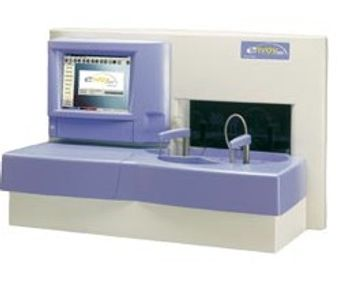
Vital Diagnostics Envoy 500
 Vital Diagnostics · Model Envoy 500
Touch Screen The Envoy 500 has a built-in LCD touch screen and, is driven by the Windows 2000 operating system. This provides greater ease of use and space savings by eliminating a bulky external monitor and CPU. Quality Control Quality Control results are stored in memory and easily displayed on the screen. QC can be evaluated using up to six Westgard rules and displayed with either Levey-Jennings Graphs or Juden Plots. Pre-Programmed Parameters The Envoy Reagent application parameters are pre-loaded into the software, saving users time and eliminating the possibility of data entry mistakes. Large Capacity The Envoy 500 holds up to 40 individual Envoy reagents (mono or dual), providing a longer walk-away operation Refrigerated Reagent Tray Onboard refrigeration and storage assures reagent stability, which increases reliability of results, while lowering laboratory costs. Continuous Inventory Monitoring Continuous inventory monitoring enables the operator to know the number of tests remaining for each reagent, minimizing waste. Positive Reagent Identification The reagent chamber contains an infrared barcode scanner capable of scanning Envoy bar coded reagents, automatically recognizing reagent position and lot expiration intervals Sample Wheel The Envoy 500 sample wheel has 52 positions available for patient samples and 26 for calibrators and controls providing the laboratory high throughput capability. Primary tubes or sample cups can be used, providing the testing flexibility users need. Liquid Sensor Detection Liquid sensor detection prevents reporting of invalid results from an insufficient sample. This ensures accurate results and proper treatment decisions. Positive Sample Identification The sample chamber contains an infared barcode scanner, capable of scanning patient barcodes eliminating the need to manually enter patient information and reducing the risk of sample errors that can cost users time and money.
Key tips
- ·Run QC controls before trusting any repair - an analyzer that passes self-test can still report clinically wrong results.
- ·Rule out a reagent lot change before opening the instrument - it can look exactly like a hardware fault.
- ·Centrifuge rotors have a hard retirement age/cycle limit regardless of visible condition - don't eyeball it.
Typical Failure Modes
Compiled for this model from its own documentation and established engineering knowledge for this equipment class - not from a verified service record. Confirm against the manufacturer's service manual.
Assay / QC failure across a channel or the whole system
HighSymptoms: Controls out of range, calibration fails, flagged results, drift over a shift.
Root cause: Reagent or cuvette issue, lamp ageing, a probe / mixer / wash-station fault, or ISE-module problems.
Sample / reagent probe clog or crash
MediumSymptoms: Short aspiration, no dispense, clot detection, probe-position error.
Root cause: Clogged or bent probe, or a clot in the sample.
Cuvette / reaction-rotor fault
MediumSymptoms: High cuvette blanks, non-uniform results by position, rotor-drive error.
Root cause: Worn / scratched cuvettes or a wash fault, or a rotor-drive fault.
ISE module fault (Na / K / Cl)
MediumSymptoms: Electrolyte results biased or noisy, ISE calibration fails.
Root cause: Aged ISE electrodes / reference, or a pinch-valve / tubing fault.
Water / vacuum / pressure system fault
MediumSymptoms: Multiple station alarms, priming failures, poor wash.
Root cause: Water / DI supply quality, a pump, or a vacuum / pressure regulator.
Serviceable Parts & Consumables
Serviceable items for this model, compiled from its documentation and engineering knowledge for this equipment class. Service class and relative cost are estimates, not manufacturer figures; no part numbers are given. Confirm intervals and pricing against the manufacturer.
Sample / reagent probes
Class Periodic replacementRel. cost $$R&R Moderate
Photometer lamp
Class Frequent wear itemRel. cost $$R&R Moderate
Reaction cuvettes / segment
Class Frequent wear itemRel. cost $$R&R Easy
ISE electrodes (Na / K / Cl) & reference
Class Frequent wear itemRel. cost $$R&R Fairly easy
Peristaltic / pinch-valve tubing
Class Frequent wear itemRel. cost $R&R Moderate
| Part | Service class | Relative cost | R&R difficulty |
|---|---|---|---|
| Sample / reagent probes | Periodic replacement | $$ | Moderate |
| Photometer lamp | Frequent wear item | $$ | Moderate |
| Reaction cuvettes / segment | Frequent wear item | $$ | Easy |
| ISE electrodes (Na / K / Cl) & reference | Frequent wear item | $$ | Fairly easy |
| Peristaltic / pinch-valve tubing | Frequent wear item | $ | Moderate |
Relative cost: $ lowest · $$$$ highest service-part cost for this equipment class. Not a price.
PM Checklist
Preventive-maintenance tasks typical of this equipment class. Perform to the manufacturer's procedure and your facility's policy - this is general reference, not a schedule for this specific unit.
- ·Daily QC controls run and reviewed
- ·Calibration verification per assay
- ·Routine cleaning and decontamination
- ·Scheduled reagent-path and pump-tubing maintenance
Troubleshooting Approach
A starting sequence for this model, compiled from its documentation and engineering knowledge for this equipment class. Follow the manufacturer's service documentation for the actual procedure.
Symptom: QC / calibration failure across a channel or the whole system
- Run fresh controls at all levels and note which analytes fail.
- Confirm reagents are in date, correctly loaded, mixed and not bubbled.
- Run the photometer / lamp-energy check and replace the lamp if energy is low.
- Clean the sample and reagent probes, the mixers and the wash / cuvette-wash stations.
- Recalibrate the affected assay / ISE module and re-run QC.
Symptom: Sample or reagent probe clog / crash / short aspiration
- Inspect the probe for a bend or blockage and clear it (wire / sonicate per the manual).
- Run the fluidics prime and the probe-wash cycle.
- Check for a clot or fibrin in the sample and the liquid-level sensing.
- Verify probe positioning / alignment.
- Replace the probe if aspiration is still short.
Symptom: ISE electrolyte results biased or noisy / ISE calibration fails
- Run the ISE calibration and check the slope / drift against spec.
- Replace an ISE electrode or the reference that is at end of life.
- Check the ISE pinch valves and tubing for wear or air.
- Confirm the ISE standard packs are in date.
- Re-run ISE QC before releasing electrolyte results.
Symptom: High cuvette blanks / position-dependent results
- Run the cuvette blank / photometric check.
- Clean or replace worn / scratched cuvettes or the reaction segment.
- Check the cuvette-wash station nozzles and drying.
- Confirm the water / DI supply quality.
- Recalibrate and re-run QC.
Technical Specs
- Throughput
- 330 samples/hr ISE module 240 test/h
- Weight
- 110 lbs
- Optical System
- Static photometric group (Biotecnica patented)
- Light Source
- Halogen lamp 12V - 35W
- Sample Volume
- 1 to 100 µL
Typical Location
Where this class of equipment is typically deployed - general reference, not this unit's own placement record.
- Central / core laboratory
- Point-of-care testing stations
- Blood bank
- Microbiology lab
Documents & Manuals
Related calculators
From BioLab, for work done with this kind of equipment.
Troubleshoot this device with Bio
Describe a symptom or error code. Bio answers from this device's own documented error codes, failure modes, parts, and guides.
Ask Bio