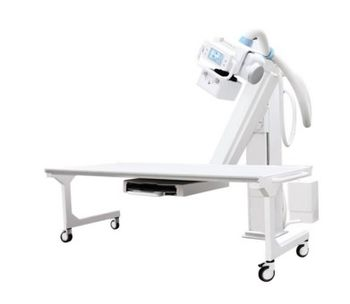
Visaris Americas Visaris360
 Visaris Americas · Model Visaris360
VisarisPACS – Your Well Deserved Peace of Mind VisarisPACS is a DICOM compliant digital medical imaging archive that provides all digital archiving and communication functionality for a modern, truly digital radiology department. Powerful patient search lets you locate and access data in the archive in a matter of seconds. Retrieve images from a range of imaging modalities using latest communication protocols and display them to perform screen based diagnostics. Digital DICOM Archive with fully scalable storage and client access Integrated DICOM communications: Store, Query, Retrieve, Search Transfer scheduled exams to modalities directly with DICOM MWL service Store images reliability with DICOM storage commitment Access your patient/exam/image database quickly Use your resources efficiently with image and automatic storage compression Know the status of each exam with integrated DICOM MPPS service Import years of existing images with a few clicks Manage your PACS easily with powerful admin and service modules Manage storage space, users, DICOM connections, patient data … Never lose your data with automated backup Do More With Visaris Diagon Workstation Perform your diagnostic reading with Visaris Diagon radiology workstation software that seamlessly integrates within any DICOM compliant radiology network. Base it on the hardware of your choice to retrieve your patient data with ease, apply powerful processing and turn your findings into great looking reports with Diagon, active diagnostic workstation: Multiple high resolution display support (up to 3 monitors and up to 5MP) Advanced PACS query/retrieve supporting wide range of modalities Retrieve previous studies automatically and display them side by side 2D still and multi-frame display, processing and manipulation 3D imaging display and processing: MIP, MPR, VRT, MinIP, SSD Process time-frame sequences: frame extraction, replay, loop, pause, advance Measure, annotate and analyze using a wide range of analytics tools Receive images from modalities directly to your Diagon workstation Import non-DICOM images and re-format as DICOM Dictate or type your reports on custom structured report (SR) templates Export images or burn them to CD with embedded DICOM viewer Roaming profile, service and configuration module Expedite Your Workflow and Disseminate Your Findings Easily Visaris RIS is a fully fledged, highly automated Radiology Information System that provides efficient electronic support diagnostic radiology workflow. Boasting a high level of automation and powerful analytical tools, Visaris RIS will expedite the diagnostic process and give you a level of control over your work you could not experience in conventional radiology departments. Based on a web (browser) platform, Visaris RIS is easily scalable to help your findings reach those they are intended to quickly and easily. Completely manage diagnostic workflow Enroll patients, create and schedule exams on all your devices Plan, monitor and direct exam progress– in real time Access and export results in a variety of forms Transcribe and verify reports so you can focus on the important Access images and findings from anywhere in the network PACS preview: quick non-diagnostic image display and manipulation Remain in control of you material usage and stock levels Integrate a CD burning robot for professional looking results Integrate easily with existing billing systems.
Key tips
- ·Never bypass a radiation interlock to "just get the image" - this is one of the few true zero-tolerance rules in BMET work.
- ·Trend image-quality phantom results over time - drift shows up before an outright failure does.
- ·Portable/mobile units take real physical abuse from transport - check wheel locks and cable strain reliefs more often than fixed units.
Typical Failure Modes
Compiled for this model from its own documentation and established engineering knowledge for this equipment class - not from a verified service record. Confirm against the manufacturer's service manual.
Detector not connecting / dropped images
HighSymptoms: Panel not detected, images not received, wireless / tethered link drops mid-exam.
Root cause: Detector battery (wireless), Wi-Fi / tether cable, a docking / connector fault, or detector electronics.
Image quality / calibration fault
MediumSymptoms: Fixed-pattern artefacts, non-uniformity, dead pixels / lines, calibration overdue or failing.
Root cause: Detector gain / offset calibration, a bad pixel map, or physical detector (drop) damage.
Generator / exposure fault
HighSymptoms: Exposure inhibited, kV / mAs error, no exposure captured, AEC over/under.
Root cause: HV generator, tube, filament supply, or an AEC / interface fault.
Positioner / tube-stand / bucky fault
MediumSymptoms: Tube column, wall stand or table bucky will not track, detent, or auto-position.
Root cause: Drive motor, brake, encoder, or the auto-positioning interface.
Acquisition workstation / PACS fault
MediumSymptoms: Images will not display, process or send; worklist missing; slow processing.
Root cause: Workstation PC, software, or the DICOM / network configuration.
Serviceable Parts & Consumables
Serviceable items for this model, compiled from its documentation and engineering knowledge for this equipment class. Service class and relative cost are estimates, not manufacturer figures; no part numbers are given. Confirm intervals and pricing against the manufacturer.
Flat-panel detector (exchange)
Class Major service partRel. cost $$$$R&R Moderate
Detector battery (wireless)
Class Periodic replacementRel. cost $$R&R Easy
Tether cable / access point
Class Periodic replacementRel. cost $$R&R Fairly easy
Positioner drive / brake / encoder
Class Major service partRel. cost $$$R&R Difficult
Acquisition workstation PC
Class Major service partRel. cost $$$R&R Moderate
AEC ion chamber
Class Major service partRel. cost $$$R&R Difficult
| Part | Service class | Relative cost | R&R difficulty |
|---|---|---|---|
| Flat-panel detector (exchange) | Major service part | $$$$ | Moderate |
| Detector battery (wireless) | Periodic replacement | $$ | Easy |
| Tether cable / access point | Periodic replacement | $$ | Fairly easy |
| Positioner drive / brake / encoder | Major service part | $$$ | Difficult |
| Acquisition workstation PC | Major service part | $$$ | Moderate |
| AEC ion chamber | Major service part | $$$ | Difficult |
Relative cost: $ lowest · $$$$ highest service-part cost for this equipment class. Not a price.
PM Checklist
Preventive-maintenance tasks typical of this equipment class. Perform to the manufacturer's procedure and your facility's policy - this is general reference, not a schedule for this specific unit.
- ·Daily QC per modality: image-quality phantom test
- ·Tube and detector inspection
- ·Annual state-required radiation safety survey
- ·Vendor-scheduled preventive maintenance
Troubleshooting Approach
A starting sequence for this model, compiled from its documentation and engineering knowledge for this equipment class. Follow the manufacturer's service documentation for the actual procedure.
Symptom: Detector not connecting or images not arriving
- Check the detector battery (wireless) or reseat the tether.
- Confirm the Wi-Fi access point, channel and range.
- Reboot the detector and the acquisition workstation.
- Try a known-good detector if the site has one.
- Escalate a confirmed detector-electronics fault to the OEM.
Symptom: Fixed-pattern artefacts or failed calibration
- Run the detector gain / offset calibration and the dead-pixel map.
- Inspect the detector for drop / crush damage.
- Expose a uniform phantom and check uniformity.
- Confirm the generator and AEC are within spec with an analyser.
- Exchange the detector if calibration will not hold.
Typical Location
Where this class of equipment is typically deployed - general reference, not this unit's own placement record.
- Radiology / Imaging department
- Emergency Department (portable units)
- Operating Room (C-arms)
- Cath lab
- Bedside ICU (portable X-ray)
Documents & Manuals
No documents available for this device yet.
Troubleshoot this device with Bio
Describe a symptom or error code. Bio answers from this device's own documented error codes, failure modes, parts, and guides.
Ask Bio