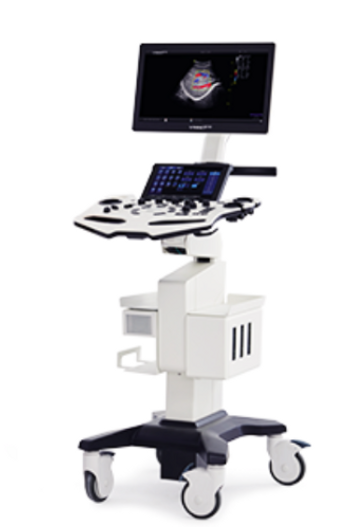
Vinno X2
 Vinno · Model X2
The new UI interface contains a wealth of practical options under a clear and concise logical structure, re-optimizing the entire process from the operator's perspective, just to save every second of your precious time. The butterfly-shaped operation panel faces the operator at a carefully designed angle, and is appropriately embellished with human-oriented knobs and buttons. The three interface slots are independent of each other and reasonably distributed. High-performance chips provided by TI and highly integrated modular circuit boards independently developed by Feino are embedded in a solid aluminum shell to shield against external interference. The high-definition medical display can be adjusted in multiple postures with the articulated arm; the highly sensitive touch screen allows users to experience the intelligent medical record management and tracking system as smoothly as flying. Scientifically manage massive patient databases and fully support all-round patient management needs such as clinical tracking, follow-up, and evaluation.
Key tips
- ·Never bypass a radiation interlock to "just get the image" - this is one of the few true zero-tolerance rules in BMET work.
- ·Trend image-quality phantom results over time - drift shows up before an outright failure does.
- ·Portable/mobile units take real physical abuse from transport - check wheel locks and cable strain reliefs more often than fixed units.
Typical Failure Modes
Compiled for this model from its own documentation and established engineering knowledge for this equipment class - not from a verified service record. Confirm against the manufacturer's service manual.
Poor 2D image quality across multiple probes
HighSymptoms: Noisy, low-contrast or non-uniform image, missing sector, drop-out that follows the system not the probe.
Root cause: Front-end / beamformer board fault, a probe-port (connector) board fault, or a system-board fault.
Transducer not recognised / probe-port fault
MediumSymptoms: A probe works on one port but not another, or is not detected at all.
Root cause: Worn probe-port connector or a scan-connector board fault.
Will not boot / intermittent shutdown
HighSymptoms: Dead system, hangs at boot, or powers off under load.
Root cause: Power supply / DC converter, the system battery, or a system-board fault.
Control panel / touchscreen or monitor fault
MediumSymptoms: Unresponsive TGC sliders or keys, distorted or blank display.
Root cause: Control-panel board, touchscreen, or the monitor.
Overheating / loud cooling fan
LowSymptoms: Thermal-shutdown warning, fan roar, hot exhaust.
Root cause: Failed or dust-clogged cooling fan or blocked air path.
DICOM / network / storage fault
LowSymptoms: Studies will not send to PACS, images will not archive, worklist empty.
Root cause: Network configuration or a storage-drive fault.
Serviceable Parts & Consumables
Serviceable items for this model, compiled from its documentation and engineering knowledge for this equipment class. Service class and relative cost are estimates, not manufacturer figures; no part numbers are given. Confirm intervals and pricing against the manufacturer.
Front-end / beamformer board
Class Major service partRel. cost $$$$R&R Difficult
Probe-port / scan-connector board
Class Major service partRel. cost $$$R&R Difficult
Power supply / DC converter
Class Major service partRel. cost $$$R&R Difficult
Control-panel / touchscreen assembly
Class Major service partRel. cost $$$R&R Moderate
Cooling fan
Class Major service partRel. cost $R&R Moderate
System hard drive
Class Major service partRel. cost $$R&R Moderate
| Part | Service class | Relative cost | R&R difficulty |
|---|---|---|---|
| Front-end / beamformer board | Major service part | $$$$ | Difficult |
| Probe-port / scan-connector board | Major service part | $$$ | Difficult |
| Power supply / DC converter | Major service part | $$$ | Difficult |
| Control-panel / touchscreen assembly | Major service part | $$$ | Moderate |
| Cooling fan | Major service part | $ | Moderate |
| System hard drive | Major service part | $$ | Moderate |
Relative cost: $ lowest · $$$$ highest service-part cost for this equipment class. Not a price.
PM Checklist
Preventive-maintenance tasks typical of this equipment class. Perform to the manufacturer's procedure and your facility's policy - this is general reference, not a schedule for this specific unit.
- ·Daily QC per modality: image-quality phantom test
- ·Tube and detector inspection
- ·Annual state-required radiation safety survey
- ·Vendor-scheduled preventive maintenance
Troubleshooting Approach
A starting sequence for this model, compiled from its documentation and engineering knowledge for this equipment class. Follow the manufacturer's service documentation for the actual procedure.
Symptom: Poor image quality or a probe not recognised
- Try the probe on a second port and a known-good probe on the suspect port.
- Wipe off all gel, inspect the lens, and scan a phantom or your own forearm.
- Inspect the probe-port connectors for bent pins or debris.
- Run any built-in front-end / channel diagnostics.
- Replace the probe-port board or front-end board as isolated.
Symptom: Will not boot or shuts down
- Confirm mains and the on/off sequence per the manual.
- Check the power-supply / DC-converter outputs.
- Note any boot / POST beep or code.
- Reseat the system boards.
- Refer the power supply or system board as isolated.
Typical Location
Where this class of equipment is typically deployed - general reference, not this unit's own placement record.
- Radiology / Imaging department
- Emergency Department (portable units)
- Operating Room (C-arms)
- Cath lab
- Bedside ICU (portable X-ray)
Documents & Manuals
No documents available for this device yet.
Troubleshoot this device with Bio
Describe a symptom or error code. Bio answers from this device's own documented error codes, failure modes, parts, and guides.
Ask Bio