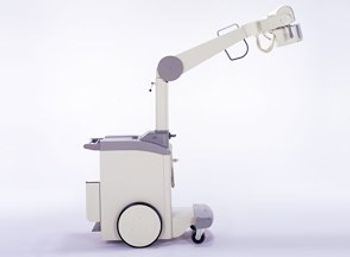
Toshiba IME-100L
 Toshiba · Model IME-100L
Wheel-guided motion Large wheels and wheel-guided motion allow operators to overcome floor gradients with less manual force. Wheel step This step is easy to tread on, and has sufficient clearance above the floor. The safety design eliminates the risk of a foot being caught between the step and the floor, even in the wheel-guided setting. Bumper A bumper the same width as the cart is provided at the front of the equipment, to alleviate the shock caused by possible collisions. Corner guide This allows you to confirm the position of the bumpers while the equipment is in motion, and helps in navigating narrow spaces. Deadman-type brake A deadman-type brake is employed. If the handle is released, the brake will be applied automatically. A slight handle movement causes deceleration while in motion. Brake elimination You can choose a brake-free condition. Thus, you can easily position the equipment while moving the main assembly. Pantograph-type arm A well-balanced, lock-free arm is employed. It eliminates time-consuming arm lock procedures for positioning, ensuring more speedy positioning. Handgrips These allow you to swivel and rotate the X-ray tube with less manual force. Vertical rotation of X-ray tube The X-ray tube can be rotated vertically by ±90º, and easily positioned for lateral-view radiography. Swiveling of the X-ray tube The X-ray tube assembly can be swiveled forward by -15º through +90º. Handgrip manipulation maintains the orientation of the X-ray port irrespective of the height of the arm. Large wheels Large 40-cm diameter wheels are employed. These are combined with free-castor-type front wheels to ensure quietness and ease of movement.
Key tips
- ·Never bypass a radiation interlock to "just get the image" - this is one of the few true zero-tolerance rules in BMET work.
- ·Trend image-quality phantom results over time - drift shows up before an outright failure does.
- ·Portable/mobile units take real physical abuse from transport - check wheel locks and cable strain reliefs more often than fixed units.
Typical Failure Modes
Compiled for this model from its own documentation and established engineering knowledge for this equipment class - not from a verified service record. Confirm against the manufacturer's service manual.
No or inconsistent exposure / generator error
HighSymptoms: Exposure inhibited, generator error / fault code, images consistently under- or over-exposed.
Root cause: HV generator / inverter fault, an exposure-switch / contactor fault, an HT-cable fault, or a tube-load / thermal interlock.
kV / mA / mAs inaccuracy
HighSymptoms: Output does not match the console, techniques drift, generator calibration fails.
Root cause: Inverter / HV-tank fault, a filament-supply fault, or a calibration issue.
AEC (phototimer) fault
MediumSymptoms: Auto-exposure images consistently over- or under-exposed, chambers not tracking.
Root cause: AEC ion chamber(s) or the AEC calibration.
Tube-stand / table / bucky / collimator fault
MediumSymptoms: Column, wall stand, table or bucky will not track / detent; collimator light out; grid errors.
Root cause: Drive / brake / detent hardware, the collimator lamp / drive, or a bucky-motor fault.
Tube overload / cooling lockout
LowSymptoms: Exposures inhibited after a series, tube-heat alarm.
Root cause: Tube housing heat limit reached or a cooling-fan fault.
Serviceable Parts & Consumables
Serviceable items for this model, compiled from its documentation and engineering knowledge for this equipment class. Service class and relative cost are estimates, not manufacturer figures; no part numbers are given. Confirm intervals and pricing against the manufacturer.
HV generator / inverter components
Class Major service partRel. cost $$$$R&R Expert-level
HT cables
Class Major service partRel. cost $$$R&R Difficult
X-ray tube assembly
Class Major service partRel. cost $$$$R&R Expert-level
AEC ion chamber
Class Major service partRel. cost $$$R&R Difficult
Collimator lamp / drive assembly
Class Periodic replacementRel. cost $$R&R Moderate
Bucky / grid motor
Class Major service partRel. cost $$R&R Moderate
| Part | Service class | Relative cost | R&R difficulty |
|---|---|---|---|
| HV generator / inverter components | Major service part | $$$$ | Expert-level |
| HT cables | Major service part | $$$ | Difficult |
| X-ray tube assembly | Major service part | $$$$ | Expert-level |
| AEC ion chamber | Major service part | $$$ | Difficult |
| Collimator lamp / drive assembly | Periodic replacement | $$ | Moderate |
| Bucky / grid motor | Major service part | $$ | Moderate |
Relative cost: $ lowest · $$$$ highest service-part cost for this equipment class. Not a price.
PM Checklist
Preventive-maintenance tasks typical of this equipment class. Perform to the manufacturer's procedure and your facility's policy - this is general reference, not a schedule for this specific unit.
- ·Daily QC per modality: image-quality phantom test
- ·Tube and detector inspection
- ·Annual state-required radiation safety survey
- ·Vendor-scheduled preventive maintenance
Troubleshooting Approach
A starting sequence for this model, compiled from its documentation and engineering knowledge for this equipment class. Follow the manufacturer's service documentation for the actual procedure.
Symptom: No exposure or kV / mA error
- Note the exact generator error code.
- Confirm the mains supply is within the generator's spec (line-voltage compensation).
- Check the HT cables and the exposure contactor.
- Confirm the tube is not in a thermal lockout.
- Escalate a confirmed inverter / HV-tank / filament fault; verify output with an X-ray analyser after repair.
Symptom: AEC images over/under-exposed
- Verify the AEC response with a phantom at two thicknesses.
- Check the AEC chamber connections and the selected chambers / density.
- Recalibrate the AEC per the service procedure.
- Compare to a manual technique.
- Replace the AEC chamber if it will not calibrate.
Typical Location
Where this class of equipment is typically deployed - general reference, not this unit's own placement record.
- Radiology / Imaging department
- Emergency Department (portable units)
- Operating Room (C-arms)
- Cath lab
- Bedside ICU (portable X-ray)
Documents & Manuals
No documents available for this device yet.
Troubleshoot this device with Bio
Describe a symptom or error code. Bio answers from this device's own documented error codes, failure modes, parts, and guides.
Ask Bio