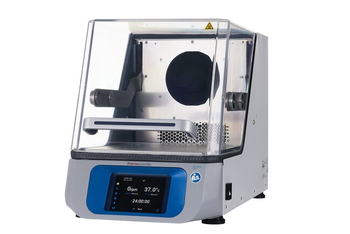
Thermo Fisher Scientific Solaris 2000
 Thermo Fisher Scientific · Model Solaris 2000
Intuitive Touchscreen Display Create, download, and share up to 99 programs across multiple units for better efficiency and reproducibility in the lab Full color, touch screen display is easy-to-read, allowing for clear view of the speed, temperature, and run times from a distance User interface has 10 optional languages Built-in orbital calculator aids in converting protocols designed with different orbits and estimating the set speed needed to obtain similar results Efficient and Reliable Operation Reliable, heavy-duty triple eccentric drive mechanism provides timed or continuous 24-hour operation to allow smooth and uniform shaking of large or uneven loads Unbalanced load sensor stops platform motion when excess vibration is detected and visual/audible alarms signal until condition is corrected Soft start feature eliminates sudden starts and stops, splashing of vessel contents or wetting of closures Market leading warranty: 2 years labor, 5 years parts, and 10 years drive mechanism Compatible with GLP/GMP Environments Access controls and historical monitoring of alerts, alarms and interaction logs to provide greater security and reproducibility USB and Ethernet connections for monitoring and data output Sealed electronics system to minimize particle generation and reduce contamination Rounded corners, easy-to-remove platforms, and a sealed motor and shaker housing protects the drive mechanism from damaging spills, simplifies cleaning, and controls contamination Improved User Experience Solaris Incubated and Refrigerated Benchtop Shakers use refrigerant-free, environmentally friendly Peltier cooling, which uses 58% less energy compared to older models with traditional compressor designs Ergonomic handles, out-of-the way lid hinges, and large clear acrylic lids allow for easy access to the platform with less wrist and hand strain Engineered to perform with a reduced noise level and compressor-free design Compatible with a wide variety of clamps, racks, trays, and adhesive mats that can accommodate most vessel types (see the manual or brochure for part number and fit recommendations)
Key tips
- ·Run QC controls before trusting any repair - an analyzer that passes self-test can still report clinically wrong results.
- ·Rule out a reagent lot change before opening the instrument - it can look exactly like a hardware fault.
- ·Centrifuge rotors have a hard retirement age/cycle limit regardless of visible condition - don't eyeball it.
Typical Failure Modes
Compiled for this model from its own documentation and established engineering knowledge for this equipment class - not from a verified service record. Confirm against the manufacturer's service manual.
Shaker does not run / speed error
HighSymptoms: Platform will not shake, speed does not match set point, drive fault.
Root cause: Door / lid not closed, an eccentric-drive or belt fault, an out-of-balance load, or a controller fault.
Incubator not reaching set temperature
HighSymptoms: Chamber below (or above) set point, temperature alarm.
Root cause: Heater element, a temperature sensor, a control-board fault, or (refrigerated) a compressor / sealed-system fault.
Incorrect temperature indication
MediumSymptoms: Displayed temperature disagrees with an independent probe.
Root cause: A programmed offset, a defective RTD, or a main-board fault.
Noise / vibration
MediumSymptoms: Rumble or knocking while shaking.
Root cause: Load imbalance, or a worn eccentric bearing / drive component.
Serviceable Parts & Consumables
Serviceable items for this model, compiled from its documentation and engineering knowledge for this equipment class. Service class and relative cost are estimates, not manufacturer figures; no part numbers are given. Confirm intervals and pricing against the manufacturer.
Eccentric-drive bearing / belt
Class Major service partRel. cost $$R&R Difficult
Heater element
Class Major service partRel. cost $$R&R Difficult
RTD temperature sensor
Class Major service partRel. cost $$R&R Moderate
Drive motor / controller
Class Major service partRel. cost $$$R&R Difficult
Refrigeration compressor (refrigerated models)
Class Major service partRel. cost $$$$R&R Expert-level
| Part | Service class | Relative cost | R&R difficulty |
|---|---|---|---|
| Eccentric-drive bearing / belt | Major service part | $$ | Difficult |
| Heater element | Major service part | $$ | Difficult |
| RTD temperature sensor | Major service part | $$ | Moderate |
| Drive motor / controller | Major service part | $$$ | Difficult |
| Refrigeration compressor (refrigerated models) | Major service part | $$$$ | Expert-level |
Relative cost: $ lowest · $$$$ highest service-part cost for this equipment class. Not a price.
PM Checklist
Preventive-maintenance tasks typical of this equipment class. Perform to the manufacturer's procedure and your facility's policy - this is general reference, not a schedule for this specific unit.
- ·Daily QC controls run and reviewed
- ·Calibration verification per assay
- ·Routine cleaning and decontamination
- ·Scheduled reagent-path and pump-tubing maintenance
Troubleshooting Approach
A starting sequence for this model, compiled from its documentation and engineering knowledge for this equipment class. Follow the manufacturer's service documentation for the actual procedure.
Symptom: Shaker will not run / speed error
- Confirm the door / lid is closed and any interlock is made.
- Check for a program that has set the speed to zero and reset it.
- Rebalance the load.
- Listen for the drive motor; inspect the belt / eccentric.
- Replace the drive component or controller as isolated.
Symptom: Not reaching temperature
- Clear any programmed offset.
- Verify ambient is within range.
- Compare the display to an independent probe.
- Check the heater fuse / element and, on refrigerated models, the compressor.
- Contact Thermo service for a defective heater, RTD, refrigeration system or main board.
Typical Location
Where this class of equipment is typically deployed - general reference, not this unit's own placement record.
- Central / core laboratory
- Point-of-care testing stations
- Blood bank
- Microbiology lab
Documents & Manuals
No documents available for this device yet.
Related calculators
From BioLab, for work done with this kind of equipment.
Troubleshoot this device with Bio
Describe a symptom or error code. Bio answers from this device's own documented error codes, failure modes, parts, and guides.
Ask Bio