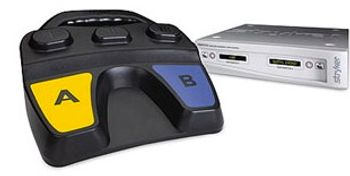
Stryker iSWITCH
 Stryker · Model iSWITCH
A single foot pedal that controls multiple devices Elimination of cords for increased safety and efficiency Ergonomic design and handle Incorporates a unique three button two pedal footswitch that communicates wirelessly to receiver console with the O.R. Extended battery life.
Key tips
- ·When no category-specific guidance fits, default to the manufacturer's own service manual and the general troubleshooting method in the Engineer's Guide.
- ·Run an incoming and annual electrical safety test regardless of how niche the device is.
Typical Failure Modes
Compiled for this model from its own documentation and established engineering knowledge for this equipment class - not from a verified service record. Confirm against the manufacturer's service manual.
No response when the footswitch is pressed
HighSymptoms: Pedal presses do nothing.
Root cause: Footswitch asleep (press button I or III to wake), sync lost, or depleted batteries.
Footswitch will not synchronise with the receiver
MediumSymptoms: Sync fails, receiver LED does not change colour.
Root cause: Sync icons not held close enough, another footswitch already on that channel, or weak batteries.
Receiver does not show an attached device
MediumSymptoms: On startup no device is indicated.
Root cause: Device not connected to the correct rear input on the receiver.
Two footswitches merged / audio not audible
LowSymptoms: Footswitch 2 stuck on the same device as Footswitch 1, or no audio messages.
Root cause: Footswitches merged (press Mode to unmerge), or the rear volume control turned down.
Serviceable Parts & Consumables
Serviceable items for this model, compiled from its documentation and engineering knowledge for this equipment class. Service class and relative cost are estimates, not manufacturer figures; no part numbers are given. Confirm intervals and pricing against the manufacturer.
Footswitch batteries
Class Frequent wear itemRel. cost $R&R Easy
Wireless footswitch assembly
Class Periodic replacementRel. cost $$$R&R Easy
Receiver console
Class Major service partRel. cost $$$R&R Fairly easy
Device interface cables
Class Periodic replacementRel. cost $R&R Easy
| Part | Service class | Relative cost | R&R difficulty |
|---|---|---|---|
| Footswitch batteries | Frequent wear item | $ | Easy |
| Wireless footswitch assembly | Periodic replacement | $$$ | Easy |
| Receiver console | Major service part | $$$ | Fairly easy |
| Device interface cables | Periodic replacement | $ | Easy |
Relative cost: $ lowest · $$$$ highest service-part cost for this equipment class. Not a price.
PM Checklist
Preventive-maintenance tasks typical of this equipment class. Perform to the manufacturer's procedure and your facility's policy - this is general reference, not a schedule for this specific unit.
- ·Follow the manufacturer's PM schedule
- ·Perform incoming and annual electrical safety testing per facility biomedical program
Troubleshooting Approach
A starting sequence for this model, compiled from its documentation and engineering knowledge for this equipment class. Follow the manufacturer's service documentation for the actual procedure.
Symptom: Footswitch does nothing
- Press button I or III to wake the footswitch.
- Re-synchronise the footswitch to the receiver.
- Replace the batteries.
- Confirm the controlled device is on the correct rear input.
- Test each pedal function.
Symptom: Will not synchronise
- Hold the footswitch sync icon within one inch of the receiver sync icon.
- Press buttons I and III simultaneously and release.
- If another footswitch holds the channel, press and hold the receiver Mode button for 5 seconds to clear it.
- Sync the new footswitch.
- Replace batteries and retry if it still fails.
Typical Location
Where this class of equipment is typically deployed - general reference, not this unit's own placement record.
- Varies by device - check the unit's own manual for facility placement guidance
Documents & Manuals
Troubleshoot this device with Bio
Describe a symptom or error code. Bio answers from this device's own documented error codes, failure modes, parts, and guides.
Ask Bio