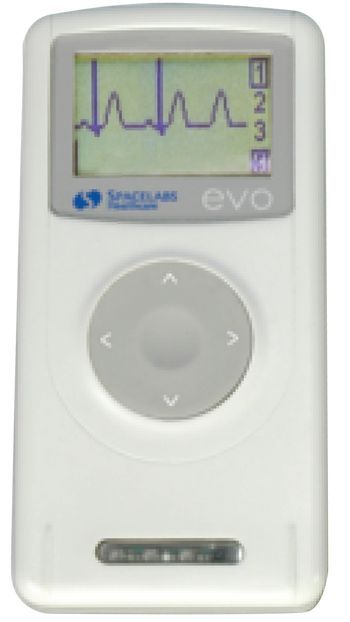
Spacelabs Evo
 Spacelabs · Model Evo
VIdeo Recorder The small unit weighs only 2½ oz and can be easily concealed under clothing, which may enhance compliance. The new evo digital recorder combines the latest Holter technology with improved patient comfort and ease of use. Its real-time built-in ECG display lets you confirm the quality of the ECG during hook-up. You can choose up to 48 hours of recording, with pacer detection always switched on. You can be assured of getting a high-quality recording to facilitate your diagnosis.evo has its own docking station with Dynamic Energy Source technology that enables evo to fully recharge during data download. The recorder is then immediately available for the next patient. evo provides low cost of ownership due to the elimination of disposable batteries, memory cards, with no moving parts to maintain and individual lead wires for easy and less costly lead replacement.
Key tips
- ·A no-signal/flatline alarm gets checked on the patient first, not the monitor - rule out a real clinical event before troubleshooting.
- ·Recalibrate NIBP against a reference manometer, not just a self-test pass.
- ·Reused patient cables (SpO2, ECG leads) are a common source of intermittent-fault complaints - swap the cable before the module.
Typical Failure Modes
Compiled for this model from its own documentation and established engineering knowledge for this equipment class - not from a verified service record. Confirm against the manufacturer's service manual.
No or poor recording / capture
HighSymptoms: Recording will not start, files corrupt, no input signal, poor image.
Root cause: Input-board / video-input fault, a cable / connector fault, or a codec / storage fault.
Storage / media fault
MediumSymptoms: "Disk full" or write errors, USB / DVD not recognised, exported files unreadable.
Root cause: Full or failing internal drive, or a worn optical / USB drive.
Network / PACS / export fault
MediumSymptoms: Studies will not send, worklist missing, share not reachable.
Root cause: Network configuration or the PACS / share connection.
Footswitch / trigger fault
LowSymptoms: Capture will not trigger from the pedal or camera button.
Root cause: Footswitch or trigger cable fault.
Fan / power fault
LowSymptoms: Overheats, shuts down, or will not power on.
Root cause: Cooling fan or power supply.
Serviceable Parts & Consumables
Serviceable items for this model, compiled from its documentation and engineering knowledge for this equipment class. Service class and relative cost are estimates, not manufacturer figures; no part numbers are given. Confirm intervals and pricing against the manufacturer.
Video input / capture board
Class Major service partRel. cost $$$R&R Difficult
Internal storage drive
Class Periodic replacementRel. cost $$R&R Moderate
Optical / USB drive
Class Periodic replacementRel. cost $R&R Fairly easy
Footswitch / trigger cable
Class Periodic replacementRel. cost $R&R Fairly easy
Cooling fan / power supply
Class Major service partRel. cost $R&R Moderate
| Part | Service class | Relative cost | R&R difficulty |
|---|---|---|---|
| Video input / capture board | Major service part | $$$ | Difficult |
| Internal storage drive | Periodic replacement | $$ | Moderate |
| Optical / USB drive | Periodic replacement | $ | Fairly easy |
| Footswitch / trigger cable | Periodic replacement | $ | Fairly easy |
| Cooling fan / power supply | Major service part | $ | Moderate |
Relative cost: $ lowest · $$$$ highest service-part cost for this equipment class. Not a price.
PM Checklist
Preventive-maintenance tasks typical of this equipment class. Perform to the manufacturer's procedure and your facility's policy - this is general reference, not a schedule for this specific unit.
- ·Routine cable and lead-wire inspection for fraying/wear
- ·Battery conditioning cycle
- ·NIBP calibration check against a reference manometer
- ·ECG / SpO2 accuracy verification against a patient simulator
- ·Annual electrical safety test
Troubleshooting Approach
A starting sequence for this model, compiled from its documentation and engineering knowledge for this equipment class. Follow the manufacturer's service documentation for the actual procedure.
Symptom: No or poor recording
- Confirm a valid input signal on each source (SDI / HDMI / DVI / composite).
- Swap the input cable and try another input.
- Check free storage space and test a short recording.
- Update / reset the codec settings per the manual.
- Replace the capture board if an input is confirmed dead.
Symptom: Storage or export fault
- Check free space and the internal drive health.
- Test export to USB and to the network share separately.
- Confirm the PACS / share settings and credentials.
- Replace a failing internal or optical drive.
- Verify an exported study opens on another workstation.
Typical Location
Where this class of equipment is typically deployed - general reference, not this unit's own placement record.
- ICU / CCU
- Emergency Department
- OR / PACU
- General med-surg floors
- Step-down units
- Telemetry units
Documents & Manuals
Troubleshoot this device with Bio
Describe a symptom or error code. Bio answers from this device's own documented error codes, failure modes, parts, and guides.
Ask Bio