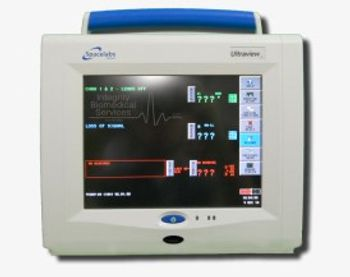
Spacelabs 91369 Ultraview SL
 Spacelabs · Model 91369 Ultraview SL
Portable monitor designed for use as a compact bedside monitor or as a battery-operated transport monitor. Spacelabs 91369 Ultraview SL Compact Monitor has a large 10.4 inch touchscreen display. Like the 90369, this unit uses dual-battery slots which make this Ultraview very portable. All prior and current Spacelabs modules are compatible with the 91369. The 91369 monitor is a lightweight, portable monitor designed for use as a compact bedside monitor or as a battery-operated transport monitor. The monitor features a five-wire, resistive touchscreen and can be operated on either AC mains or battery power. The single-high module slot on the right side of the monitor accepts all single-high modules, including the 90496 Ultraview® Command module and 91496 Ultraview SL™ Command module, to permit the monitoring of parameters such as electrocardiography (ECG), pulse oximetry (SpO2), temperature, and invasive pressure.
Key tips
- ·A no-signal/flatline alarm gets checked on the patient first, not the monitor - rule out a real clinical event before troubleshooting.
- ·Recalibrate NIBP against a reference manometer, not just a self-test pass.
- ·Reused patient cables (SpO2, ECG leads) are a common source of intermittent-fault complaints - swap the cable before the module.
Typical Failure Modes
Compiled for this model from its own documentation and established engineering knowledge for this equipment class - not from a verified service record. Confirm against the manufacturer's service manual.
A parameter drops out or reads wrong
HighSymptoms: ECG, IBP, SpO2, temperature, CO2 or CO intermittently drops or is implausible.
Root cause: Worn patient cable / sensor, or a parameter-module / input-board fault.
NIBP will not measure or is inaccurate
MediumSymptoms: NIBP times out, cuff will not inflate / hold, readings implausible.
Root cause: Internal NIBP pump or valve, a cuff / hose leak, or a pressure-transducer fault.
Module / parameter not recognised
MediumSymptoms: The host does not display a plugged-in module or a built-in parameter.
Root cause: Docking / connector fault or an internal board fault.
Display / touchscreen fault
MediumSymptoms: Blank, dim or distorted display; unresponsive touchscreen.
Root cause: Display, backlight, or controller fault.
Battery / power fault
MediumSymptoms: Short battery run time, will not hold charge, will not power on.
Root cause: Aged battery pack or a power-supply fault.
Network / central-station connectivity fault
LowSymptoms: Monitor not shown at the central station, admit fails, intermittent drop.
Root cause: Wired / Wi-Fi network configuration or a communication board.
Serviceable Parts & Consumables
Serviceable items for this model, compiled from its documentation and engineering knowledge for this equipment class. Service class and relative cost are estimates, not manufacturer figures; no part numbers are given. Confirm intervals and pricing against the manufacturer.
Patient cable set (ECG / IBP / SpO2 / temp)
Class Frequent wear itemRel. cost $$R&R Easy
NIBP cuff and hose
Class Frequent wear itemRel. cost $R&R Easy
Internal NIBP pump / valve
Class Major service partRel. cost $$$R&R Difficult
Parameter module / input board
Class Major service partRel. cost $$$R&R Difficult
Battery pack
Class Periodic replacementRel. cost $$R&R Fairly easy
Display / touchscreen assembly
Class Major service partRel. cost $$$R&R Moderate
| Part | Service class | Relative cost | R&R difficulty |
|---|---|---|---|
| Patient cable set (ECG / IBP / SpO2 / temp) | Frequent wear item | $$ | Easy |
| NIBP cuff and hose | Frequent wear item | $ | Easy |
| Internal NIBP pump / valve | Major service part | $$$ | Difficult |
| Parameter module / input board | Major service part | $$$ | Difficult |
| Battery pack | Periodic replacement | $$ | Fairly easy |
| Display / touchscreen assembly | Major service part | $$$ | Moderate |
Relative cost: $ lowest · $$$$ highest service-part cost for this equipment class. Not a price.
PM Checklist
Preventive-maintenance tasks typical of this equipment class. Perform to the manufacturer's procedure and your facility's policy - this is general reference, not a schedule for this specific unit.
- ·Routine cable and lead-wire inspection for fraying/wear
- ·Battery conditioning cycle
- ·NIBP calibration check against a reference manometer
- ·ECG / SpO2 accuracy verification against a patient simulator
- ·Annual electrical safety test
Error Codes
Extracted directly from this unit's own service manual.
80EPROM checksum bad
8FStack pointer bad
81Internal RAM will not write all zeroes
82Internal RAM will not write all ones
83Timer 0 - No overflow
84Timer 0 - High byte bad
85Timer 0 - Low byte bad
86Timer 1 - No overflow
87Timer 1 - High byte bad
88Timer 1 - Low byte bad
30SDLC Errors - Bad Xmit status
31SDLC Errors - No SI
32SDLC Errors - No start flag
33SDLC Errors - Bad address
34SDLC Errors - Bad frame type
35SDLC Errors - No end flag
10Stuck I/O bus bit 0 low
11Stuck I/O bus bit 1 low
12Stuck I/O bus bit 2 low
13Stuck I/O bus bit 3 low
14Stuck I/O bus bit 4 low
15Stuck I/O bus bit 5 low
16Stuck I/O bus bit 6 low
17Stuck I/O bus bit 7 low
18Stuck I/O bus bit 0 high
19Stuck I/O bus bit 1 high
1AStuck I/O bus bit 2 high
1BStuck I/O bus bit 3 high
1CStuck I/O bus bit 4 high
1DStuck I/O bus bit 5 high
1EStuck I/O bus bit 6 high
1FStuck I/O bus bit 7 high
50External RAM - Stuck bit - Bank 0
51External RAM - Stuck bit - Bank 1
52External RAM - Stuck bit - Bank 2
53External RAM - Stuck bit - Bank 3
583-Par RAM test error - Bank 0
593-Par RAM test error - Bank 1
5A3-Par RAM test error - Bank 2
5B3-Par RAM test error - Bank 3
22Front Panel key input error
23EEPROM Tests - Checksum bad - No diagnostic jumper
25EEPROM Tests - Error during checksum write
26EEPROM Tests - New checksum no good
38Printer Tests - WRRDY inactive or -SYNC active after reset
39Printer Tests - Readback system wrong state after reset
3APrinter Tests - Error active after reset
3BPrinter Tests - +BUSY not active after idle CMD
3CPrinter Tests - +BUSY not inactive after idle CMD
3DPrinter Tests - Error not active after illegal CMD
3EPrinter Tests - Error not inactive after idle CMD
3FPrinter Tests - +BUSY not inactive after idle CMD
40Printer Tests - Incorrect feedback after illegal CMD
41Thermal array over-temperature
42Low 12 V supply to AR42 recorder
43High 12 V supply
44Other AR42 error
27Error detected during print test
2ASDLC cable not present
2BSDLC clock frequency too high
Troubleshooting Approach
A starting sequence for this model, compiled from its documentation and engineering knowledge for this equipment class. Follow the manufacturer's service documentation for the actual procedure.
Symptom: A parameter drops out or reads wrong (ECG / IBP / SpO2 / temp / CO2 / CO)
- Reseat the patient cable at the module and at the monitor.
- Swap in a known-good cable / sensor for that parameter and re-test.
- Move the module to another host or slot to tell module from host.
- Inspect the module docking connector for bent or recessed pins.
- Verify against a patient simulator; replace the cable, or refer the parameter module / input board if the fault stays with it.
Symptom: NIBP will not measure or is inaccurate
- Leak-test the cuff and hose (occlude and watch for pressure decay).
- Run the monitor's NIBP calibration-verification against a calibrated manometer.
- Confirm correct cuff size and placement and check for a kinked hose.
- Verify against a NIBP simulator at several pressures.
- Refer the monitor for internal pump / valve service if it still fails.
Symptom: Blank / dim / frozen display or unresponsive touchscreen
- Power-cycle the monitor fully (mains removed, battery out where possible).
- Check the display backlight and the display / touchscreen cable.
- Note any boot or self-test error code.
- Re-calibrate the touchscreen if the touch offset is the issue.
- Replace the display / touchscreen assembly or refer the main board.
Symptom: Not shown at the central station / network dropout
- Confirm the wired drop or Wi-Fi settings and that other monitors on that segment are online.
- Check the monitor's network address / unit-bed assignment and re-admit.
- Reseat the network card / cable.
- Restart the monitor's network interface.
- Escalate a whole-unit outage to the central-station server / IT.
Typical Location
Where this class of equipment is typically deployed - general reference, not this unit's own placement record.
- ICU / CCU
- Emergency Department
- OR / PACU
- General med-surg floors
- Step-down units
- Telemetry units
Documents & Manuals
Safety & Recalls
Synced live from the FDA openFDA API.
- RECALL
The clinician did not realize the monitor was in END CASE mode and was expecting audible alarms. Visual alarms continue to work normally. The firm performed a retrospective analysis of all recalls since 2011 and discovered 222 additional serial numbers were missed and were not included in the previous recall under RES 59456 (recall number Z-3032-2011).
- RECALL
The clinician did not realize the monitor was in END CASE mode and was expecting audible alarms. Visual alarms continue to work normally.
- RECALL
Spacelabs received a report of the Model 91518 Multigas Analyzer trending low levels of an anesthetic agent that is not present during a particular case. The error is limited to only the trend table data.
- RECALL
Monitor may reset repeatedly which can result in a loss of patient monitoring for several minutes. Cause is a software problem.
- RECALL
Telemetry Modules are failing to alarm for low heart rate and asystole.
- RECALL
During battery insertion there is potential for patient waveforms to move to an open receiver module or to an occupied receiver causing the intermittent inappropriate monitoring of both patients for several minutes.
- RECALL
Inaccurate partial pressure readings; readings are not compensated for ambient pressure in mmHg or kPa.
Troubleshoot this device with Bio
Describe a symptom or error code. Bio answers from this device's own documented error codes, failure modes, parts, and guides.
Ask Bio