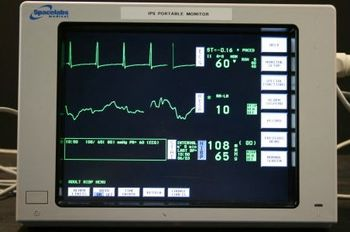
Spacelabs 90367 Ultraview
 Spacelabs · Model 90367 Ultraview
Fully PCIS™/Ultraview Care Network-compatible and are designed for use as small bedside monitors or as battery-operated transport monitors. The 90367 Ultraview® 1030 monitor and the 90369 Ultraview 1050 monitor are fully PCIS™/Ultraview Care Network-compatible and are designed for use as small bedside monitors or as battery-operated transport monitors. These monitors feature a 10.4-inch color display and an infrared touchscreen, and they can be operated on either mains power or battery. A single-high module slot on the right side of the monitor accepts all single-high modules, including the 90470 Multiparameter module, 90496 Ultraview Command module, and 91496 Ultraview SL™ Command module, to permit monitoring of parameters such as ECG, temperature, and invasive pressure. The optional 90310 Wireless Network Interface (WNI) provides a seamless network of communications with other Ultraview PCIS/PCMS™ monitors via a Wireless Local Area Network (WLAN). These flexible networks use the 90310 as the point of airwave transmit and receive for the Ethernet network interface. Networks can use a single channel or multiple channels with additional 90310 WNIs (the number required depends upon the number of waveforms per monitor and the number of monitors in use). The capnography option provides integrated monitoring of EtCO2, inspired CO2, and respiratory rate. This option allows an external oxygen sensor to be attached to the Ultraview 1030/1050 transport monitor, which measures the FiO2 parameter and adjusts the CO2 reading to compensate for the presence of O2.
Key tips
- ·A no-signal/flatline alarm gets checked on the patient first, not the monitor - rule out a real clinical event before troubleshooting.
- ·Recalibrate NIBP against a reference manometer, not just a self-test pass.
- ·Reused patient cables (SpO2, ECG leads) are a common source of intermittent-fault complaints - swap the cable before the module.
Typical Failure Modes
Compiled for this model from its own documentation and established engineering knowledge for this equipment class - not from a verified service record. Confirm against the manufacturer's service manual.
A parameter drops out or reads wrong
HighSymptoms: ECG, IBP, SpO2, temperature, CO2 or CO intermittently drops or is implausible.
Root cause: Worn patient cable / sensor, or a parameter-module / input-board fault.
NIBP will not measure or is inaccurate
MediumSymptoms: NIBP times out, cuff will not inflate / hold, readings implausible.
Root cause: Internal NIBP pump or valve, a cuff / hose leak, or a pressure-transducer fault.
Module / parameter not recognised
MediumSymptoms: The host does not display a plugged-in module or a built-in parameter.
Root cause: Docking / connector fault or an internal board fault.
Display / touchscreen fault
MediumSymptoms: Blank, dim or distorted display; unresponsive touchscreen.
Root cause: Display, backlight, or controller fault.
Battery / power fault
MediumSymptoms: Short battery run time, will not hold charge, will not power on.
Root cause: Aged battery pack or a power-supply fault.
Network / central-station connectivity fault
LowSymptoms: Monitor not shown at the central station, admit fails, intermittent drop.
Root cause: Wired / Wi-Fi network configuration or a communication board.
Serviceable Parts & Consumables
Serviceable items for this model, compiled from its documentation and engineering knowledge for this equipment class. Service class and relative cost are estimates, not manufacturer figures; no part numbers are given. Confirm intervals and pricing against the manufacturer.
Patient cable set (ECG / IBP / SpO2 / temp)
Class Frequent wear itemRel. cost $$R&R Easy
NIBP cuff and hose
Class Frequent wear itemRel. cost $R&R Easy
Internal NIBP pump / valve
Class Major service partRel. cost $$$R&R Difficult
Parameter module / input board
Class Major service partRel. cost $$$R&R Difficult
Battery pack
Class Periodic replacementRel. cost $$R&R Fairly easy
Display / touchscreen assembly
Class Major service partRel. cost $$$R&R Moderate
| Part | Service class | Relative cost | R&R difficulty |
|---|---|---|---|
| Patient cable set (ECG / IBP / SpO2 / temp) | Frequent wear item | $$ | Easy |
| NIBP cuff and hose | Frequent wear item | $ | Easy |
| Internal NIBP pump / valve | Major service part | $$$ | Difficult |
| Parameter module / input board | Major service part | $$$ | Difficult |
| Battery pack | Periodic replacement | $$ | Fairly easy |
| Display / touchscreen assembly | Major service part | $$$ | Moderate |
Relative cost: $ lowest · $$$$ highest service-part cost for this equipment class. Not a price.
PM Checklist
Preventive-maintenance tasks typical of this equipment class. Perform to the manufacturer's procedure and your facility's policy - this is general reference, not a schedule for this specific unit.
- ·Routine cable and lead-wire inspection for fraying/wear
- ·Battery conditioning cycle
- ·NIBP calibration check against a reference manometer
- ·ECG / SpO2 accuracy verification against a patient simulator
- ·Annual electrical safety test
Error Codes
Extracted directly from this unit's own service manual.
01030001Diagnostic(s) Failed; degraded performance
Monitor functional but in need of repair. Some features may not be available. Replace CPU PCBA.
01030002Critical Failure
Replace CPU PCBA.
01030003Can't diagnose at this boot stage
No information available.
01030100Diagnostics Port Test Failed
Replace CPU PCBA.
01030200860 Test Failed
Replace CPU PCBA.
01030201860 SCC Transmit Failed
Replace CPU PCBA.
01030202860 SCC configuration not recognized
Replace CPU PCBA.
01030300DRAM Test Failed
Replace CPU PCBA.
01030301DRAM Test can't allocate memory
Reboot and retest. If problem persists, replace CPU PCBA.
01030400GDS RAM Test Failed
Replace CPU PCBA.
01030500FLASH ROM Test Failed
Replace CPU PCBA.
01030501FLASH ROM boot checksum larger than flash
Reburn boot kernel software into flash memory and retest. If failure persists, replace CPU PCBA.
01030502FLASH ROM app checksum larger than flash
Reburn application software into flash memory and retest. If failure persists, replace CPU PCBA.
01030503FLASH ROM boot checksum error
Reburn boot kernel software into flash memory and retest. If failure persists, replace CPU PCBA.
01030504FLASH ROM app checksum error
Reburn application software into flash memory and retest. If failure persists, replace CPU PCBA.
01030505FLASH ROM read/write memory test error
Replace CPU PCBA.
01030600Power Subsystem Test Failed
Replace CPU PCBA.
01030601A2D Converter failed to convert
Replace CPU PCBA.
01030602Invalid Power Request
Replace CPU PCBA.
01030603Temperature out of spec
Replace CPU PCBA.
01030700PCI Bridge Test Failed
Replace CPU PCBA.
01030701PCI Bridge configuration not recognized
Replace CPU PCBA.
01030702PCI Bridge registers are not writable
Replace CPU PCBA.
01030703PCI Bridge revision not valid for clinical use
Replace CPU PCBA.
01030800Ethernet Test Failed
Replace CPU PCBA.
01030801Ethernet Setup Failed
Replace CPU PCBA.
01030802Ethernet Transmit Failed
Replace CPU PCBA.
01030900ISA Bridge Test Failed
Replace CPU PCBA.
01030A00Video Test Failed
Replace CPU PCBA.
01030A01Invalid Display Type
Replace CPU PCBA.
01030A02Invalid Display Size
Replace CPU PCBA.
01030A03Video configuration not recognized
Replace CPU PCBA.
01030A04Video DRAM failure
Replace CPU PCBA.
01030A05Video could not detect hsync signal
Replace CPU PCBA.
01030A06Video could not detect blue video signal
Replace CPU PCBA.
01030B00Couldn't open IRTS device driver
Reboot and retest. If problem persists, replace CPU PCBA.
01030B01IRTS interface failed
Replace CPU PCBA.
01030B02IRTS ring PCBA interface failed
Replace CPU PCBA.
01030B03IRTS IR pair failed
Re-calibrate the touchscreen and retest. If problem persists, replace IRTS PCBA/bezel.
01030B04IRTS reset failed
Replace CPU PCBA.
01030B05IRTS change mode failed
Replace CPU PCBA.
01030B06IRTS uP RAM failed
Replace CPU PCBA.
01030B07IRTS uP ROM failed
Replace CPU PCBA.
01030B08IRTS data dump failure
Replace CPU PCBA.
01030B09Interactive IRTS test failure
Replace CPU PCBA.
01030B0AIRTS ALU error
Replace CPU PCBA.
01030B0BIRTS Remote Keypad ALU error
Replace CPU PCBA.
01030B0CIRTS ALU warning status, please calibrate
Re-calibrate the touchscreen and retest. If problem persists, replace IRTS PCBA/bezel.
01030C00OS error while diagnosing KBD
Reboot and retest. If problem persists, replace CPU PCBA.
01030C01Can't access KBD device registers
Replace CPU PCBA.
01030C02KBD didn't respond to command
Replace CPU PCBA.
01030C03KBD failed selftest
Replace CPU PCBA.
01030C04KBD failed interface test
Replace CPU PCBA.
01030D00Cant access AUDIO device registers
Replace CPU PCBA.
01030D01Could not open audio device
Reboot and retest. If problem persists, replace CPU PCBA.
01030D02Audio device didn't respond correctly
Replace CPU PCBA.
01030D03Audio Loopback test failed
Replace CPU PCBA.
01030E00NVRAM Test Failed
Replace CPU PCBA.
01030E01NVRAM Clock Not Running
Replace CPU PCBA.
01030E02NVRAM Checksum error
Zero the NVRAM and reboot. If problem persists, replace CPU PCBA.
Troubleshooting Approach
A starting sequence for this model, compiled from its documentation and engineering knowledge for this equipment class. Follow the manufacturer's service documentation for the actual procedure.
Symptom: A parameter drops out or reads wrong (ECG / IBP / SpO2 / temp / CO2 / CO)
- Reseat the patient cable at the module and at the monitor.
- Swap in a known-good cable / sensor for that parameter and re-test.
- Move the module to another host or slot to tell module from host.
- Inspect the module docking connector for bent or recessed pins.
- Verify against a patient simulator; replace the cable, or refer the parameter module / input board if the fault stays with it.
Symptom: NIBP will not measure or is inaccurate
- Leak-test the cuff and hose (occlude and watch for pressure decay).
- Run the monitor's NIBP calibration-verification against a calibrated manometer.
- Confirm correct cuff size and placement and check for a kinked hose.
- Verify against a NIBP simulator at several pressures.
- Refer the monitor for internal pump / valve service if it still fails.
Symptom: Blank / dim / frozen display or unresponsive touchscreen
- Power-cycle the monitor fully (mains removed, battery out where possible).
- Check the display backlight and the display / touchscreen cable.
- Note any boot or self-test error code.
- Re-calibrate the touchscreen if the touch offset is the issue.
- Replace the display / touchscreen assembly or refer the main board.
Symptom: Not shown at the central station / network dropout
- Confirm the wired drop or Wi-Fi settings and that other monitors on that segment are online.
- Check the monitor's network address / unit-bed assignment and re-admit.
- Reseat the network card / cable.
- Restart the monitor's network interface.
- Escalate a whole-unit outage to the central-station server / IT.
Typical Location
Where this class of equipment is typically deployed - general reference, not this unit's own placement record.
- ICU / CCU
- Emergency Department
- OR / PACU
- General med-surg floors
- Step-down units
- Telemetry units
Documents & Manuals
Troubleshoot this device with Bio
Describe a symptom or error code. Bio answers from this device's own documented error codes, failure modes, parts, and guides.
Ask Bio