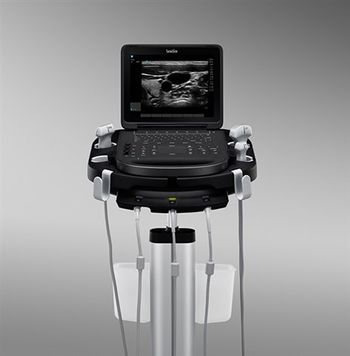
SonoSite Edge II
 SonoSite · Model Edge II
[u]Visualization, Clearly Enhanced[/u] In the acute care environment, reducing the time to make an accurate diagnosis is a critical need. The Edge II features DirectClear Technology, a novel, patented process that is available on select transducers. DirectClear elevates transducer performance by increasing penetration and contrast resolution. This contributes to an unsurpassed imaging experience for the bedside clinician. [u]Taking Durability to the Armored Level[/u] Designed to be truly portable and used in the most rugged environments, the Edge II reinforces our commitment to reliability and durability with Armored Cable Technology. With an embedded metal jacket, armored cables protect transducers from common abuse accident scenarios, like being rolled over, stepped on, or twisted, and help maintain image quality over the life of transducers built on this cable platform. [u]Ultrasound for Clarity and Confidence[/u] The Edge II features an easy-to-use interface for intuitive access to frequently used functions like gain and a wide-angle display with an anti-reflection coating for minimal adjustments during viewing. Designed with infection control in mind, the Edge II boasts a keypad with a seal extended to the edge to inhibit liquid ingress and low-profile keys with snap-dome technology for easy cleaning and tactile feedback.
Key tips
- ·Never bypass a radiation interlock to "just get the image" - this is one of the few true zero-tolerance rules in BMET work.
- ·Trend image-quality phantom results over time - drift shows up before an outright failure does.
- ·Portable/mobile units take real physical abuse from transport - check wheel locks and cable strain reliefs more often than fixed units.
Typical Failure Modes
Compiled for this model from its own documentation and established engineering knowledge for this equipment class - not from a verified service record. Confirm against the manufacturer's service manual.
Poor 2D image quality / channel dropout
HighSymptoms: Noisy or non-uniform image, missing sector, artefacts across multiple probes.
Root cause: Front-end / beamformer board fault, or a transducer-connector (probe port) fault.
Transducer not recognised / probe-port fault
MediumSymptoms: A probe is not detected on one port but works on another.
Root cause: Worn probe-port connector or a scan-connector board fault.
Will not power on / boot fault
HighSymptoms: Dead system, no boot, or intermittent shutdowns.
Root cause: Power supply / DC converter, the battery, or a system-board fault.
Battery will not hold charge (portable)
MediumSymptoms: Short run time, will not charge, powers off unexpectedly.
Root cause: Aged battery pack.
Touchscreen / control-panel or display fault
MediumSymptoms: Unresponsive controls, distorted or blank display.
Root cause: Touchscreen, control-panel board, or the display.
Overheating / cooling fault
LowSymptoms: Thermal shutdown, loud fan.
Root cause: Failed fan or blocked air path.
Serviceable Parts & Consumables
Serviceable items for this model, compiled from its documentation and engineering knowledge for this equipment class. Service class and relative cost are estimates, not manufacturer figures; no part numbers are given. Confirm intervals and pricing against the manufacturer.
Front-end / beamformer board
Class Major service partRel. cost $$$$R&R Difficult
Probe-port / scan-connector board
Class Major service partRel. cost $$$R&R Difficult
Power supply / DC converter
Class Major service partRel. cost $$$R&R Difficult
Battery pack
Class Periodic replacementRel. cost $$R&R Easy
Touchscreen / control-panel board
Class Major service partRel. cost $$$R&R Moderate
Cooling fan
Class Major service partRel. cost $R&R Moderate
| Part | Service class | Relative cost | R&R difficulty |
|---|---|---|---|
| Front-end / beamformer board | Major service part | $$$$ | Difficult |
| Probe-port / scan-connector board | Major service part | $$$ | Difficult |
| Power supply / DC converter | Major service part | $$$ | Difficult |
| Battery pack | Periodic replacement | $$ | Easy |
| Touchscreen / control-panel board | Major service part | $$$ | Moderate |
| Cooling fan | Major service part | $ | Moderate |
Relative cost: $ lowest · $$$$ highest service-part cost for this equipment class. Not a price.
PM Checklist
Preventive-maintenance tasks typical of this equipment class. Perform to the manufacturer's procedure and your facility's policy - this is general reference, not a schedule for this specific unit.
- ·Daily QC per modality: image-quality phantom test
- ·Tube and detector inspection
- ·Annual state-required radiation safety survey
- ·Vendor-scheduled preventive maintenance
Troubleshooting Approach
A starting sequence for this model, compiled from its documentation and engineering knowledge for this equipment class. Follow the manufacturer's service documentation for the actual procedure.
Symptom: Poor image / probe not recognised
- Try the probe on a second port and a known-good probe on the suspect port.
- Wipe off all gel and inspect the probe lens; try on a phantom.
- Inspect the probe-port connectors for bent pins or debris.
- Run any built-in front-end diagnostics.
- Replace the probe-port board or front-end board as isolated.
Symptom: Will not power on / short battery life
- Confirm mains / charger operation and try with the battery removed.
- Check the power supply / DC-converter output.
- Fully charge and time the battery run.
- Replace the battery pack if run time is short.
- Refer the power supply or system board as isolated.
Typical Location
Where this class of equipment is typically deployed - general reference, not this unit's own placement record.
- Radiology / Imaging department
- Emergency Department (portable units)
- Operating Room (C-arms)
- Cath lab
- Bedside ICU (portable X-ray)
Documents & Manuals
Troubleshoot this device with Bio
Describe a symptom or error code. Bio answers from this device's own documented error codes, failure modes, parts, and guides.
Ask Bio