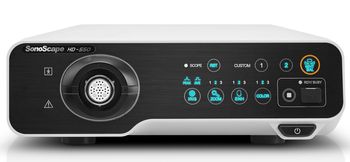
SonoScape HD-550
SonoScape · Model HD-550
More versatile with the new multi-mode VIST (Versatile Intelligent Staining Technology) VIST multi-mode is interchangeable at the touch of a button, without any delay you can notice. A clear vision with Full HD output Armed with a 2-megapixel CMOS sensor, HD-550 supports 1080p resolution. Brilliant workflow HD-550 inherits the built-in workstation with 500GB of hard disk. It allows you to access patient data, to capture and record images and videos, to create and edit reports in one spot without the need of any extra software.
Key tips
- ·A failed leak test means the scope does not get reprocessed or used - send it for repair, full stop.
- ·A shortened reprocessing cycle is a real infection-control failure, not a minor deviation - follow AAMI ST91 exactly.
- ·Track light-source lamp-hours against the manufacturer's limit rather than running to failure.
Typical Failure Modes
Compiled for this model from its own documentation and established engineering knowledge for this equipment class - not from a verified service record. Confirm against the manufacturer's service manual.
No or dim illumination / lamp fault
HighSymptoms: No light output, dim or flickering light, lamp-hours alarm, colour shift.
Root cause: Xenon / LED lamp at end of life, a lamp power supply fault, or a light-cable fault.
Poor video image
HighSymptoms: Noisy, dark, discoloured or out-of-focus image, dropouts, no image.
Root cause: Camera head / coupler fault, a camera-cable fault, or a CCU / video-processor fault.
White-balance / colour fault
MediumSymptoms: Cannot white-balance, persistent colour cast.
Root cause: Camera head sensor drift, a dirty coupler, or the light source colour temperature.
Overheating / fan fault
LowSymptoms: Thermal shutdown, loud fan, hot exhaust.
Root cause: Failed or clogged cooling fan.
Output / connector fault
LowSymptoms: Signal only on one output, connector damage, HD/SDI dropout.
Root cause: Worn video output connector or an output board fault.
Serviceable Parts & Consumables
Serviceable items for this model, compiled from its documentation and engineering knowledge for this equipment class. Service class and relative cost are estimates, not manufacturer figures; no part numbers are given. Confirm intervals and pricing against the manufacturer.
Xenon / LED lamp module
Class Frequent wear itemRel. cost $$$R&R Fairly easy
Camera head / coupler
Class Periodic replacementRel. cost $$$R&R Moderate
Camera cable
Class Periodic replacementRel. cost $$R&R Fairly easy
Fibre-optic light cable
Class Periodic replacementRel. cost $$R&R Easy
CCU / video-processor board
Class Major service partRel. cost $$$R&R Difficult
| Part | Service class | Relative cost | R&R difficulty |
|---|---|---|---|
| Xenon / LED lamp module | Frequent wear item | $$$ | Fairly easy |
| Camera head / coupler | Periodic replacement | $$$ | Moderate |
| Camera cable | Periodic replacement | $$ | Fairly easy |
| Fibre-optic light cable | Periodic replacement | $$ | Easy |
| CCU / video-processor board | Major service part | $$$ | Difficult |
Relative cost: $ lowest · $$$$ highest service-part cost for this equipment class. Not a price.
PM Checklist
Preventive-maintenance tasks typical of this equipment class. Perform to the manufacturer's procedure and your facility's policy - this is general reference, not a schedule for this specific unit.
- ·Leak testing before each reprocessing cycle
- ·Scope reprocessing per AAMI ST91
- ·Light source lamp-hour tracking
- ·Annual full PM
Troubleshooting Approach
A starting sequence for this model, compiled from its documentation and engineering knowledge for this equipment class. Follow the manufacturer's service documentation for the actual procedure.
Symptom: No or dim light
- Check the lamp-hours counter and replace the lamp module if near / past its rating.
- Inspect the fibre-optic light cable for dark (broken) fibres against a bright light.
- Confirm the lamp strikes (listen / watch) and the fan runs.
- Replace the lamp power supply if the lamp will not strike.
- Verify full brightness with a fresh cable.
Symptom: Poor video image
- Clean the scope lens and coupler and re-white-balance.
- Swap the camera head and cable to isolate head vs CCU.
- Confirm the light source output and cable.
- Try a second monitor / output cable.
- Replace the camera head or refer the CCU as isolated.
Typical Location
Where this class of equipment is typically deployed - general reference, not this unit's own placement record.
- Endoscopy suite / GI lab
- Operating Room
- Bronchoscopy suite
Documents & Manuals
No documents available for this device yet.
Troubleshoot this device with Bio
Describe a symptom or error code. Bio answers from this device's own documented error codes, failure modes, parts, and guides.
Ask Bio