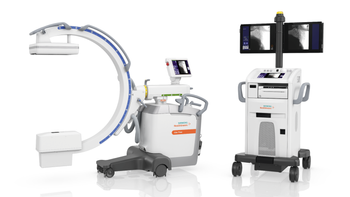
Siemens Healthineers Cios Flow
 Siemens Healthineers · Model Cios Flow
Designed for more ease in the OR Versatility supports system utilization Cyber security to safeguard data and access Retina Imaging Chain with CMOS technology: Intelligent algorithms automatically adjust brightness and contrast, detect motion, enhance edges, and optimize metal visualization for improved depiction of surrounding tissue. SpotAdapt and touch gestures: SpotAdapt automatically optimizes imaging parameters to the anatomy of interest. Tablet-like touch gestures let you collimate, rotate, and flip images – and take advantage of SpotAdapt – with just one finger. High-brightness green lasers: For improved visibility on all skin types and blood – despite bright OR lighting. Lightweight system design: Featuring a non-compromising C-design, and weighing only 606 lb (275 kg), Cios Flow is particularly easy to position and move. Wireless footswitch: For less hassle around the equipment and more freedom in the OR.
Key tips
- ·Never bypass a radiation interlock to "just get the image" - this is one of the few true zero-tolerance rules in BMET work.
- ·Trend image-quality phantom results over time - drift shows up before an outright failure does.
- ·Portable/mobile units take real physical abuse from transport - check wheel locks and cable strain reliefs more often than fixed units.
Typical Failure Modes
Compiled for this model from its own documentation and established engineering knowledge for this equipment class - not from a verified service record. Confirm against the manufacturer's service manual.
No or inconsistent fluoro / exposure
HighSymptoms: No image on boost, exposure inhibited, kV/mA error, image too dark or bright.
Root cause: X-ray tube / monoblock fault, HV generator fault, or the AEC / dose-control loop.
Image-intensifier or flat-panel detector fault
HighSymptoms: Dim, distorted, vignetted or noisy image; dead lines (flat panel); S-distortion (II).
Root cause: Image-intensifier tube ageing / II fault, or a flat-panel detector fault.
C-arm movement / brake fault
MediumSymptoms: Orbital, lateral or vertical motion binds, drifts, or a brake will not hold.
Root cause: Worn friction brakes, bearings, or the counterbalance.
Monitor cart / video fault
MediumSymptoms: No image on one or both monitors, image freeze, no last-image-hold.
Root cause: Monitor, the cart-to-stand cable, or the image-processing PC.
Thermal / duty-cycle lockout
LowSymptoms: Fluoro inhibited after a run, tube-heat warning.
Root cause: Monoblock heat limit reached or a cooling-fan fault.
Serviceable Parts & Consumables
Serviceable items for this model, compiled from its documentation and engineering knowledge for this equipment class. Service class and relative cost are estimates, not manufacturer figures; no part numbers are given. Confirm intervals and pricing against the manufacturer.
X-ray tube / monoblock
Class Major service partRel. cost $$$$R&R Expert-level
Image intensifier tube / camera
Class Major service partRel. cost $$$$R&R Difficult
Flat-panel detector (if fitted)
Class Major service partRel. cost $$$$R&R Difficult
C-arm friction-brake / bearing kit
Class Major service partRel. cost $$R&R Moderate
Monitor / video cable
Class Major service partRel. cost $$R&R Fairly easy
Cooling fan
Class Periodic replacementRel. cost $R&R Moderate
| Part | Service class | Relative cost | R&R difficulty |
|---|---|---|---|
| X-ray tube / monoblock | Major service part | $$$$ | Expert-level |
| Image intensifier tube / camera | Major service part | $$$$ | Difficult |
| Flat-panel detector (if fitted) | Major service part | $$$$ | Difficult |
| C-arm friction-brake / bearing kit | Major service part | $$ | Moderate |
| Monitor / video cable | Major service part | $$ | Fairly easy |
| Cooling fan | Periodic replacement | $ | Moderate |
Relative cost: $ lowest · $$$$ highest service-part cost for this equipment class. Not a price.
PM Checklist
Preventive-maintenance tasks typical of this equipment class. Perform to the manufacturer's procedure and your facility's policy - this is general reference, not a schedule for this specific unit.
- ·Daily QC per modality: image-quality phantom test
- ·Tube and detector inspection
- ·Annual state-required radiation safety survey
- ·Vendor-scheduled preventive maintenance
Troubleshooting Approach
A starting sequence for this model, compiled from its documentation and engineering knowledge for this equipment class. Follow the manufacturer's service documentation for the actual procedure.
Symptom: No or poor fluoroscopic image
- Note the exact error and whether it is dose (dark/bright) or geometry (distortion).
- Confirm the tube is not in a thermal lockout.
- Check the interconnect cable between the stand and the monitor cart.
- Run any built-in image-calibration / gain routine.
- Escalate a confirmed tube, II or detector fault; verify output with an X-ray analyser after repair.
Symptom: C-arm motion binds or a brake slips
- Identify which axis (orbital / lateral / vertical / wig-wag).
- Check the brake handle / lock and its cable or solenoid.
- Inspect the bearings and counterbalance for that axis.
- Adjust or replace the friction-brake kit.
- Confirm smooth motion and that each brake holds under load.
Typical Location
Where this class of equipment is typically deployed - general reference, not this unit's own placement record.
- Radiology / Imaging department
- Emergency Department (portable units)
- Operating Room (C-arms)
- Cath lab
- Bedside ICU (portable X-ray)
Documents & Manuals
No documents available for this device yet.
Troubleshoot this device with Bio
Describe a symptom or error code. Bio answers from this device's own documented error codes, failure modes, parts, and guides.
Ask Bio