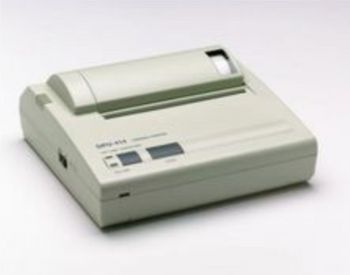
Seiko DPU 414
 Seiko · Model DPU 414
CRT display (640 dots max.) hardcopy HEX dump (hexadecimal code) copy Dual-power supply Supports Centronics and serial data input Built-in data buffer (approximately 28 kilobytes) Prints 40 column-standard characters and 80 column-condensed characters Interface: Serial and Parallel.
Key tips
- ·When no category-specific guidance fits, default to the manufacturer's own service manual and the general troubleshooting method in the Engineer's Guide.
- ·Run an incoming and annual electrical safety test regardless of how niche the device is.
Typical Failure Modes
Compiled for this model from its own documentation and established engineering knowledge for this equipment class - not from a verified service record. Confirm against the manufacturer's service manual.
No or faint printout
MediumSymptoms: Blank or very light print from the host device (monitor / analyser).
Root cause: Worn thermal print head, low head pressure, or wrong / aged thermal paper.
Paper jam / feed fault
MediumSymptoms: Paper jams, does not advance, or tears.
Root cause: Worn platen roller or a mis-loaded roll.
Communication fault
MediumSymptoms: Host device reports the printer offline or garbled output.
Root cause: Serial / parallel cable, connector, or a baud / handshake configuration issue.
Battery / power fault (portable use)
LowSymptoms: Will not power on, short battery life.
Root cause: Aged battery or a power-adapter fault.
Serviceable Parts & Consumables
Serviceable items for this model, compiled from its documentation and engineering knowledge for this equipment class. Service class and relative cost are estimates, not manufacturer figures; no part numbers are given. Confirm intervals and pricing against the manufacturer.
Thermal print head
Class Periodic replacementRel. cost $$R&R Fairly easy
Platen roller
Class Periodic replacementRel. cost $R&R Fairly easy
Thermal paper rolls
Class ConsumableRel. cost $R&R Easy
Data cable
Class Periodic replacementRel. cost $R&R Easy
Battery / power adapter
Class Periodic replacementRel. cost $R&R Easy
| Part | Service class | Relative cost | R&R difficulty |
|---|---|---|---|
| Thermal print head | Periodic replacement | $$ | Fairly easy |
| Platen roller | Periodic replacement | $ | Fairly easy |
| Thermal paper rolls | Consumable | $ | Easy |
| Data cable | Periodic replacement | $ | Easy |
| Battery / power adapter | Periodic replacement | $ | Easy |
Relative cost: $ lowest · $$$$ highest service-part cost for this equipment class. Not a price.
PM Checklist
Preventive-maintenance tasks typical of this equipment class. Perform to the manufacturer's procedure and your facility's policy - this is general reference, not a schedule for this specific unit.
- ·Follow the manufacturer's PM schedule
- ·Perform incoming and annual electrical safety testing per facility biomedical program
Troubleshooting Approach
A starting sequence for this model, compiled from its documentation and engineering knowledge for this equipment class. Follow the manufacturer's service documentation for the actual procedure.
Symptom: No or faint printout
- Confirm the correct thermal paper is loaded, heat-sensitive side out.
- Clean the thermal print head with isopropyl alcohol.
- Check the head-lever / platen pressure.
- Print a self-test if the printer supports one.
- Replace the print head if it stays faint.
Symptom: Offline / garbled output
- Reseat the data cable at both ends.
- Confirm the baud rate / handshake matches the host setting.
- Try a known-good cable.
- Print a self-test to isolate printer vs host.
- Replace the cable or refer the printer interface.
Typical Location
Where this class of equipment is typically deployed - general reference, not this unit's own placement record.
- Varies by device - check the unit's own manual for facility placement guidance
Documents & Manuals
Troubleshoot this device with Bio
Describe a symptom or error code. Bio answers from this device's own documented error codes, failure modes, parts, and guides.
Ask Bio