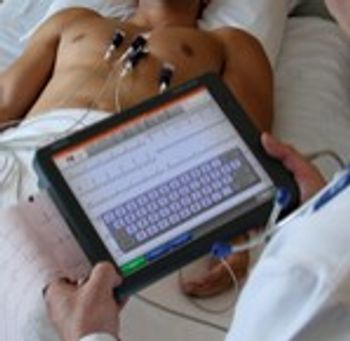
Schiller MS-2010
 Schiller · Model MS-2010
Advanced processing. no waiting. Instant start-up provides immediate availability. ECG processed, interpreted and printed in less than 3 seconds after acquisition Synchronize time Auto set the MS-2010 time with your hospital time master to obtain accurate documentation of your patient’s clinical history. Fast entry Enter patient data quickly and accurately as you choose: type on touch screen keyboard or scan the bar code. and orders from a worklist via SEMA or HIS. Clinical excellence Get complete clinical information with the SCHILLER Interpretation software with thrombolysis software or with advanced ECG tools such as SAECG or HRV. Never miss a beat Capture and store 5 minutes of uninterrupted 12-lead data to document intermittent arrhythmias. High-volume storage. Storage of up to 350 ECGs. Full disclosure storage of up to 5 minutes for easy acquisition of clean and stable ECG traces. One-touch workflow MS-2010 can be configured to automatically print, save, transfer, and retrieve a previous ECG – at the touch of a button. [i]Connect: [/i]. Via LAN, WLAN or GPRS to SEMA or HIS. PDF export of resting ECG reports [i]Automated workflow: [/i]. Acquire, print, save, transfer and retrieve diagnostic ECGs to and from SEMA or HIS – all automatically. Support for HL7 worklists Stay connected Built on a s standard platform, the MS-2010 fits seamlessly into your existing IT infrastructure – so that you are always connected.
Key tips
- ·A no-signal/flatline alarm gets checked on the patient first, not the monitor - rule out a real clinical event before troubleshooting.
- ·Recalibrate NIBP against a reference manometer, not just a self-test pass.
- ·Reused patient cables (SpO2, ECG leads) are a common source of intermittent-fault complaints - swap the cable before the module.
Typical Failure Modes
Compiled for this model from its own documentation and established engineering knowledge for this equipment class - not from a verified service record. Confirm against the manufacturer's service manual.
Noisy ECG / lead-off
HighSymptoms: Baseline wander, muscle or AC noise, "lead fail", poor 12-lead quality.
Root cause: Poor skin prep, dried or lifting electrodes, or a worn patient cable / lead set.
Will not acquire or analyse
MediumSymptoms: Acquisition hangs, no interpretation, or a self-test failure.
Root cause: Acquisition-module fault or a software issue.
Printer / recorder fault
MediumSymptoms: No or faint report, paper jam, misregistered grid.
Root cause: Thermal print head, paper handling, or (older units) the stylus.
Battery / power fault
MediumSymptoms: Short battery run time, will not hold charge, will not power on.
Root cause: Aged battery pack.
Connectivity fault
LowSymptoms: ECGs will not transmit to the ECG-management system / EMR.
Root cause: Network / Wi-Fi / modem configuration or the communication module.
Serviceable Parts & Consumables
Serviceable items for this model, compiled from its documentation and engineering knowledge for this equipment class. Service class and relative cost are estimates, not manufacturer figures; no part numbers are given. Confirm intervals and pricing against the manufacturer.
Patient cable / 10-lead set
Class Frequent wear itemRel. cost $$R&R Easy
Acquisition module
Class Major service partRel. cost $$$R&R Moderate
Thermal print head / paper
Class Periodic replacementRel. cost $R&R Fairly easy
Battery pack
Class Periodic replacementRel. cost $$R&R Fairly easy
Communication / modem module
Class Major service partRel. cost $$R&R Moderate
| Part | Service class | Relative cost | R&R difficulty |
|---|---|---|---|
| Patient cable / 10-lead set | Frequent wear item | $$ | Easy |
| Acquisition module | Major service part | $$$ | Moderate |
| Thermal print head / paper | Periodic replacement | $ | Fairly easy |
| Battery pack | Periodic replacement | $$ | Fairly easy |
| Communication / modem module | Major service part | $$ | Moderate |
Relative cost: $ lowest · $$$$ highest service-part cost for this equipment class. Not a price.
PM Checklist
Preventive-maintenance tasks typical of this equipment class. Perform to the manufacturer's procedure and your facility's policy - this is general reference, not a schedule for this specific unit.
- ·Routine cable and lead-wire inspection for fraying/wear
- ·Battery conditioning cycle
- ·NIBP calibration check against a reference manometer
- ·ECG / SpO2 accuracy verification against a patient simulator
- ·Annual electrical safety test
Troubleshooting Approach
A starting sequence for this model, compiled from its documentation and engineering knowledge for this equipment class. Follow the manufacturer's service documentation for the actual procedure.
Symptom: Noisy ECG
- Re-prep the skin and fit fresh electrodes.
- Secure the lead wires and route away from AC sources.
- Swap in a known-good patient cable / lead set.
- Check the acquisition-module connection.
- Confirm a clean 12-lead on a simulator.
Symptom: Will not print or transmit
- Check the paper and clean the print head.
- Print a test grid / pattern.
- Confirm the network / Wi-Fi / modem settings and send a test ECG.
- Reboot the cart.
- Escalate a persistent print or communication fault.
Technical Specs
- EKG/ECG Type
- Rest
Typical Location
Where this class of equipment is typically deployed - general reference, not this unit's own placement record.
- ICU / CCU
- Emergency Department
- OR / PACU
- General med-surg floors
- Step-down units
- Telemetry units
Documents & Manuals
Related calculators
From BioLab, for work done with this kind of equipment.
Troubleshoot this device with Bio
Describe a symptom or error code. Bio answers from this device's own documented error codes, failure modes, parts, and guides.
Ask Bio