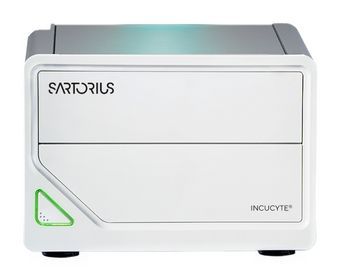
Sartorius Incucyte SX1
 Sartorius · Model Incucyte SX1
Live-Cell Imaging System The Incucyte® SX1 Live-Cell Analysis System automatically acquires and analyzes images around the clock, enabling you to derive deeper and more physiologically relevant information about your cells, plus real-time kinetic data - without ever removing your cells from the incubator. Change can happen in an instant. Whether simply assaying cell health or more complex processes like migration, invasion, or immune cell killing, see what your cells are doing and when they do it. The Incucyte® SX1 instrument, proprietary assays and reagents provide you with the ability to gain new insights into biological processes via real-time, quantitative analysis of live cells. Conventional approaches to cell analysis only capture a single time point, enabling only single-point and end-point measurements, and cells are perturbed or destroyed as part of the assay process. The Incucyte® system offers the advantage of performing live-cell analysis without ever having to displace cells or disrupt their surroundings. The system automatically and continually collects and analyzes images throughout the course of an experiment while cells remain unperturbed in a physiologically relevant environment. The SX1 enables even first-time users to set-up an experiment and begin acquiring images within minutes. Image viewing, analysis and graphing is similarly streamlined – images from a 96-well experiment can be viewed simultaneously, then converted into movies, metrics, and corresponding publication- and presentation-ready graphs with just a few clicks. In addition to improving productivity for the individual user. Data is accessible remotely to a user via unlimited, free networked licenses. Supplementary to the Incucyte® platform, Incucyte® proprietary reagents and analysis software are also available which enable researchers to perform real-time, quantitative live cell analysis and evaluate a wide variety of cellular processes over time.
Key tips
- ·Run QC controls before trusting any repair - an analyzer that passes self-test can still report clinically wrong results.
- ·Rule out a reagent lot change before opening the instrument - it can look exactly like a hardware fault.
- ·Centrifuge rotors have a hard retirement age/cycle limit regardless of visible condition - don't eyeball it.
Typical Failure Modes
Compiled for this model from its own documentation and established engineering knowledge for this equipment class - not from a verified service record. Confirm against the manufacturer's service manual.
Will not power on or unexpected shutdown
HighSymptoms: The laboratory & diagnostics is dead, reboots, or shuts down mid-use.
Root cause: Mains lead / fuse, an aged battery, or a power-supply board fault.
Battery will not hold charge
MediumSymptoms: Short run time on battery; low-battery alarm soon after a full charge.
Root cause: Aged rechargeable battery pack or a charger fault.
Display / control-panel fault
MediumSymptoms: Blank, dim or distorted display; unresponsive keys or touchscreen.
Root cause: Display, backlight, or control-board fault.
Fails self-test or calibration
MediumSymptoms: Power-on self-test or the scheduled performance check fails or is out of tolerance.
Root cause: Sensor drift or an internal board fault; recalibration or repair needed.
Serviceable Parts & Consumables
Serviceable items for this model, compiled from its documentation and engineering knowledge for this equipment class. Service class and relative cost are estimates, not manufacturer figures; no part numbers are given. Confirm intervals and pricing against the manufacturer.
Rechargeable battery pack
Class Periodic replacementRel. cost $$R&R Fairly easy
Power supply / mains board
Class Major service partRel. cost $$$R&R Difficult
Display / control-panel assembly
Class Major service partRel. cost $$$R&R Moderate
Cooling fan
Class Major service partRel. cost $R&R Moderate
| Part | Service class | Relative cost | R&R difficulty |
|---|---|---|---|
| Rechargeable battery pack | Periodic replacement | $$ | Fairly easy |
| Power supply / mains board | Major service part | $$$ | Difficult |
| Display / control-panel assembly | Major service part | $$$ | Moderate |
| Cooling fan | Major service part | $ | Moderate |
Relative cost: $ lowest · $$$$ highest service-part cost for this equipment class. Not a price.
PM Checklist
Preventive-maintenance tasks typical of this equipment class. Perform to the manufacturer's procedure and your facility's policy - this is general reference, not a schedule for this specific unit.
- ·Daily QC controls run and reviewed
- ·Calibration verification per assay
- ·Routine cleaning and decontamination
- ·Scheduled reagent-path and pump-tubing maintenance
Troubleshooting Approach
A starting sequence for this model, compiled from its documentation and engineering knowledge for this equipment class. Follow the manufacturer's service documentation for the actual procedure.
Symptom: Will not power on
- Confirm the outlet, mains lead and fuse.
- Try on battery, then on mains only, to isolate the supply.
- Look for a power indicator or POST code.
- Replace the fuse / battery / power supply as isolated.
- Run the self-test after any repair.
Symptom: Fails self-test or calibration
- Note the exact failure message / code.
- Power-cycle and repeat the self-test.
- Verify against a reference / simulator where one applies.
- Recalibrate per the service manual.
- Refer the affected board for service if it will not hold calibration.
Typical Location
Where this class of equipment is typically deployed - general reference, not this unit's own placement record.
- Central / core laboratory
- Point-of-care testing stations
- Blood bank
- Microbiology lab
Documents & Manuals
No documents available for this device yet.
Troubleshoot this device with Bio
Describe a symptom or error code. Bio answers from this device's own documented error codes, failure modes, parts, and guides.
Ask Bio