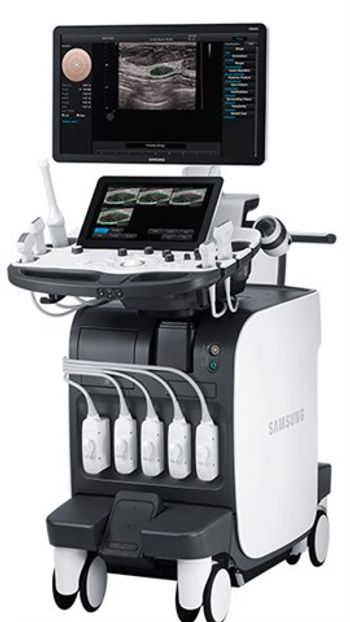
Samsung RS80A Premium
 Samsung · Model RS80A Premium
Superb Image Quality 23" full high-definition (FHD) LED Screen. S-Vision Architecture - Provides outstanding images through newly developed S-Vision Beamformer and Imaging Engine. These state-of-the-art technologies ensure detailed resolution and tissue uniformity for all types of applications in radiology and general imaging. S-Vue Transducer - Gives broader bandwidth and higher sensitivity to enable high image quality at depth. (Samsung Medison has expanded its premium probe line-up to support diagnosis over various areas such as chest, abdomen, carotid and thyroid) Higher Efficiency and Diagnostic Confidence S-Detect - Uses the standardized Breast Imaging-Reporting and Data System (BI-RADS) score for analysis and classification of targeted regions. S-Detect results in more effective diagnosis by reducing unnecessary biopsies and saving time through simplified procedures. E-Breast & E-Thyroid - The latest breast and thyroid ElastoScan (Elastography) that makes it easier for users to distinguish benign from malignant masses through acquiring the strain ratio between the target and reference area faster than before. Advanced QuickScan - Allows important imaging parameters to be automatically adjusted, such as color gain, location of the color box and angle correction. Innovative Design and Usability Intuitive Design - Equips a 3D Navigator with much less keys on the control panel for ease of use and greater examination throughput. Users are given more operating space as keyboard is embedded into the touch screen. The device can remember user’s favorable location and height of the control panel every time they run the system.
Key tips
- ·Never bypass a radiation interlock to "just get the image" - this is one of the few true zero-tolerance rules in BMET work.
- ·Trend image-quality phantom results over time - drift shows up before an outright failure does.
- ·Portable/mobile units take real physical abuse from transport - check wheel locks and cable strain reliefs more often than fixed units.
Typical Failure Modes
Compiled for this model from its own documentation and established engineering knowledge for this equipment class - not from a verified service record. Confirm against the manufacturer's service manual.
Poor 2D image quality across multiple probes
HighSymptoms: Noisy, low-contrast or non-uniform image, missing sector, drop-out that follows the system not the probe.
Root cause: Front-end / beamformer board fault, a probe-port (connector) board fault, or a system-board fault.
Transducer not recognised / probe-port fault
MediumSymptoms: A probe works on one port but not another, or is not detected at all.
Root cause: Worn probe-port connector or a scan-connector board fault.
Will not boot / intermittent shutdown
HighSymptoms: Dead system, hangs at boot, or powers off under load.
Root cause: Power supply / DC converter, the system battery, or a system-board fault.
Control panel / touchscreen or monitor fault
MediumSymptoms: Unresponsive TGC sliders or keys, distorted or blank display.
Root cause: Control-panel board, touchscreen, or the monitor.
Overheating / loud cooling fan
LowSymptoms: Thermal-shutdown warning, fan roar, hot exhaust.
Root cause: Failed or dust-clogged cooling fan or blocked air path.
DICOM / network / storage fault
LowSymptoms: Studies will not send to PACS, images will not archive, worklist empty.
Root cause: Network configuration or a storage-drive fault.
Serviceable Parts & Consumables
Serviceable items for this model, compiled from its documentation and engineering knowledge for this equipment class. Service class and relative cost are estimates, not manufacturer figures; no part numbers are given. Confirm intervals and pricing against the manufacturer.
Front-end / beamformer board
Class Major service partRel. cost $$$$R&R Difficult
Probe-port / scan-connector board
Class Major service partRel. cost $$$R&R Difficult
Power supply / DC converter
Class Major service partRel. cost $$$R&R Difficult
Control-panel / touchscreen assembly
Class Major service partRel. cost $$$R&R Moderate
Cooling fan
Class Major service partRel. cost $R&R Moderate
System hard drive
Class Major service partRel. cost $$R&R Moderate
| Part | Service class | Relative cost | R&R difficulty |
|---|---|---|---|
| Front-end / beamformer board | Major service part | $$$$ | Difficult |
| Probe-port / scan-connector board | Major service part | $$$ | Difficult |
| Power supply / DC converter | Major service part | $$$ | Difficult |
| Control-panel / touchscreen assembly | Major service part | $$$ | Moderate |
| Cooling fan | Major service part | $ | Moderate |
| System hard drive | Major service part | $$ | Moderate |
Relative cost: $ lowest · $$$$ highest service-part cost for this equipment class. Not a price.
PM Checklist
Preventive-maintenance tasks typical of this equipment class. Perform to the manufacturer's procedure and your facility's policy - this is general reference, not a schedule for this specific unit.
- ·Daily QC per modality: image-quality phantom test
- ·Tube and detector inspection
- ·Annual state-required radiation safety survey
- ·Vendor-scheduled preventive maintenance
Error Codes
Extracted directly from this unit's own service manual.
Er 3Select this checkbox to turn on Caps Lock On. This means that when text is entered, it is entered in capital letters.
Delete all Text with Un-freezeModify the list of abbreviations stored on the system. Press the button to switch to the Autotext Edit screen. To exit, press the Close button.
Delete all Arrow with Un-freezeA list of abbreviations for this function is stored on the system. You can add a new abbreviation or edit the existing abbreviations as desired.
Caps Lock on1. Press the New button. 2. Enter the terms you want to add into the Abbreviation and Full Word fields at the bottom of the screen. The word will be added to the abbreviation list.
Autotext Edit1. Use the trackball and the Set button to select a word to delete from the list. In the Abbreviation and Full Word fields at the bottom of the screen, the abbreviation you have selected and the corresponding full term are displayed. 2. Press the Delete button. A warning message will appear. 3. To delete the selected word, press OK. The word will be deleted from the abbreviation list. Press Cancel
Word listSelect an application to modify and edit the corresponding text page.
Export/ImportShare the text saved on the system with another system, or import a text entry from another system.
Foot SwitchSet the functions of the left and right pedals of the foot switch. Configurable functions are: None, Freeze, Update, Record, Print 1, Save, Store Clip, Volume Start and Ez Exam+(Up).
VCR ModelSet as Built-in Recorder. The user cannot change this setting.
COMConfigure a device to connect to a serial port. Choose between Open Line Transfer and Reserved. If you select Reserve, the COM port will not be used. Select Open Line Transfer, connect the device, and reboot the system.
ADVR DeviceSelect a media type for real-time recording. You may select either DVD or USB.
Mic.Set this to on or off by using the trackball. The default setting for mic is Off.
Printer OrientationNOTE: This option is available only for an Echo printer that uses roll paper. Set the type and page orientation of the Echo printer.
PortraitVertical orientation.
LandscapeHorizontal orientation.
Print OrganizationSet which type of printer to use when P1 or P2 button is pressed on the control panel.
Local Printing AreaSet the area that will be printed.
Video Out (1280 x 872)Print part of the monitor screen, containing the image area.
Image OnlyPrint only the image area.
Printing Image AdjustmentAdjust the print quality of images. Select the image type and adjust Gamma, Brightness, and Contrast. NOTE: This is only supported by some digital printers.
RMS ControlIf you are experiencing a technical problem with the product, this feature takes control of the system remotely and collects data to help solve the problem.
Service ApplicationPress the button to display the Service Application screen. The Service Application screen consists of Log and Service tabs.
LogThe various logs generated by the equipment, pertaining to the frequency of use, errors, system information, etc., can be viewed.
ErrorShow information about the error that has occurred in the system. Select an image to view the circumstances in which the error occurred.
UtilizationSpecific utilization information such as Application, Probe, and Preset may be viewed.
Export Image CompensationSet the Post Curve of the image to use the DICOM service. Press the button to display the Compensation window.
Adjust GammaAdjust Gamma, Brightness, and Contrast by using the slider for each op
Unit InformationThe unit of the selected reference, such as Input, Output, SD, etc., is displayed.
Table TypeSelect the table type for the selected reference. For the Growth Table, SD (Standard Deviation) is displayed.
Range TypeSet the Min. and Max. values of the selected reference and display them in a table. The SD value varies according to the range selected by the user.
Value TypeOnly the measurement values entered by the user are displayed, regardless of the range of Min., Max., and SD.
Show In DaysWhen the checkbox is selected, the table unit is changed from wd (week-day) to d (day).
EFW Sequential MeasurementThis setting is necessary when you assign “EFW Measure” to a User Key (U1-3) at Setup > User Defined key > User Key Setup. The assigned function is used when you use the User Key (U1-3) to measure the EFW. You can also set up EFW measure in Touch Menu Designer. For details, see “Touch Menu Designer” in this chapter. Specify the order of measurement items when measuring EFW using the User Key (U1-3
Calc. & GraphSelect the sub-tab Calc. & Graph under the OB tab. You can specify settings for calculation and graphs.
Trend GraphSpecify whether to include a graph for a certain item or ratio in an obstetrics report. Press and the Editor screen for the selected graph will appear.
LV Volume MethodSpecify how the volume of the left ventricle is measured. Teichholz, Cubed or Gibson can be selected. For more information on calculation formulae, please refer to the reference manual.
Measurement Result TypeSet a measurement method. Select Avg., Last, Max., or Min. value.
Number of Results DisplayedSpecify the number of lines for measurement results that are displayed on the screen.
WMS Level SelectSelect the Score menu to use from WMS Level Select: WMS-Level 4, WMS-Level 5, or WMS-Level 7.
A/B RatioSpecify each individual peak velocity for which a ratio between A and B will be calculated.
ICA/CCA RatioSelect a measurement item to use for the ICA and CCA ratio. If Highest is selected, the highest result will be used.
Troubleshooting Approach
A starting sequence for this model, compiled from its documentation and engineering knowledge for this equipment class. Follow the manufacturer's service documentation for the actual procedure.
Symptom: Poor 2D image quality across multiple probes / channel dropout
- Confirm the fault is present on more than one probe and on a phantom, not just one transducer.
- Inspect the probe-port connectors for bent pins or debris; reseat.
- Run the built-in front-end / channel diagnostics.
- Check cooling - a thermally throttled front end degrades the image.
- Escalate a confirmed beamformer / front-end board fault to the OEM.
Symptom: A transducer is not recognised on one port
- Try that probe on a second port and a known-good probe on the suspect port.
- Clean the port and the probe connector; check for a bent pin.
- Confirm the probe is a supported model for this system software.
- Reboot the system after reseating.
- Replace the probe-port / scan-connector board if the fault stays with the port.
Symptom: Will not boot / intermittent shutdown
- Note any boot / POST beep or on-screen code.
- Check the mains supply and the power-on sequence per the manual.
- Check the power-supply / DC-converter outputs and the system battery.
- Reseat the system boards and drives.
- Refer the power supply or the system board as isolated.
Symptom: Unresponsive control panel / TGC sliders / touchscreen or distorted monitor
- Power-cycle the system.
- Clean around the sliders / trackball; check the control-panel ribbon cable.
- Recalibrate the touchscreen.
- Check the monitor cable and, for a distorted image, the monitor itself.
- Replace the control-panel board or monitor as isolated.
Symptom: Studies will not send to PACS / archive
- Confirm the network cable / Wi-Fi and the DICOM store settings (AE title, IP, port).
- Send a test image and read the DICOM error.
- Check free space on the system drive.
- Verify the PACS accepts from this AE title.
- Restart the DICOM service / system.
Technical Specs
- Cart Based
- 1
- Portable
- 1
- Image Display
- 23 in
Typical Location
Where this class of equipment is typically deployed - general reference, not this unit's own placement record.
- Radiology / Imaging department
- Emergency Department (portable units)
- Operating Room (C-arms)
- Cath lab
- Bedside ICU (portable X-ray)
Documents & Manuals
Troubleshoot this device with Bio
Describe a symptom or error code. Bio answers from this device's own documented error codes, failure modes, parts, and guides.
Ask Bio