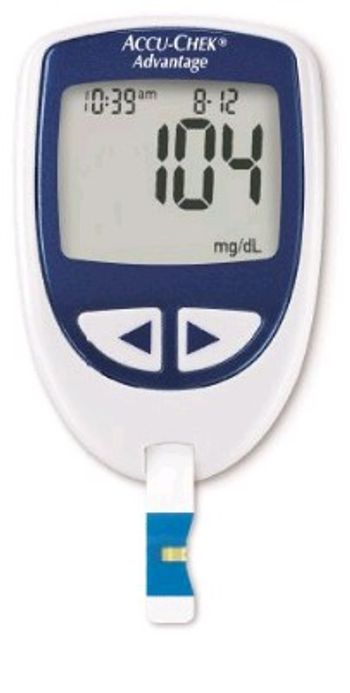
Roche ACCU-CHEK Advantage
 Roche · Model ACCU-CHEK Advantage
Downloadable 480-value memory with time and date. Uses one readily available 3-volt lithium coin cell battery. Compatible with ACCU-CHEK data management tools. Preferred on most healthcare plan formularies, so you may save money. Easy handling. The small design is about the size of a stopwatch, with rubber side grips.
Typical Failure Modes
Compiled for this model from its own documentation and established engineering knowledge for this equipment class - not from a verified service record. Confirm against the manufacturer's service manual.
Result / QC failure
HighSymptoms: Result flagged or biased, QC control out of range, strip / cartridge error code.
Root cause: Expired or mishandled strips / cartridges, a temperature / hematocrit interference, or an optics / electrode fault.
Strip / cartridge port fault
MediumSymptoms: Strip not detected, error on insertion, intermittent contact.
Root cause: Contaminated or worn strip-port contacts / optics.
Will not power on / battery fault
MediumSymptoms: Dead unit, short battery life, will not charge.
Root cause: Depleted or aged battery.
Barcode / connectivity fault
LowSymptoms: Operator / lot barcode will not scan, results not sent to the docking / LIS.
Root cause: Barcode reader or the docking-station / wireless link.
Display / button fault
LowSymptoms: Missing segments, unresponsive buttons.
Root cause: Display or keypad fault.
Serviceable Parts & Consumables
Serviceable items for this model, compiled from its documentation and engineering knowledge for this equipment class. Service class and relative cost are estimates, not manufacturer figures; no part numbers are given. Confirm intervals and pricing against the manufacturer.
Test strips / cartridges
Class Frequent wear itemRel. cost $$R&R Easy
QC control solutions
Class Frequent wear itemRel. cost $R&R Easy
Battery
Class Frequent wear itemRel. cost $R&R Easy
Strip-port contacts / optics module
Class Periodic replacementRel. cost $$R&R Moderate
Docking station / barcode reader
Class Periodic replacementRel. cost $$R&R Fairly easy
| Part | Service class | Relative cost | R&R difficulty |
|---|---|---|---|
| Test strips / cartridges | Frequent wear item | $$ | Easy |
| QC control solutions | Frequent wear item | $ | Easy |
| Battery | Frequent wear item | $ | Easy |
| Strip-port contacts / optics module | Periodic replacement | $$ | Moderate |
| Docking station / barcode reader | Periodic replacement | $$ | Fairly easy |
Relative cost: $ lowest · $$$$ highest service-part cost for this equipment class. Not a price.
Troubleshooting Approach
A starting sequence for this model, compiled from its documentation and engineering knowledge for this equipment class. Follow the manufacturer's service documentation for the actual procedure.
Symptom: Sensor / electrode fault or drift / QC failure
- Run the relevant calibration and check the sensor / electrode status screen.
- De-bubble / rinse the measuring path and check for protein deposits.
- Replace an electrode / membrane / sensor cassette at end of life or that fails calibration.
- Confirm the solution pack / reagent cartridge and calibration gas are in date and not empty.
- Re-run QC at the relevant levels before releasing results.
Symptom: Sample not aspirated / clot / inlet alarm
- Run the inlet / preheater clot-removal or rinse routine.
- Inspect the inlet probe and gasket.
- Replace the inlet gasket or probe.
- Confirm free sample aspiration with a QC sample.
- Replace worn peristaltic pump tubing if transport is still poor.
Symptom: Result flagged / questionable vs the clinical picture
- Repeat with a fresh sample / strip / cassette from correctly stored, in-date stock.
- Run the QC controls at each level.
- Confirm the meter / analyzer is coded / calibrated to the current lot.
- Clean the measurement chamber / strip port and the optics per the manual.
- Quarantine the lot if QC fails; refer the analyzer if QC passes but a result still looks wrong.
Symptom: Will not power on / short battery life / strip-port fault (handhelds)
- Fit fresh batteries or confirm the charger / dock.
- Clean the strip-port contacts / optics.
- Try several strips from a fresh vial.
- Replace the battery.
- Replace the meter if it will not read known-good strips.
Technical Specs
- Height
- 3.3 in
- Length
- 0.8 in
- Weight
- 1.8 oz with battery
- Width
- 2.2 in
Documents & Manuals
Safety & Recalls
Synced live from the FDA openFDA API.
- RECALL
The meter gives a strip error message that can "actually" mean either a problem with the strip or a blood glucose too low to measure, but the meter error message only reports that there is a strip error and the manual only instructs the user to retest with a new strip using a larger drop of blood.
Troubleshoot this device with Bio
Describe a symptom or error code. Bio answers from this device's own documented error codes, failure modes, parts, and guides.
Ask Bio