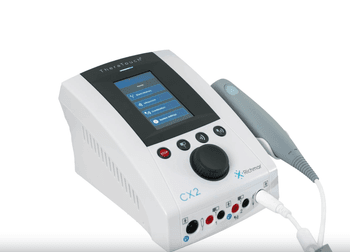
Richmar TheraTouch CX2
RIRichmar · Model TheraTouch CX2
TheraTouch CX2 two-channel combination therapy system Combines therapeutic ultrasound and electrotherapy Simple-to-use, intuitive, menu-driven interface 1 MHz and 3 MHz therapeutic ultrasound Pulsed and continuous ultrasound output modes 5 cm² ergonomic ultrasound applicator included Maximum ultrasound BNR of 5:1 Two channels of electrical stimulation Interferential waveform Premodulated waveform Biphasic waveform: Symmetrical Asymmetrical RAAS NMS waveform Russian waveform High Volt waveform Microcurrent waveform Rapid Agonist Antagonist Sequencing (RAAS) Eight evidence-based clinical stimulation protocols Electrode placement suggestions Customizable treatment parameters Save up to 99 user-defined protocols Ability to combine therapeutic ultrasound with electrical stimulation Bilingual interface with English and Spanish options Three-year warranty (Generated by AI)
Key tips
- ·Never bypass a radiation interlock to "just get the image" - this is one of the few true zero-tolerance rules in BMET work.
- ·Trend image-quality phantom results over time - drift shows up before an outright failure does.
- ·Portable/mobile units take real physical abuse from transport - check wheel locks and cable strain reliefs more often than fixed units.
Typical Failure Modes
Compiled for this model from its own documentation and established engineering knowledge for this equipment class - not from a verified service record. Confirm against the manufacturer's service manual.
Ultrasoustic output drops to zero or displays error during treatment
HighSymptoms: Therapy head produces no ultrasound output or intermittent output; display may show reduced power or fault indicator; patient reports no sensation.
Root cause: Piezoelectric crystal degradation or internal microfracture within the applicator; waveguide seal failure allowing moisture ingress; mainboard ultrasound driver IC failure.
Electrical stimulation channel produces no output or intermittent output
MediumSymptoms: Stimulation channel fails to deliver current; waveform selection has no effect; patient reports tingling only on one channel.
Root cause: Output relay contact wear or failure; stimulation driver transistor degradation; electrode cable shield break or connector pin corrosion.
Device fails to power on or shuts down unexpectedly
HighSymptoms: Power button unresponsive; unit displays blank screen or immediate shutdown; no LED indicators.
Root cause: Internal fuse blowout (line voltage surge); AC power inlet terminal block loose or damaged; mainboard power supply capacitor failure; battery pack (if equipped) cell degradation.
Waveform selection does not change output characteristics
MediumSymptoms: Device remains in default mode regardless of user selection; menu navigation appears functional but settings have no effect.
Root cause: Software logic fault in firmware; waveform selection switch/contact matrix failure; mainboard MCU communication error with stimulation DSP.
Thermal overload protection activates prematurely
LowSymptoms: Device shuts down ultrasound output after short duration; display shows thermal warning; applicator feels warm but not excessively hot.
Root cause: Ultrasound power sensor drift or calibration loss; airflow obstruction over cooling vents; applicator contact surface degradation affecting heat transfer.
Serviceable Parts & Consumables
Serviceable items for this model, compiled from its documentation and engineering knowledge for this equipment class. Service class and relative cost are estimates, not manufacturer figures; no part numbers are given. Confirm intervals and pricing against the manufacturer.
5 cm² ergonomic therapeutic ultrasound applicator
Consumable wear item; crystal degradation primary failure mode. Inspect seal integrity each service visit.
Class Frequent wear itemRel. cost $R&R Easy
Mainboard ultrasound driver integrated circuit
Surface-mount component; susceptible to thermal stress. Requires rework equipment for replacement.
Class Periodic replacementRel. cost $$R&R Moderate
Stimulation output relay assembly
Contact pitting causes intermittent channel failure. Swap relay if cleaning contacts restores function.
Class Periodic replacementRel. cost $$R&R Moderate
AC power inlet terminal block and fuse assembly
Fuse blowout common after voltage events. Check terminal block for charring or loose screws.
Class Major service partRel. cost $R&R Fairly easy
Internal cooling fan (if service manual confirms fan-equipped configur
Dust accumulation reduces cooling efficiency. Verify airflow at vent slots during calibration.
Class Periodic replacementRel. cost $R&R Fairly easy
User interface membrane keypad and display assembly
Capacitive touch membrane prone to drift. Full assembly replacement required; no component-level repair.
Class Periodic replacementRel. cost $$R&R Moderate
| Part | Service class | Relative cost | R&R difficulty |
|---|---|---|---|
| 5 cm² ergonomic therapeutic ultrasound applicator Consumable wear item; crystal degradation primary failure mode. Inspect seal integrity each service visit. | Frequent wear item | $ | Easy |
| Mainboard ultrasound driver integrated circuit Surface-mount component; susceptible to thermal stress. Requires rework equipment for replacement. | Periodic replacement | $$ | Moderate |
| Stimulation output relay assembly Contact pitting causes intermittent channel failure. Swap relay if cleaning contacts restores function. | Periodic replacement | $$ | Moderate |
| AC power inlet terminal block and fuse assembly Fuse blowout common after voltage events. Check terminal block for charring or loose screws. | Major service part | $ | Fairly easy |
| Internal cooling fan (if service manual confirms fan-equipped configur Dust accumulation reduces cooling efficiency. Verify airflow at vent slots during calibration. | Periodic replacement | $ | Fairly easy |
| User interface membrane keypad and display assembly Capacitive touch membrane prone to drift. Full assembly replacement required; no component-level repair. | Periodic replacement | $$ | Moderate |
Relative cost: $ lowest · $$$$ highest service-part cost for this equipment class. Not a price.
PM Checklist
Preventive-maintenance tasks typical of this equipment class. Perform to the manufacturer's procedure and your facility's policy - this is general reference, not a schedule for this specific unit.
- ·Daily QC per modality: image-quality phantom test
- ·Tube and detector inspection
- ·Annual state-required radiation safety survey
- ·Vendor-scheduled preventive maintenance
Troubleshooting Approach
A starting sequence for this model, compiled from its documentation and engineering knowledge for this equipment class. Follow the manufacturer's service documentation for the actual procedure.
Symptom: No ultrasound output, device powers on normally
- Visually inspect applicator cable and connector for damage or loose seating; verify 5 cm² applicator is properly attached to therapy head.
- Connect a known-working applicator to isolate whether fault lies in handpiece cable or mainboard driver.
- If output restored with known-good applicator, replace the original applicator as consumable wear item. If no output with known-good applicator, suspect mainboard ultrasound driver IC or waveguide seal failure.
Symptom: One stimulation channel produces no output, other channel functional
- Swap stimulation electrode cables between channels at the rear panel; if fault follows cable, replace the cable assembly.
- Inspect the relay contacts on the affected channel for pitting or carbon tracking; clean with appropriate contact cleaner if accessible.
- If relay contacts are intact and fault persists, replace the stimulation output relay assembly for the non-functioning channel.
Technical Specs
- Product Name
- TheraTouch CX2
- Product Type
- Combination Therapy System
- Therapy Types
- Therapeutic Ultrasound and Electrotherapy
- Stimulation Channels
- 2
- Ultrasound Frequencies
- 1 MHz and 3 MHz
- Ultrasound Modes
- Pulsed and Continuous
- Ultrasound Applicator
- 5 cm² ergonomic applicator
- Maximum BNR
- 5:1
- Stimulation Waveforms
- Interferential, Premodulated, Biphasic, NMS, Russian, High Volt, Microcurrent
- Biphasic Modes
- Symmetrical, Asymmetrical, RAAS
- Clinical Protocols
- 8 evidence-based stimulation protocols
- User-Defined Protocols
- Up to 99
- Electrode Guidance
- Electrode placement suggestions
- Interface Languages
- English and Spanish
- Warranty
- 3 years
Typical Location
Where this class of equipment is typically deployed - general reference, not this unit's own placement record.
- Radiology / Imaging department
- Emergency Department (portable units)
- Operating Room (C-arms)
- Cath lab
- Bedside ICU (portable X-ray)
Documents & Manuals
No documents available for this device yet.
Troubleshoot this device with Bio
Describe a symptom or error code. Bio answers from this device's own documented error codes, failure modes, parts, and guides.
Ask Bio