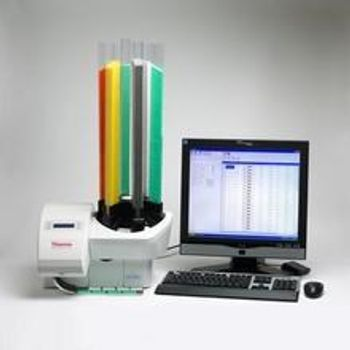
Richard-Allan Scientific Printmate AS 450
 Richard-Allan Scientific · Model Printmate AS 450
Printmate prints easy-to-read, permanent black type (300dpi print is perfect for printing linear and 2-D barcodes as well as graphics and logos). The small size of the PrintMate means it can easily fit next to the grossing area and print fast enough to keep up when printing single cases; your printer allows you to decide the workflow that best fits your laboratory. Prints cassettes with no reduction time for printing 2-D barcodes. Combines ruggedness with capacity to work reliably as a batch printer in high volume laboratories. Dual track collection system collects up to 100 cassettes in organiser trays. The trays stacked and simplify matching cassettes to specimen containers at the grossing station. LabWriter software prints large batches or single cassettes using standard or special numbering configurations. The software can use barcodes from requisitions to automatically print cassettes eliminating errors from the process. The PrintMate is compatible with all LIS interfaces to any Thermo Scientific printer. Connections includes: Serial, network, USB.
Key tips
- ·Run QC controls before trusting any repair - an analyzer that passes self-test can still report clinically wrong results.
- ·Rule out a reagent lot change before opening the instrument - it can look exactly like a hardware fault.
- ·Centrifuge rotors have a hard retirement age/cycle limit regardless of visible condition - don't eyeball it.
Typical Failure Modes
Compiled for this model from its own documentation and established engineering knowledge for this equipment class - not from a verified service record. Confirm against the manufacturer's service manual.
Will not power on or unexpected shutdown
HighSymptoms: The laboratory & diagnostics is dead, reboots, or shuts down mid-use.
Root cause: Mains lead / fuse, an aged battery, or a power-supply board fault.
Battery will not hold charge
MediumSymptoms: Short run time on battery; low-battery alarm soon after a full charge.
Root cause: Aged rechargeable battery pack or a charger fault.
Display / control-panel fault
MediumSymptoms: Blank, dim or distorted display; unresponsive keys or touchscreen.
Root cause: Display, backlight, or control-board fault.
Fails self-test or calibration
MediumSymptoms: Power-on self-test or the scheduled performance check fails or is out of tolerance.
Root cause: Sensor drift or an internal board fault; recalibration or repair needed.
Serviceable Parts & Consumables
Serviceable items for this model, compiled from its documentation and engineering knowledge for this equipment class. Service class and relative cost are estimates, not manufacturer figures; no part numbers are given. Confirm intervals and pricing against the manufacturer.
Rechargeable battery pack
Class Periodic replacementRel. cost $$R&R Fairly easy
Power supply / mains board
Class Major service partRel. cost $$$R&R Difficult
Display / control-panel assembly
Class Major service partRel. cost $$$R&R Moderate
Cooling fan
Class Major service partRel. cost $R&R Moderate
| Part | Service class | Relative cost | R&R difficulty |
|---|---|---|---|
| Rechargeable battery pack | Periodic replacement | $$ | Fairly easy |
| Power supply / mains board | Major service part | $$$ | Difficult |
| Display / control-panel assembly | Major service part | $$$ | Moderate |
| Cooling fan | Major service part | $ | Moderate |
Relative cost: $ lowest · $$$$ highest service-part cost for this equipment class. Not a price.
PM Checklist
Preventive-maintenance tasks typical of this equipment class. Perform to the manufacturer's procedure and your facility's policy - this is general reference, not a schedule for this specific unit.
- ·Daily QC controls run and reviewed
- ·Calibration verification per assay
- ·Routine cleaning and decontamination
- ·Scheduled reagent-path and pump-tubing maintenance
Troubleshooting Approach
A starting sequence for this model, compiled from its documentation and engineering knowledge for this equipment class. Follow the manufacturer's service documentation for the actual procedure.
Symptom: Poor / uneven sections or blocks / paraffin problems
- Fit a fresh blade at the correct clearance angle and confirm both clamps are tight.
- Confirm the paraffin bath / cold-plate temperatures against a reference.
- Check the block is faced and at the right temperature.
- Cut a range of thicknesses to check feed consistency.
- Service the micro-feed / dispensing mechanism as isolated.
Symptom: Dispenser / valve / heater fault (embedding centre)
- Check the paraffin dispenser valve and its heater.
- Confirm the reservoir, warm plate and cold plate reach temperature.
- Clean solidified paraffin from the valve and nozzle.
- Replace the dispenser valve or a heater as isolated.
- Verify temperatures and a clean dispense after repair.
Symptom: Refrigeration / defrost fault (cryostat) / heavy frost
- Check the chamber and specimen-head temperature sensors.
- Confirm the defrost cycle completes.
- Inspect the door seal.
- Compare chamber temperature to an independent reference.
- Escalate a sealed-system refrigeration fault to a certified tech.
Technical Specs
- Height
- 230 mm without cassette tubes
- Length
- 400 mm
- Width
- 480 mm
Typical Location
Where this class of equipment is typically deployed - general reference, not this unit's own placement record.
- Central / core laboratory
- Point-of-care testing stations
- Blood bank
- Microbiology lab
Documents & Manuals
Troubleshoot this device with Bio
Describe a symptom or error code. Bio answers from this device's own documented error codes, failure modes, parts, and guides.
Ask Bio