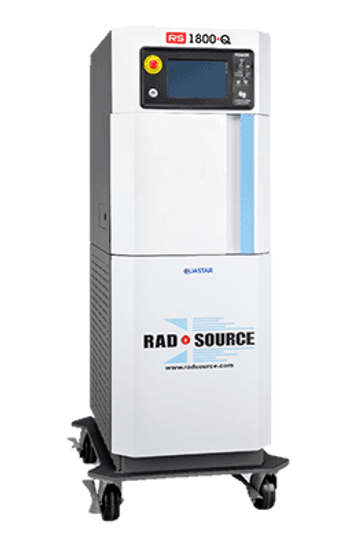
RadSource RS 1800
 RadSource · Model RS 1800
High X-Ray Output – High Throughput Produces a high x-ray output, and has a large field, providing advantageous configurations for high throughput and dose rate. Better Uniformity Due to the larger field with no need to collimate the beam, a better uniformity can be achieved compared to standard imaging tube x-ray technology. Beam Hardness – Built-in Filtration Quastar has filtration built into the design of the x-ray emitter – designed to attenuate weaker non-penetrating x-rays. Power Efficiency – Increased Life Span The Quastar emitter runs at less than maximum power which increases lifetime of 7 years or more – up to 2.5X longer than the standard imaging x-ray tube x-ray. Repairable Energy Source Design – Manageable Cost of Ownership Unlike traditional imaging x-ray sources that require full replacement, the Quastar emitter is engineered to be repairable and last up to 7 years. Only Quastar can achieve superior dose uniformity resulting in lower run times. No Radioactive Source – Lower Cost of Ownership (RS 1800) Meets safety requirements specified in Fed. Reg. 21 CFR 1020.40. No Nuclear Regulatory Commission (NRC) License is required. No nuclear disposal requirements. No additional security requirements for nuclear equipment. No additional safety equipment for laboratory staff. Direct Replacement for Gamma Irradiator U.S. Government recognized as a safe and direct alternative for radioactive isotope (gamma) source irradiators. RS 1800. Q One Day Plug & Play Installation The RS 1800. Q does not need an external water connection to the facility – providing improved workflow efficiency with flexible equipment placement throughout the facility. Instrument Portability Mounted on sturdy caster wheels for convenient portability improves sample workflow efficiency, allowing for the placement of the RS 1800. Q throughout the facility. Self-Contained Cabinet All Rad Source irradiators are manufactured as cabinet x-ray devices and conform to the radiation safety guidelines in US CFR 21 1020.41.
Key tips
- ·Run QC controls before trusting any repair - an analyzer that passes self-test can still report clinically wrong results.
- ·Rule out a reagent lot change before opening the instrument - it can look exactly like a hardware fault.
- ·Centrifuge rotors have a hard retirement age/cycle limit regardless of visible condition - don't eyeball it.
Typical Failure Modes
Compiled for this model from its own documentation and established engineering knowledge for this equipment class - not from a verified service record. Confirm against the manufacturer's service manual.
Will not power on or unexpected shutdown
HighSymptoms: The laboratory & diagnostics is dead, reboots, or shuts down mid-use.
Root cause: Mains lead / fuse, an aged battery, or a power-supply board fault.
Battery will not hold charge
MediumSymptoms: Short run time on battery; low-battery alarm soon after a full charge.
Root cause: Aged rechargeable battery pack or a charger fault.
Display / control-panel fault
MediumSymptoms: Blank, dim or distorted display; unresponsive keys or touchscreen.
Root cause: Display, backlight, or control-board fault.
Fails self-test or calibration
MediumSymptoms: Power-on self-test or the scheduled performance check fails or is out of tolerance.
Root cause: Sensor drift or an internal board fault; recalibration or repair needed.
Serviceable Parts & Consumables
Serviceable items for this model, compiled from its documentation and engineering knowledge for this equipment class. Service class and relative cost are estimates, not manufacturer figures; no part numbers are given. Confirm intervals and pricing against the manufacturer.
Rechargeable battery pack
Class Periodic replacementRel. cost $$R&R Fairly easy
Power supply / mains board
Class Major service partRel. cost $$$R&R Difficult
Display / control-panel assembly
Class Major service partRel. cost $$$R&R Moderate
Cooling fan
Class Major service partRel. cost $R&R Moderate
| Part | Service class | Relative cost | R&R difficulty |
|---|---|---|---|
| Rechargeable battery pack | Periodic replacement | $$ | Fairly easy |
| Power supply / mains board | Major service part | $$$ | Difficult |
| Display / control-panel assembly | Major service part | $$$ | Moderate |
| Cooling fan | Major service part | $ | Moderate |
Relative cost: $ lowest · $$$$ highest service-part cost for this equipment class. Not a price.
PM Checklist
Preventive-maintenance tasks typical of this equipment class. Perform to the manufacturer's procedure and your facility's policy - this is general reference, not a schedule for this specific unit.
- ·Daily QC controls run and reviewed
- ·Calibration verification per assay
- ·Routine cleaning and decontamination
- ·Scheduled reagent-path and pump-tubing maintenance
Troubleshooting Approach
A starting sequence for this model, compiled from its documentation and engineering knowledge for this equipment class. Follow the manufacturer's service documentation for the actual procedure.
Symptom: Will not power on
- Confirm the outlet, mains lead and fuse.
- Try on battery, then on mains only, to isolate the supply.
- Look for a power indicator or POST code.
- Replace the fuse / battery / power supply as isolated.
- Run the self-test after any repair.
Symptom: Fails self-test or calibration
- Note the exact failure message / code.
- Power-cycle and repeat the self-test.
- Verify against a reference / simulator where one applies.
- Recalibrate per the service manual.
- Refer the affected board for service if it will not hold calibration.
Technical Specs
- Height
- 162.56 cm
- Weight
- 1350
- Width
- 76.2 cm
Typical Location
Where this class of equipment is typically deployed - general reference, not this unit's own placement record.
- Central / core laboratory
- Point-of-care testing stations
- Blood bank
- Microbiology lab
Documents & Manuals
Troubleshoot this device with Bio
Describe a symptom or error code. Bio answers from this device's own documented error codes, failure modes, parts, and guides.
Ask Bio