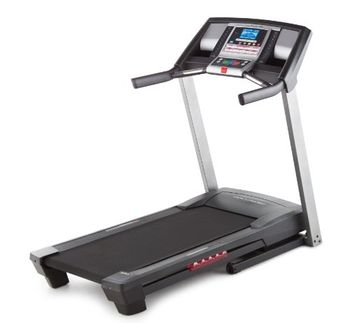
ProForm 590T
 ProForm · Model 590T
Powered by 2.25 CHP Mach Z Motor with quiet, self-cooling drive system. Has a 6” Backlit Display for easy monitoring of workout progress. Has a QuickSpeed Control for instant change of speed from 0-10 MPH. Features a Quick Incline Control which allows for easy incline changes. With 16 built-in workout apps designed by a Certified Personal Trainer. Has a Dual-Grip Heart Rate Monitor in handlebars to monitor heart rate during workouts. TreadBelt is 20” x 55” which operates smoothly and quietly. The Proform 590 T Treadmill can hold 300 lbs. weight capacity.
Key tips
- ·A no-signal/flatline alarm gets checked on the patient first, not the monitor - rule out a real clinical event before troubleshooting.
- ·Recalibrate NIBP against a reference manometer, not just a self-test pass.
- ·Reused patient cables (SpO2, ECG leads) are a common source of intermittent-fault complaints - swap the cable before the module.
Typical Failure Modes
Compiled for this model from its own documentation and established engineering knowledge for this equipment class - not from a verified service record. Confirm against the manufacturer's service manual.
Belt slips, drifts or runs rough
HighSymptoms: Walking belt slips under load, tracks off-centre, jerky or noisy.
Root cause: Worn or stretched belt, a worn deck, loss of drive-belt tension, or worn rollers.
Will not start / no speed or incline response
HighSymptoms: Console dead, belt will not move, incline will not change, error code.
Root cause: Breaker / power, a drive-motor or controller fault, a lift-motor fault, or a console-cable fault.
Speed or incline inaccuracy
MediumSymptoms: Actual speed / grade does not match the display or protocol.
Root cause: Speed-sensor or incline-potentiometer / limit-switch fault - needs calibration.
Drive-motor / controller fault
MediumSymptoms: Motor cuts out under load, burning smell, controller error.
Root cause: Worn motor brushes / bearings or a drive-controller fault.
Emergency-stop / safety-key fault
HighSymptoms: E-stop or safety key does not stop the belt, or stops it unexpectedly.
Root cause: Failed e-stop switch / magnet or its wiring - a safety function.
Serviceable Parts & Consumables
Serviceable items for this model, compiled from its documentation and engineering knowledge for this equipment class. Service class and relative cost are estimates, not manufacturer figures; no part numbers are given. Confirm intervals and pricing against the manufacturer.
Walking belt & deck
Class Periodic replacementRel. cost $$R&R Moderate
Drive belt
Class Periodic replacementRel. cost $R&R Moderate
Drive motor / controller
Class Major service partRel. cost $$$R&R Difficult
Incline (lift) motor / potentiometer
Class Major service partRel. cost $$R&R Moderate
Roller / bearing set
Class Major service partRel. cost $$R&R Moderate
| Part | Service class | Relative cost | R&R difficulty |
|---|---|---|---|
| Walking belt & deck | Periodic replacement | $$ | Moderate |
| Drive belt | Periodic replacement | $ | Moderate |
| Drive motor / controller | Major service part | $$$ | Difficult |
| Incline (lift) motor / potentiometer | Major service part | $$ | Moderate |
| Roller / bearing set | Major service part | $$ | Moderate |
Relative cost: $ lowest · $$$$ highest service-part cost for this equipment class. Not a price.
PM Checklist
Preventive-maintenance tasks typical of this equipment class. Perform to the manufacturer's procedure and your facility's policy - this is general reference, not a schedule for this specific unit.
- ·Routine cable and lead-wire inspection for fraying/wear
- ·Battery conditioning cycle
- ·NIBP calibration check against a reference manometer
- ·ECG / SpO2 accuracy verification against a patient simulator
- ·Annual electrical safety test
Troubleshooting Approach
A starting sequence for this model, compiled from its documentation and engineering knowledge for this equipment class. Follow the manufacturer's service documentation for the actual procedure.
Symptom: A parameter drops out or reads wrong (ECG / IBP / SpO2 / temp / CO2 / CO)
- Reseat the patient cable at the module and at the monitor.
- Swap in a known-good cable / sensor for that parameter and re-test.
- Move the module to another host or slot to tell module from host.
- Inspect the module docking connector for bent or recessed pins.
- Verify against a patient simulator; replace the cable, or refer the parameter module / input board if the fault stays with it.
Symptom: NIBP will not measure or is inaccurate
- Leak-test the cuff and hose (occlude and watch for pressure decay).
- Run the monitor's NIBP calibration-verification against a calibrated manometer.
- Confirm correct cuff size and placement and check for a kinked hose.
- Verify against a NIBP simulator at several pressures.
- Refer the monitor for internal pump / valve service if it still fails.
Symptom: Blank / dim / frozen display or unresponsive touchscreen
- Power-cycle the monitor fully (mains removed, battery out where possible).
- Check the display backlight and the display / touchscreen cable.
- Note any boot or self-test error code.
- Re-calibrate the touchscreen if the touch offset is the issue.
- Replace the display / touchscreen assembly or refer the main board.
Symptom: Not shown at the central station / network dropout
- Confirm the wired drop or Wi-Fi settings and that other monitors on that segment are online.
- Check the monitor's network address / unit-bed assignment and re-admit.
- Reseat the network card / cable.
- Restart the monitor's network interface.
- Escalate a whole-unit outage to the central-station server / IT.
Typical Location
Where this class of equipment is typically deployed - general reference, not this unit's own placement record.
- ICU / CCU
- Emergency Department
- OR / PACU
- General med-surg floors
- Step-down units
- Telemetry units
Documents & Manuals
Troubleshoot this device with Bio
Describe a symptom or error code. Bio answers from this device's own documented error codes, failure modes, parts, and guides.
Ask Bio