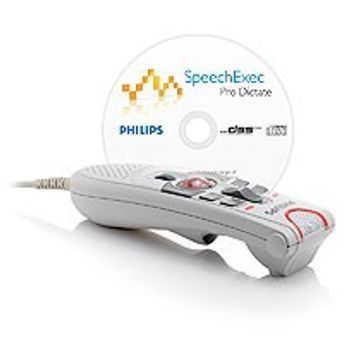
Philips SpeechMike Exec Classic
 Philips Healthcare · Model SpeechMike Exec Classic
4-Position Switch for single handed use. Dust-proof optical trackball and scroll wheel for precise navigation. Clearly visible LEDs indicate recording, inserting and overwriting. Easy to use dictation and transcription functionality for organizing recordings. Priority indexing allows authors to easily define urgent jobs. Spoken instructions improve communication with the transcriptionist. SpeechMike Classic. Hanging Bracket. SpeechExec Pro Dictate Software. USB Software Dongle.
Key tips
- ·When no category-specific guidance fits, default to the manufacturer's own service manual and the general troubleshooting method in the Engineer's Guide.
- ·Run an incoming and annual electrical safety test regardless of how niche the device is.
Typical Failure Modes
Compiled for this model from its own documentation and established engineering knowledge for this equipment class - not from a verified service record. Confirm against the manufacturer's service manual.
No or poor audio capture
MediumSymptoms: Recording silent, low, or distorted; PC does not register the mic.
Root cause: USB / wireless link fault, a failed microphone element, or a driver issue.
Buttons / slide switch unresponsive
MediumSymptoms: Record / play / trackball or the slide switch does not register.
Root cause: Worn membrane keypad or slide switch.
Wireless pairing / dock fault (Air)
MediumSymptoms: SpeechMike Air will not pair, short battery life, will not charge in the dock.
Root cause: Aged battery, dock contacts, or the RF link.
Barcode scanner fault (Barcode model)
LowSymptoms: Barcodes will not scan.
Root cause: Scanner window / module.
Serviceable Parts & Consumables
Serviceable items for this model, compiled from its documentation and engineering knowledge for this equipment class. Service class and relative cost are estimates, not manufacturer figures; no part numbers are given. Confirm intervals and pricing against the manufacturer.
USB cable / RF dongle
Class Periodic replacementRel. cost $R&R Easy
Microphone element
Class Periodic replacementRel. cost $$R&R Fairly easy
Membrane keypad / slide switch
Class Periodic replacementRel. cost $R&R Fairly easy
Rechargeable battery (Air)
Class Periodic replacementRel. cost $$R&R Easy
Charging dock
Class Periodic replacementRel. cost $$R&R Easy
| Part | Service class | Relative cost | R&R difficulty |
|---|---|---|---|
| USB cable / RF dongle | Periodic replacement | $ | Easy |
| Microphone element | Periodic replacement | $$ | Fairly easy |
| Membrane keypad / slide switch | Periodic replacement | $ | Fairly easy |
| Rechargeable battery (Air) | Periodic replacement | $$ | Easy |
| Charging dock | Periodic replacement | $$ | Easy |
Relative cost: $ lowest · $$$$ highest service-part cost for this equipment class. Not a price.
PM Checklist
Preventive-maintenance tasks typical of this equipment class. Perform to the manufacturer's procedure and your facility's policy - this is general reference, not a schedule for this specific unit.
- ·Follow the manufacturer's PM schedule
- ·Perform incoming and annual electrical safety testing per facility biomedical program
Troubleshooting Approach
A starting sequence for this model, compiled from its documentation and engineering knowledge for this equipment class. Follow the manufacturer's service documentation for the actual procedure.
Symptom: No or poor audio
- Try another USB port and, if possible, another PC.
- Confirm the mic is selected as the input device and the level is up.
- Reinstall / update the SpeechMike driver.
- Flex the cable near the strain relief while recording (wired).
- Replace the cable, dongle or microphone element as isolated.
Symptom: Buttons not responding
- Test every button and the slide switch.
- Clean around the keys.
- Replace the membrane keypad / slide switch.
- For Air, replace the battery and clean the dock contacts.
- Confirm all controls in the dictation software.
Typical Location
Where this class of equipment is typically deployed - general reference, not this unit's own placement record.
- Varies by device - check the unit's own manual for facility placement guidance
Documents & Manuals
No documents available for this device yet.
Troubleshoot this device with Bio
Describe a symptom or error code. Bio answers from this device's own documented error codes, failure modes, parts, and guides.
Ask Bio