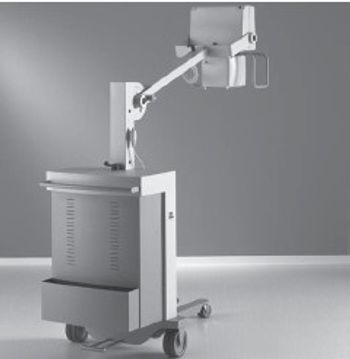
Philips Practix 100 plus
 Philips Healthcare · Model Practix 100 plus
One switch - three functions Routine procedures have to be fast and efficient - which is why we have designed Practix 100 plus so as to reduce the effort involved. For example, you only have to operate a single handgrip to guide Practix 100 plus straight ahead or parallel to the bed. The brake is also integrated. The extremely low base, combined with the ability to move parallel to the bed, means that the X-ray tube unit of Practix 100 plus can be easily positioned at any part of the body while the patient is lying in bed or in an incubator. Clear layout- All the control displays are clearly arranged on the operator's console. As soon as the exposure parameters have been set, the values appear on the control panel which also shows the current system status. Chest X-rays are the most frequent application in intensive care. For such routine procedures, Practix 100 plus offers 32 memory locations for storing and retrieving your own individual routine settings at the press of a button. Ability to move parallel to the bed Clear layout of the operator's console Short exposure times with high mAs capacity offers excellent image quality Offers 32 memory locations for your own individual routine settings Exceptional manoeuvrability: versatile and easy to use Advantages that can save you money: easy to operate, very efficient.
Key tips
- ·Never bypass a radiation interlock to "just get the image" - this is one of the few true zero-tolerance rules in BMET work.
- ·Trend image-quality phantom results over time - drift shows up before an outright failure does.
- ·Portable/mobile units take real physical abuse from transport - check wheel locks and cable strain reliefs more often than fixed units.
Typical Failure Modes
Compiled for this model from its own documentation and established engineering knowledge for this equipment class - not from a verified service record. Confirm against the manufacturer's service manual.
No or inconsistent exposure
HighSymptoms: Exposure inhibited, kV / mAs error, images under- or over-exposed.
Root cause: HV generator / capacitor fault, exposure-switch fault, tube fault, or a thermal interlock.
Drive / propulsion fault (motor-driven units)
MediumSymptoms: Unit will not drive, drives weakly, or a drive fault code.
Root cause: Drive battery, drive motor / controller, or the throttle handle.
Battery pack will not hold charge
HighSymptoms: Few exposures per charge, will not reach full charge, unit dies mid-round.
Root cause: Aged exposure / drive battery bank or a charger fault.
Column / arm / brake fault
MediumSymptoms: Tube arm drifts, will not extend / rotate, or a brake will not hold.
Root cause: Worn arm bearings, counterbalance, or brakes.
Detector / console fault (DR units)
MediumSymptoms: Panel not detected, images not received, console errors.
Root cause: Wireless detector, its battery, or the acquisition PC.
Serviceable Parts & Consumables
Serviceable items for this model, compiled from its documentation and engineering knowledge for this equipment class. Service class and relative cost are estimates, not manufacturer figures; no part numbers are given. Confirm intervals and pricing against the manufacturer.
Battery bank (exposure / drive)
Class Periodic replacementRel. cost $$$R&R Moderate
HV generator / capacitor module
Class Major service partRel. cost $$$$R&R Expert-level
Drive motor / controller
Class Major service partRel. cost $$$R&R Difficult
Column arm brake / bearing kit
Class Major service partRel. cost $$R&R Moderate
Wireless detector / battery (DR)
Class Periodic replacementRel. cost $$$$R&R Fairly easy
| Part | Service class | Relative cost | R&R difficulty |
|---|---|---|---|
| Battery bank (exposure / drive) | Periodic replacement | $$$ | Moderate |
| HV generator / capacitor module | Major service part | $$$$ | Expert-level |
| Drive motor / controller | Major service part | $$$ | Difficult |
| Column arm brake / bearing kit | Major service part | $$ | Moderate |
| Wireless detector / battery (DR) | Periodic replacement | $$$$ | Fairly easy |
Relative cost: $ lowest · $$$$ highest service-part cost for this equipment class. Not a price.
PM Checklist
Preventive-maintenance tasks typical of this equipment class. Perform to the manufacturer's procedure and your facility's policy - this is general reference, not a schedule for this specific unit.
- ·Daily QC per modality: image-quality phantom test
- ·Tube and detector inspection
- ·Annual state-required radiation safety survey
- ·Vendor-scheduled preventive maintenance
Troubleshooting Approach
A starting sequence for this model, compiled from its documentation and engineering knowledge for this equipment class. Follow the manufacturer's service documentation for the actual procedure.
Symptom: No or inconsistent exposure
- Note the exact error code.
- Confirm the battery bank is fully charged (exposure energy depends on it).
- Check the exposure switch and cable.
- Confirm the tube is not in a thermal lockout.
- Escalate a confirmed generator / capacitor / tube fault; verify output with an analyser after repair.
Symptom: Will not drive or short battery life
- Check the charge level and that the charger reaches full charge overnight.
- Load-test or check the battery bank voltages against spec.
- For no-drive, check the drive fuse, motor controller and throttle.
- Replace the battery bank when capacity is low.
- Confirm exposure count per charge returns to spec.
Typical Location
Where this class of equipment is typically deployed - general reference, not this unit's own placement record.
- Radiology / Imaging department
- Emergency Department (portable units)
- Operating Room (C-arms)
- Cath lab
- Bedside ICU (portable X-ray)
Documents & Manuals
No documents available for this device yet.
Troubleshoot this device with Bio
Describe a symptom or error code. Bio answers from this device's own documented error codes, failure modes, parts, and guides.
Ask Bio