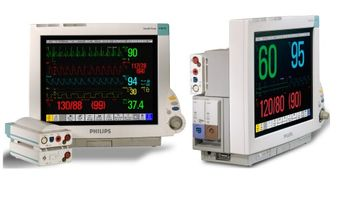
Philips IntelliVue MP60 and MP70
 Philips Healthcare · Model IntelliVue MP60 and MP70
Patient monitoring and clinical analysis - connected. Redesigned user interface improves visibility of patient data, make it easier to use, and to enhance compatibility with standard software. Dynamic Wave area features waves that automatically adjust in size depending on the number of waves configured. Capture, review, and store diagnostic 12-lead ECGs at the monitor before sending them to the IntelliVue Information Center. You can also locally print in a harmonized layout. Each NBP measurement now generates a column in the vital signs trend table. Measurements for other values are added to provide a comprehensive vital signs data set for the NBP measurement time, offering a more complete picture. The Smart Alarm Delay algorithm helps reduce the number of pulse oximetry nuisance alarms, allowing you to focus your attention where needed. ‘Smart’ prioritization of patient information. - Portal technology uses Philips Tunneling Control Engine to prioritize physiologic measurements, monitoring information, and alarm notifications – regardless of the amount of network traffic. IntelliVue offers uninterrupted patient monitoring without the risk of system overload or additional network connections. Touchscreen operation - makes many functions accessible through simple, one-touch commands. (Touchscreen is available on MP70 only.). SpeedPoint operation - Designed for easy information input and onscreen navigation (optional on MP70). Customized viewing options - View and analyze data in graphical or numerical formats, juxtapose real-time measurements and trended data, and organize every onscreen element – from waveforms to data labels – as desired. IntelliVue comes with 10 pre-set screen configurations. No separate hard drive and no fan. IntelliVue is space-saving, quiet, stable, and starts quickly.
Key tips
- ·A no-signal/flatline alarm gets checked on the patient first, not the monitor - rule out a real clinical event before troubleshooting.
- ·Recalibrate NIBP against a reference manometer, not just a self-test pass.
- ·Reused patient cables (SpO2, ECG leads) are a common source of intermittent-fault complaints - swap the cable before the module.
Typical Failure Modes
Compiled for this model from its own documentation and established engineering knowledge for this equipment class - not from a verified service record. Confirm against the manufacturer's service manual.
A parameter drops out or reads wrong
HighSymptoms: ECG, IBP, SpO2, temperature, CO2 or CO intermittently drops or is implausible.
Root cause: Worn patient cable / sensor, or a parameter-module / input-board fault.
NIBP will not measure or is inaccurate
MediumSymptoms: NIBP times out, cuff will not inflate / hold, readings implausible.
Root cause: Internal NIBP pump or valve, a cuff / hose leak, or a pressure-transducer fault.
Module / parameter not recognised
MediumSymptoms: The host does not display a plugged-in module or a built-in parameter.
Root cause: Docking / connector fault or an internal board fault.
Display / touchscreen fault
MediumSymptoms: Blank, dim or distorted display; unresponsive touchscreen.
Root cause: Display, backlight, or controller fault.
Battery / power fault
MediumSymptoms: Short battery run time, will not hold charge, will not power on.
Root cause: Aged battery pack or a power-supply fault.
Network / central-station connectivity fault
LowSymptoms: Monitor not shown at the central station, admit fails, intermittent drop.
Root cause: Wired / Wi-Fi network configuration or a communication board.
Serviceable Parts & Consumables
Serviceable items for this model, compiled from its documentation and engineering knowledge for this equipment class. Service class and relative cost are estimates, not manufacturer figures; no part numbers are given. Confirm intervals and pricing against the manufacturer.
Patient cable set (ECG / IBP / SpO2 / temp)
Class Frequent wear itemRel. cost $$R&R Easy
NIBP cuff and hose
Class Frequent wear itemRel. cost $R&R Easy
Internal NIBP pump / valve
Class Major service partRel. cost $$$R&R Difficult
Parameter module / input board
Class Major service partRel. cost $$$R&R Difficult
Battery pack
Class Periodic replacementRel. cost $$R&R Fairly easy
Display / touchscreen assembly
Class Major service partRel. cost $$$R&R Moderate
| Part | Service class | Relative cost | R&R difficulty |
|---|---|---|---|
| Patient cable set (ECG / IBP / SpO2 / temp) | Frequent wear item | $$ | Easy |
| NIBP cuff and hose | Frequent wear item | $ | Easy |
| Internal NIBP pump / valve | Major service part | $$$ | Difficult |
| Parameter module / input board | Major service part | $$$ | Difficult |
| Battery pack | Periodic replacement | $$ | Fairly easy |
| Display / touchscreen assembly | Major service part | $$$ | Moderate |
Relative cost: $ lowest · $$$$ highest service-part cost for this equipment class. Not a price.
PM Checklist
Preventive-maintenance tasks typical of this equipment class. Perform to the manufacturer's procedure and your facility's policy - this is general reference, not a schedule for this specific unit.
- ·Routine cable and lead-wire inspection for fraying/wear
- ·Battery conditioning cycle
- ·NIBP calibration check against a reference manometer
- ·ECG / SpO2 accuracy verification against a patient simulator
- ·Annual electrical safety test
Troubleshooting Approach
A starting sequence for this model, compiled from its documentation and engineering knowledge for this equipment class. Follow the manufacturer's service documentation for the actual procedure.
Symptom: A parameter drops out
- Reseat the patient cable at the module / monitor.
- Swap in a known-good cable / sensor for that parameter.
- Dock the module on a different host / slot to isolate module vs host.
- Inspect the docking connector for bent pins.
- Replace the cable, or refer the module / input board if the fault stays with it.
Symptom: NIBP problem
- Leak-test the cuff and hose.
- Run the monitor's NIBP calibration verification.
- Check for a kinked hose or a positional patient limb.
- Verify NIBP against a reference / simulator.
- Refer the monitor for internal pump / valve service if it persists.
Typical Location
Where this class of equipment is typically deployed - general reference, not this unit's own placement record.
- ICU / CCU
- Emergency Department
- OR / PACU
- General med-surg floors
- Step-down units
- Telemetry units
Documents & Manuals
No documents available for this device yet.
Troubleshoot this device with Bio
Describe a symptom or error code. Bio answers from this device's own documented error codes, failure modes, parts, and guides.
Ask Bio