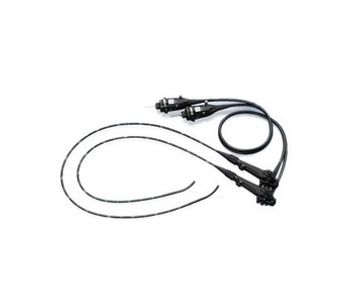
Olympus PCF-PH190L/I
 Olympus · Model PCF-PH190L/I
The PCF-PH190 offers outstanding diagnostic capabilities in a colonoscope of only 9.5 mm outer diameter. Outstanding HD image clarity: High quality HDTV images have outstanding colour reproduction, even brightness, and reduced levels of halation and noise, assisting in lesion detection and accurate diagnosis. Brighter and higher contrast Narrow Band Imaging: NBI in EVIS EXERA III offers a significantly increased viewable distance compared to previous generations. The improved contrast combined with this increased brightness means that NBI opens new possibilities in assisting you in lesion detection and characterisation. Unique Responsive Insertion Technologies: RIT in the PCF-PH190 combines two unique proprietary Olympus technologies: HFT (High-Force Transmission) and PB (Passive Bending). These technologies improve endoscope insertability and ergonomics. Thanks to RIT, the endoscope offers improved operator control when manoeuvring and moves more easily through the colon. Improved image quality: EVIS EXERA III endoscopes offer the highest level of endoscopic image quality, ensuring outstanding colour reproduction and even brightness across the whole endoscopic image decisive in helping you establish a diagnosis. Thanks to improved signal processing, EVIS EXERA III endoscopes feature significantly reduced levels of halation and noise. Waterproof One-touch Connector: EVIS EXERA III endoscopes feature a brand-new connector design no longer requiring the connection of a video or ScopeGuide cable. The connector is fully submersible, eliminating the need for a water-resistant cap. Designed for ease-of-use: Ergonomically designed control section for enhanced colonoscope manoeuvrability, with easy-to-access controls and user-programmable switches.
Key tips
- ·A failed leak test means the scope does not get reprocessed or used - send it for repair, full stop.
- ·A shortened reprocessing cycle is a real infection-control failure, not a minor deviation - follow AAMI ST91 exactly.
- ·Track light-source lamp-hours against the manufacturer's limit rather than running to failure.
Typical Failure Modes
Compiled for this model from its own documentation and established engineering knowledge for this equipment class - not from a verified service record. Confirm against the manufacturer's service manual.
Fails the leak test
HighSymptoms: The manual or automated leak test fails; bubbles from the bending section, insertion tube, or a channel port.
Root cause: A pinhole in the bending-rubber, a channel breach, or a damaged distal cap - fluid invasion risk.
Poor or lost image
HighSymptoms: Blurred, dark, spotty, half-image or no image; colour cast that will not white-balance.
Root cause: Fluid invasion into the CCD / fibre bundle, a broken image bundle, or lens-surface damage / adhesive fog.
Angulation / bending-section fault
MediumSymptoms: Up/down or left/right angulation is loose, will not hold, over-tight, or limited range.
Root cause: Stretched or broken angulation wires, a worn brake, or bending-section damage.
Channel blockage / air-water or suction fault
MediumSymptoms: Poor suction, no or weak air / water, will not pass a cleaning brush.
Root cause: Debris or a kink in the channel, a worn air/water or suction valve seat, or a crushed channel.
Light-guide / connector fault
MediumSymptoms: Dim or no illumination from the scope with a known-good light source.
Root cause: Broken light-guide fibres or a damaged light-guide connector.
Serviceable Parts & Consumables
Serviceable items for this model, compiled from its documentation and engineering knowledge for this equipment class. Service class and relative cost are estimates, not manufacturer figures; no part numbers are given. Confirm intervals and pricing against the manufacturer.
Bending-rubber / distal cap
Class Frequent wear itemRel. cost $$R&R Moderate
Angulation wires / brake assembly
Class Periodic replacementRel. cost $$$R&R Difficult
Air/water & suction valves / seats
Class Frequent wear itemRel. cost $R&R Easy
Image bundle / CCD repair (OEM/3rd-party)
Class Periodic replacementRel. cost $$$$R&R Expert-level
Light-guide bundle / connector
Class Periodic replacementRel. cost $$$R&R Difficult
| Part | Service class | Relative cost | R&R difficulty |
|---|---|---|---|
| Bending-rubber / distal cap | Frequent wear item | $$ | Moderate |
| Angulation wires / brake assembly | Periodic replacement | $$$ | Difficult |
| Air/water & suction valves / seats | Frequent wear item | $ | Easy |
| Image bundle / CCD repair (OEM/3rd-party) | Periodic replacement | $$$$ | Expert-level |
| Light-guide bundle / connector | Periodic replacement | $$$ | Difficult |
Relative cost: $ lowest · $$$$ highest service-part cost for this equipment class. Not a price.
PM Checklist
Preventive-maintenance tasks typical of this equipment class. Perform to the manufacturer's procedure and your facility's policy - this is general reference, not a schedule for this specific unit.
- ·Leak testing before each reprocessing cycle
- ·Scope reprocessing per AAMI ST91
- ·Light source lamp-hour tracking
- ·Annual full PM
Troubleshooting Approach
A starting sequence for this model, compiled from its documentation and engineering knowledge for this equipment class. Follow the manufacturer's service documentation for the actual procedure.
Symptom: Fails the leak test
- Repeat the leak test, watching where bubbles originate (bending section, insertion tube, channels).
- Confirm the leak tester / connector itself holds pressure.
- Quarantine the scope immediately - do not reprocess a leaking scope in fluid.
- Send for channel / bending-section repair.
- Re-leak-test and re-image after repair before returning to service.
Symptom: Poor or lost image
- Confirm the processor, light source and monitor with a known-good scope.
- Inspect the distal lens for scratches, chips or adhesive fog.
- Check for fluid droplets behind the lens (invasion).
- White-balance and check all channels.
- Send for image-bundle / CCD repair if the fault is in the scope.
Technical Specs
- Length
- 1680 mm
Typical Location
Where this class of equipment is typically deployed - general reference, not this unit's own placement record.
- Endoscopy suite / GI lab
- Operating Room
- Bronchoscopy suite
Documents & Manuals
Troubleshoot this device with Bio
Describe a symptom or error code. Bio answers from this device's own documented error codes, failure modes, parts, and guides.
Ask Bio