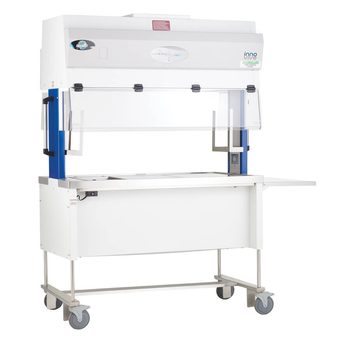
NuAire NU-620 M
 NuAire · Model NU-620 M
AEROMAX CONTROL SYSTEM The Aeromax control system visualizes airflow plenum pressure through a series of multicolored lights and activates both an audible and visual alarm whenever station performance departs from normal parameters. CONFIGURED JUST FOR INNOVIVE The Innovive® edition NU-620M is configured specifically for technicians to carry out the Innovive® disposable mouse cage changing process with the greatest ease and efficiency. The placement of the deep well(s), the feeder holders, and the optional water bottle rack are purposefully engineered to fit seamlessly with the user's workflow to create the most streamlined and ergonomic experience possible when working with these disposable cages. SEGMENTED AIR FLOW ZONES The Innovive® edition’s customization for your workflow does not end with adapting the physical features of the work area. The design of the work area must channel the very airflow dynamics themselves to serve the needs of your cage changing procedure. The work surface is designed with airflow slots that harness the power of the vertical “piston of air” to create clean and dirty cage areas that are separately from each other by an air barrier. NU-S620-500M WORK SURFACE The 5 ft. (1.5m) nominal width model features a pattern of air slots along the perimeter and across the centerline of the work surface. This pattern outlines the clean and dirty cage areas around two deep wells that allow for an easy to reach and space saving way to stack mouse cages.
Key tips
- ·Free-flow protection must be verified on every PM - a failed anti-free-flow clamp is a direct overdose risk.
- ·Test occlusion alarms in both directions - failing to alarm when it should is more dangerous than a false alarm.
- ·Battery run-time complaints are the most common real-world nuisance call - a full charge/discharge cycle test catches most of them.
Typical Failure Modes
Compiled for this model from its own documentation and established engineering knowledge for this equipment class - not from a verified service record. Confirm against the manufacturer's service manual.
Will not power on or unexpected shutdown
HighSymptoms: The infusion therapy is dead, reboots, or shuts down mid-use.
Root cause: Mains lead / fuse, an aged battery, or a power-supply board fault.
Battery will not hold charge
MediumSymptoms: Short run time on battery; low-battery alarm soon after a full charge.
Root cause: Aged rechargeable battery pack or a charger fault.
Display / control-panel fault
MediumSymptoms: Blank, dim or distorted display; unresponsive keys or touchscreen.
Root cause: Display, backlight, or control-board fault.
Fails self-test or calibration
MediumSymptoms: Power-on self-test or the scheduled performance check fails or is out of tolerance.
Root cause: Sensor drift or an internal board fault; recalibration or repair needed.
Serviceable Parts & Consumables
Serviceable items for this model, compiled from its documentation and engineering knowledge for this equipment class. Service class and relative cost are estimates, not manufacturer figures; no part numbers are given. Confirm intervals and pricing against the manufacturer.
Rechargeable battery pack
Class Periodic replacementRel. cost $$R&R Fairly easy
Power supply / mains board
Class Major service partRel. cost $$$R&R Difficult
Display / control-panel assembly
Class Major service partRel. cost $$$R&R Moderate
Cooling fan
Class Major service partRel. cost $R&R Moderate
| Part | Service class | Relative cost | R&R difficulty |
|---|---|---|---|
| Rechargeable battery pack | Periodic replacement | $$ | Fairly easy |
| Power supply / mains board | Major service part | $$$ | Difficult |
| Display / control-panel assembly | Major service part | $$$ | Moderate |
| Cooling fan | Major service part | $ | Moderate |
Relative cost: $ lowest · $$$$ highest service-part cost for this equipment class. Not a price.
PM Checklist
Preventive-maintenance tasks typical of this equipment class. Perform to the manufacturer's procedure and your facility's policy - this is general reference, not a schedule for this specific unit.
- ·Occlusion pressure and flow-rate accuracy verification
- ·Battery conditioning cycle
- ·Door latch and air-in-line sensor inspection
- ·Post-drop functional check before return to service
- ·Annual PM per manufacturer schedule
Troubleshooting Approach
A starting sequence for this model, compiled from its documentation and engineering knowledge for this equipment class. Follow the manufacturer's service documentation for the actual procedure.
Symptom: Will not power on
- Confirm the outlet, mains lead and fuse.
- Try on battery, then on mains only, to isolate the supply.
- Look for a power indicator or POST code.
- Replace the fuse / battery / power supply as isolated.
- Run the self-test after any repair.
Symptom: Fails self-test or calibration
- Note the exact failure message / code.
- Power-cycle and repeat the self-test.
- Verify against a reference / simulator where one applies.
- Recalibrate per the service manual.
- Refer the affected board for service if it will not hold calibration.
Typical Location
Where this class of equipment is typically deployed - general reference, not this unit's own placement record.
- Patient care floors
- ICU
- OR
- Oncology / infusion centers
- Home health (portable pumps)
Documents & Manuals
No documents available for this device yet.
Troubleshoot this device with Bio
Describe a symptom or error code. Bio answers from this device's own documented error codes, failure modes, parts, and guides.
Ask Bio