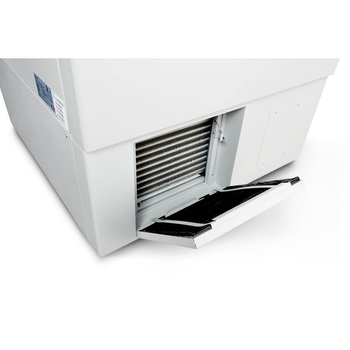
NuAire Blizzard NU-99729VFT
 NuAire · Model Blizzard NU-99729VFT
TOUCH SCREEN CONTROL The NU-99729VFT offers a modern interface to the modern laboratory that displays the most important information on screen and quick access to four submenus for monitoring and configuration. Choose your set points, record sample deposits and withdrawals, graph temperature history, or download the logs for nearly any aspect of your freezer’s operation in just a few quick finger presses. INTERACTIVE ON SCREEN GRAPH Press the tab to view the temperature graph for the last 2 hours, day, week, or month or type in your own custom timeframe to chart the most relevant data range. From whichever one you start, continue by using your fingers on the screen to zoom in, zoom out, scroll or choose a specific moment in time and drill down to the exact temperature reading you are looking for. Finally, download years of data via the side USB port. INSULATED & GASKETED DOORS The outer freezer structure combines VIP and polyurethane foam to insulate the main chamber. The outer door uses quadruple gasketing to defend against the loss of cold air, while the four inner doors not only compartmentalize the interior during door openings but also provide a second line of defense through their own insulation and single gasketing. The outer door perimeter is implanted with heated elements that keep ice and frost build up under control to keep your samples isolated inside.
Key tips
- ·A no-signal/flatline alarm gets checked on the patient first, not the monitor - rule out a real clinical event before troubleshooting.
- ·Recalibrate NIBP against a reference manometer, not just a self-test pass.
- ·Reused patient cables (SpO2, ECG leads) are a common source of intermittent-fault complaints - swap the cable before the module.
Typical Failure Modes
Compiled for this model from its own documentation and established engineering knowledge for this equipment class - not from a verified service record. Confirm against the manufacturer's service manual.
Will not power on or unexpected shutdown
HighSymptoms: The patient monitoring is dead, reboots, or shuts down mid-use.
Root cause: Mains lead / fuse, an aged battery, or a power-supply board fault.
Battery will not hold charge
MediumSymptoms: Short run time on battery; low-battery alarm soon after a full charge.
Root cause: Aged rechargeable battery pack or a charger fault.
Display / control-panel fault
MediumSymptoms: Blank, dim or distorted display; unresponsive keys or touchscreen.
Root cause: Display, backlight, or control-board fault.
Fails self-test or calibration
MediumSymptoms: Power-on self-test or the scheduled performance check fails or is out of tolerance.
Root cause: Sensor drift or an internal board fault; recalibration or repair needed.
Serviceable Parts & Consumables
Serviceable items for this model, compiled from its documentation and engineering knowledge for this equipment class. Service class and relative cost are estimates, not manufacturer figures; no part numbers are given. Confirm intervals and pricing against the manufacturer.
Rechargeable battery pack
Class Periodic replacementRel. cost $$R&R Fairly easy
Power supply / mains board
Class Major service partRel. cost $$$R&R Difficult
Display / control-panel assembly
Class Major service partRel. cost $$$R&R Moderate
Cooling fan
Class Major service partRel. cost $R&R Moderate
| Part | Service class | Relative cost | R&R difficulty |
|---|---|---|---|
| Rechargeable battery pack | Periodic replacement | $$ | Fairly easy |
| Power supply / mains board | Major service part | $$$ | Difficult |
| Display / control-panel assembly | Major service part | $$$ | Moderate |
| Cooling fan | Major service part | $ | Moderate |
Relative cost: $ lowest · $$$$ highest service-part cost for this equipment class. Not a price.
PM Checklist
Preventive-maintenance tasks typical of this equipment class. Perform to the manufacturer's procedure and your facility's policy - this is general reference, not a schedule for this specific unit.
- ·Routine cable and lead-wire inspection for fraying/wear
- ·Battery conditioning cycle
- ·NIBP calibration check against a reference manometer
- ·ECG / SpO2 accuracy verification against a patient simulator
- ·Annual electrical safety test
Troubleshooting Approach
A starting sequence for this model, compiled from its documentation and engineering knowledge for this equipment class. Follow the manufacturer's service documentation for the actual procedure.
Symptom: Will not power on
- Confirm the outlet, mains lead and fuse.
- Try on battery, then on mains only, to isolate the supply.
- Look for a power indicator or POST code.
- Replace the fuse / battery / power supply as isolated.
- Run the self-test after any repair.
Symptom: Fails self-test or calibration
- Note the exact failure message / code.
- Power-cycle and repeat the self-test.
- Verify against a reference / simulator where one applies.
- Recalibrate per the service manual.
- Refer the affected board for service if it will not hold calibration.
Typical Location
Where this class of equipment is typically deployed - general reference, not this unit's own placement record.
- ICU / CCU
- Emergency Department
- OR / PACU
- General med-surg floors
- Step-down units
- Telemetry units
Documents & Manuals
No documents available for this device yet.
Troubleshoot this device with Bio
Describe a symptom or error code. Bio answers from this device's own documented error codes, failure modes, parts, and guides.
Ask Bio