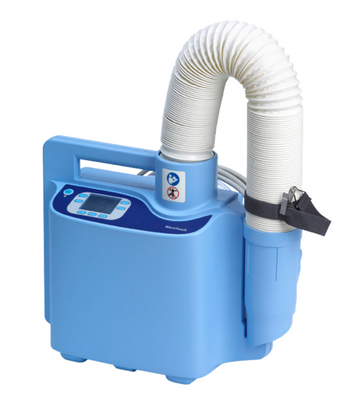
Nellcor Warm Touch 6000
 Nellcor · Model Warm Touch 6000
Easy to Use - intuitive LCD screen and menu function provide all information at a glance Easy to Control - 5 different settings, including ambient and boost, for more flexibility and precision Easy to Handle - the low weight makes it easy to transport and attach to a cart, bed rail or an IV pole Easy to Service - the onscreen filter expiration warning makes it easy to maintain and service.
Key tips
- ·Never skip temperature-accuracy verification to save time - it's the one check that directly prevents burns.
- ·Hose/blanket connector wear is the most common real fault and the easiest to miss on a quick visual check.
Typical Failure Modes
Compiled for this model from its own documentation and established engineering knowledge for this equipment class - not from a verified service record. Confirm against the manufacturer's service manual.
Not delivering warm air / temperature fault
HighSymptoms: Air not warm, temperature alarm, over-temp shutdown, blows cold.
Root cause: Heater element, a temperature-sensor / thermal-cutout fault, or a control-board fault.
Low airflow / blower fault
MediumSymptoms: Weak airflow, blanket will not inflate, blower noisy.
Root cause: Worn blower, a blocked intake filter, or a kinked / disconnected hose.
Hose / adapter fault
LowSymptoms: Hose cracked, will not connect to the blanket, air leaks at the coupling.
Root cause: Worn hose or end fitting.
Filter overdue / dirty
LowSymptoms: Reduced airflow, longer warm-up.
Root cause: Clogged intake / HEPA filter.
Over-temperature safety fault
MediumSymptoms: Repeated over-temp alarms even with good airflow.
Root cause: Sensor or thermal-cutout fault.
Serviceable Parts & Consumables
Serviceable items for this model, compiled from its documentation and engineering knowledge for this equipment class. Service class and relative cost are estimates, not manufacturer figures; no part numbers are given. Confirm intervals and pricing against the manufacturer.
Heater element
Class Major service partRel. cost $$R&R Moderate
Blower / motor
Class Major service partRel. cost $$R&R Moderate
Temperature sensor / thermal cutout
Class Major service partRel. cost $$R&R Moderate
Intake / HEPA filter
Class Frequent wear itemRel. cost $R&R Easy
Delivery hose / adapter
Class Periodic replacementRel. cost $$R&R Easy
| Part | Service class | Relative cost | R&R difficulty |
|---|---|---|---|
| Heater element | Major service part | $$ | Moderate |
| Blower / motor | Major service part | $$ | Moderate |
| Temperature sensor / thermal cutout | Major service part | $$ | Moderate |
| Intake / HEPA filter | Frequent wear item | $ | Easy |
| Delivery hose / adapter | Periodic replacement | $$ | Easy |
Relative cost: $ lowest · $$$$ highest service-part cost for this equipment class. Not a price.
PM Checklist
Preventive-maintenance tasks typical of this equipment class. Perform to the manufacturer's procedure and your facility's policy - this is general reference, not a schedule for this specific unit.
- ·Hose / blanket connector inspection
- ·Temperature-accuracy verification
- ·Annual electrical safety test
Troubleshooting Approach
A starting sequence for this model, compiled from its documentation and engineering knowledge for this equipment class. Follow the manufacturer's service documentation for the actual procedure.
Symptom: Blows cold or over-temp alarm
- Confirm the intake filter is clean and airflow is unobstructed.
- Run the self-test and note any code.
- Check the heater draws current and the temperature sensor reads correctly.
- Verify delivered air temperature at the hose end with a thermometer.
- Replace the heater or sensor / thermal cutout as isolated.
Symptom: Weak airflow
- Replace the intake / HEPA filter.
- Check the hose for kinks or splits.
- Confirm the blanket is an approved type and connected correctly.
- Inspect the blower and impeller.
- Replace the blower if airflow is still low.
Technical Specs
- Height
- 67.1 cm
- Length
- 38.6 cm
- Weight
- 3.1 kg
- Width
- 32.3 cm
Typical Location
Where this class of equipment is typically deployed - general reference, not this unit's own placement record.
- Operating Room
- PACU
- Emergency Department
- Labor & Delivery
- NICU
Documents & Manuals
No documents available for this device yet.
Troubleshoot this device with Bio
Describe a symptom or error code. Bio answers from this device's own documented error codes, failure modes, parts, and guides.
Ask Bio