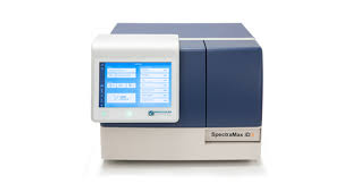
Molecular Devices SpectraMax iD3 and iD5
 Molecular Devices · Model SpectraMax iD3 and iD5
QuickSync The Quick Sync feature pushes data to any computer within the same network and delivers data in an Excel-compatible format. Automatic filter identification Using NFC tags, the SpectraMax iD5 reader automatically detects the wavelength properties of each filter in addition to the filter slide configuration, eliminating confusion and the need for manual information entry. Hybrid optical system The SpectraMax iD5 reader provides the flexibility to set up experiments using filters, or a monochromator in 1 nm increments, or a hybrid mix of monochromator and filter-based wavelength selection. Flexible temperature control Simple-to-use temperature control adjusts the experiment's conditions from ambient up to 66°C. Flash assays captured with ease The SpectraMax Injector System with SmartInject® Technology features low dead volume (10 µL), overflow protection, and ensures equal mixing across the plate for high-precision experiments.
Key tips
- ·Run QC controls before trusting any repair - an analyzer that passes self-test can still report clinically wrong results.
- ·Rule out a reagent lot change before opening the instrument - it can look exactly like a hardware fault.
- ·Centrifuge rotors have a hard retirement age/cycle limit regardless of visible condition - don't eyeball it.
Typical Failure Modes
Compiled for this model from its own documentation and established engineering knowledge for this equipment class - not from a verified service record. Confirm against the manufacturer's service manual.
Absorbance / QC out of tolerance
HighSymptoms: Readings biased or noisy, calibration / self-test fails, poor plate-to-plate reproducibility.
Root cause: Lamp / LED ageing, dirty optics or filters, or a filter-wheel fault.
Plate-transport / carriage fault
MediumSymptoms: Plate not drawn in or positioned, carriage-error message, wells read at the wrong position.
Root cause: Worn transport belt / motor or a position-sensor fault.
Wash-manifold fault (washers)
MediumSymptoms: Wells not aspirated / dispensed evenly, high residual volume, needles blocked.
Root cause: Blocked or bent manifold needles, or a pump / vacuum fault.
Filter / optics fault
MediumSymptoms: A specific wavelength reads wrong, filter not found.
Root cause: Damaged interference filter or a filter-wheel position fault.
PC / printer / LIS fault
LowSymptoms: Results will not calculate, print or transfer.
Root cause: Onboard software, printer, or the interface.
Serviceable Parts & Consumables
Serviceable items for this model, compiled from its documentation and engineering knowledge for this equipment class. Service class and relative cost are estimates, not manufacturer figures; no part numbers are given. Confirm intervals and pricing against the manufacturer.
Lamp / LED source
Class Periodic replacementRel. cost $$R&R Fairly easy
Interference filters / filter wheel
Class Major service partRel. cost $$R&R Moderate
Plate-transport belt / motor
Class Periodic replacementRel. cost $$R&R Moderate
Wash-manifold needles / pump tubing (washers)
Class Frequent wear itemRel. cost $R&R Fairly easy
Optics / detector board
Class Major service partRel. cost $$$R&R Difficult
| Part | Service class | Relative cost | R&R difficulty |
|---|---|---|---|
| Lamp / LED source | Periodic replacement | $$ | Fairly easy |
| Interference filters / filter wheel | Major service part | $$ | Moderate |
| Plate-transport belt / motor | Periodic replacement | $$ | Moderate |
| Wash-manifold needles / pump tubing (washers) | Frequent wear item | $ | Fairly easy |
| Optics / detector board | Major service part | $$$ | Difficult |
Relative cost: $ lowest · $$$$ highest service-part cost for this equipment class. Not a price.
PM Checklist
Preventive-maintenance tasks typical of this equipment class. Perform to the manufacturer's procedure and your facility's policy - this is general reference, not a schedule for this specific unit.
- ·Daily QC controls run and reviewed
- ·Calibration verification per assay
- ·Routine cleaning and decontamination
- ·Scheduled reagent-path and pump-tubing maintenance
Troubleshooting Approach
A starting sequence for this model, compiled from its documentation and engineering knowledge for this equipment class. Follow the manufacturer's service documentation for the actual procedure.
Symptom: Absorbance or QC out of tolerance
- Run the self-test and any absorbance-verification plate.
- Clean the optical path and inspect the filters.
- Check the lamp / LED energy and replace it if low.
- Read a known standard / QC plate.
- Escalate an optics / detector fault to the OEM.
Symptom: Plate transport or wash fault
- Clear any jammed plate and check the carriage moves freely.
- Inspect the transport belt and position sensor.
- For a washer, unblock / straighten the manifold needles and check the pump and vacuum.
- Run a wash-performance check (residual volume).
- Replace the belt, needles or pump tubing as isolated.
Typical Location
Where this class of equipment is typically deployed - general reference, not this unit's own placement record.
- Central / core laboratory
- Point-of-care testing stations
- Blood bank
- Microbiology lab
Documents & Manuals
No documents available for this device yet.
Related calculators
From BioLab, for work done with this kind of equipment.
Troubleshoot this device with Bio
Describe a symptom or error code. Bio answers from this device's own documented error codes, failure modes, parts, and guides.
Ask Bio