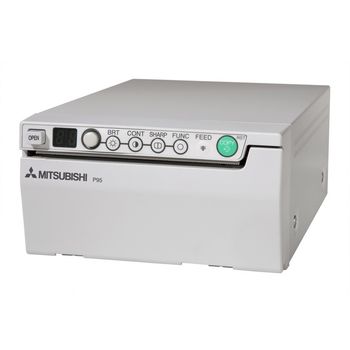
Mitsubishi International Corporation Mitsubishi P-95DW
 Mitsubishi International Corporation · Model Mitsubishi P-95DW
High speed printing High-density 325 dpi thermal head Enhanced user-friendly controls conveniently located on front panel Streamlined design with small footprint Jam-free reliability USB 2.0 interface Worldwide compatibility Internal 16-bit ASIC image processing simultaneously achieves faster and high quality printing Paper save mode allows for more standard prints per roll Long lasting quality and reliability General Specifications Print Method: Thermal printing on thermal sensitive paper Dot Density: 1280 dots/100 m (325 dpi) Resolution: Standard - 1280 x 960 Grayscale: 256 levels Interface: USB 2.0 Print Capacity: Up to 254 set at (1280 x 960) page size Print Speed: Standard – 1.9 sec. Picture Size: Standard – 3.94 x 2.95” (100 x 75 mm) Power Supply: 100-240V AC, 50/60Hz Power Consumption: 1.5 to 0.8 amps Operating Temperature: 5°C-40°C Dimensions (W x D x H): Approx. 6.07 x 9.45 x 3.33” (154 x 240 x 84.5 mm) Weight: Approx. 5.72 lbs. (2.6 kg.) Regulatory Approvals: UL60601-1; CAN.CSA C22.2 No.601-1(C-UL); FCC-Part 15 Class A, ICES-003 Class A; TÜV GS, TÜB GM; CE Mark (EMC 2004/108/EC); MIC approved.
Key tips
- ·When no category-specific guidance fits, default to the manufacturer's own service manual and the general troubleshooting method in the Engineer's Guide.
- ·Run an incoming and annual electrical safety test regardless of how niche the device is.
Typical Failure Modes
Compiled for this model from its own documentation and established engineering knowledge for this equipment class - not from a verified service record. Confirm against the manufacturer's service manual.
Poor print quality
HighSymptoms: Density too light / dark, banding, streaks, non-uniform image, blotches.
Root cause: Print head / laser optics contamination, film / cartridge issue, or density-calibration drift.
Film jam / transport fault
MediumSymptoms: Film jams in the pick-up or transport, mis-feeds, or multi-feeds.
Root cause: Worn pick-up rollers, a transport-roller fault, or a mis-loaded film cartridge.
Density / calibration fault
MediumSymptoms: Prints do not match the reference, calibration fails, densitometer error.
Root cause: Internal densitometer or the calibration routine.
DICOM / queue fault
MediumSymptoms: Jobs stuck in the queue, printer offline to modalities, association failures.
Root cause: Network / DICOM configuration or the controller board.
Thermal head / laser fault
MediumSymptoms: Whole-image defect, print-engine error.
Root cause: Thermal print head or the laser / optics module.
Serviceable Parts & Consumables
Serviceable items for this model, compiled from its documentation and engineering knowledge for this equipment class. Service class and relative cost are estimates, not manufacturer figures; no part numbers are given. Confirm intervals and pricing against the manufacturer.
Pick-up / transport rollers
Class Periodic replacementRel. cost $$R&R Moderate
Thermal print head / laser optics
Class Periodic replacementRel. cost $$$R&R Difficult
Internal densitometer
Class Major service partRel. cost $$R&R Moderate
Controller / network board
Class Major service partRel. cost $$R&R Moderate
Film (media)
Class ConsumableRel. cost $$R&R Easy
| Part | Service class | Relative cost | R&R difficulty |
|---|---|---|---|
| Pick-up / transport rollers | Periodic replacement | $$ | Moderate |
| Thermal print head / laser optics | Periodic replacement | $$$ | Difficult |
| Internal densitometer | Major service part | $$ | Moderate |
| Controller / network board | Major service part | $$ | Moderate |
| Film (media) | Consumable | $$ | Easy |
Relative cost: $ lowest · $$$$ highest service-part cost for this equipment class. Not a price.
PM Checklist
Preventive-maintenance tasks typical of this equipment class. Perform to the manufacturer's procedure and your facility's policy - this is general reference, not a schedule for this specific unit.
- ·Follow the manufacturer's PM schedule
- ·Perform incoming and annual electrical safety testing per facility biomedical program
Troubleshooting Approach
A starting sequence for this model, compiled from its documentation and engineering knowledge for this equipment class. Follow the manufacturer's service documentation for the actual procedure.
Symptom: Poor print quality
- Print the built-in test / SMPTE pattern.
- Run the density calibration.
- Clean the print head / laser optics per the manual.
- Confirm the film type / cartridge matches the printer setting.
- Replace the print head or optics module if a whole-image defect persists.
Symptom: Film jam or jobs stuck
- Clear the jam and note the location.
- Inspect and clean the pick-up and transport rollers.
- For queue problems, check the DICOM association and network.
- Restart the print controller.
- Send a test job from a modality to confirm.
Typical Location
Where this class of equipment is typically deployed - general reference, not this unit's own placement record.
- Varies by device - check the unit's own manual for facility placement guidance
Documents & Manuals
No documents available for this device yet.
Troubleshoot this device with Bio
Describe a symptom or error code. Bio answers from this device's own documented error codes, failure modes, parts, and guides.
Ask Bio