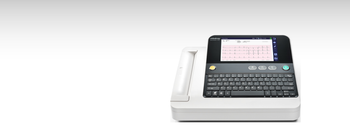
Mindray BeneHeart R12
Mindray · Model BeneHeart R12
Ergonomic look and simple layout enable R12 to achieve user’s satisfaction: 8-inch LCD screen with 800*400 high resolution Frosted membrane keyboard. Typing and editing can be as easy and comfortable as using a computer Optional touch bars for users with different operating preferences Built-in thermal printer and external USB printer supported Minimized workload and optimized workflow On-screen full preview maximizes user’s flexibility without printing a paper report. Barcode scanner supported. Shorten the time of information input.
Key tips
- ·When no category-specific guidance fits, default to the manufacturer's own service manual and the general troubleshooting method in the Engineer's Guide.
- ·Run an incoming and annual electrical safety test regardless of how niche the device is.
Typical Failure Modes
Compiled for this model from its own documentation and established engineering knowledge for this equipment class - not from a verified service record. Confirm against the manufacturer's service manual.
Noisy ECG / lead-off
HighSymptoms: Baseline wander, muscle / AC noise, "lead fail", poor 12-lead quality.
Root cause: Poor skin prep, dried or lifting electrodes, or a worn patient cable / lead set.
Will not acquire / analyse / print
MediumSymptoms: Acquisition hangs, no interpretation, printer jam or faint output.
Root cause: Acquisition-module fault, a software issue, or thermal print-head / paper handling.
Battery / power fault
MediumSymptoms: Short battery run time, will not hold charge, will not power on.
Root cause: Aged battery pack.
Connectivity fault
LowSymptoms: ECGs will not transmit to the EMR / data system, orders not received.
Root cause: Wi-Fi / LAN configuration or the communication module.
Serviceable Parts & Consumables
Serviceable items for this model, compiled from its documentation and engineering knowledge for this equipment class. Service class and relative cost are estimates, not manufacturer figures; no part numbers are given. Confirm intervals and pricing against the manufacturer.
Patient cable / 10-lead set
Class Frequent wear itemRel. cost $$R&R Easy
Acquisition module
Class Major service partRel. cost $$$R&R Moderate
Thermal print head / paper
Class Periodic replacementRel. cost $R&R Fairly easy
Battery pack
Class Periodic replacementRel. cost $$R&R Fairly easy
Wi-Fi / communication module
Class Major service partRel. cost $$R&R Moderate
| Part | Service class | Relative cost | R&R difficulty |
|---|---|---|---|
| Patient cable / 10-lead set | Frequent wear item | $$ | Easy |
| Acquisition module | Major service part | $$$ | Moderate |
| Thermal print head / paper | Periodic replacement | $ | Fairly easy |
| Battery pack | Periodic replacement | $$ | Fairly easy |
| Wi-Fi / communication module | Major service part | $$ | Moderate |
Relative cost: $ lowest · $$$$ highest service-part cost for this equipment class. Not a price.
PM Checklist
Preventive-maintenance tasks typical of this equipment class. Perform to the manufacturer's procedure and your facility's policy - this is general reference, not a schedule for this specific unit.
- ·Follow the manufacturer's PM schedule
- ·Perform incoming and annual electrical safety testing per facility biomedical program
Troubleshooting Approach
A starting sequence for this model, compiled from its documentation and engineering knowledge for this equipment class. Follow the manufacturer's service documentation for the actual procedure.
Symptom: Noisy ECG
- Re-prep the skin and fit fresh electrodes.
- Secure the lead wires and route away from AC sources.
- Swap in a known-good patient cable / lead set.
- Check the acquisition module connection.
- Confirm a clean 12-lead.
Symptom: Will not transmit
- Confirm the Wi-Fi / network settings and signal.
- Check the EMR / data-system destination configuration.
- Send a test ECG.
- Reboot the unit.
- Escalate a persistent communication fault.
Typical Location
Where this class of equipment is typically deployed - general reference, not this unit's own placement record.
- Varies by device - check the unit's own manual for facility placement guidance
Documents & Manuals
No documents available for this device yet.
Troubleshoot this device with Bio
Describe a symptom or error code. Bio answers from this device's own documented error codes, failure modes, parts, and guides.
Ask Bio