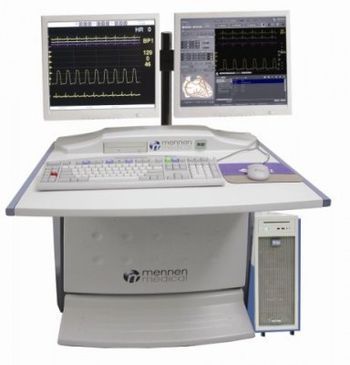
Mennen Medical HORIZON XVu
 Mennen Medical · Model HORIZON XVu
Complete Hemodynamic Analysis. Gradient / Valve / Resistance calculations (Simultaneous Multi Pressure Analysis or Pullback). Oximetry Package. PCI Table. Multi-purpose Intuitive User Interface. Complete Full Disclosure Playback. Intra Cardiac ECG Lead Capability (6 Channels0. Coronary Tree Graphical Documentation. Import / Export Connectivity - HL7 / DICOM / XML Interfaces. Customizable Billing, Inventory and Lab Interfaces (with HemoCIS). Interface Availability for ACC Data Vendors. Pre-configured and Customer Configurable Notes. Versatile Customized Reporting. Built in interface to “HemoCIS” database. Interface to Mennen Medical’s VitaLogik / Envoy Bedside Monitoring Family (with HemoCIS). Remote Service via MODEM / VPN. Network Storage and Archive Capability for All Procedural Data. Upgrade Pathway Available for All Older Mennen Medical Hemodynamic Systems. FFR Measurement Software.
Typical Failure Modes
Compiled for this model from its own documentation and established engineering knowledge for this equipment class - not from a verified service record. Confirm against the manufacturer's service manual.
Will not power on or unexpected shutdown
HighSymptoms: The patient monitoring is dead, reboots, or shuts down mid-use.
Root cause: Mains lead / fuse, an aged battery, or a power-supply board fault.
Battery will not hold charge
MediumSymptoms: Short run time on battery; low-battery alarm soon after a full charge.
Root cause: Aged rechargeable battery pack or a charger fault.
Display / control-panel fault
MediumSymptoms: Blank, dim or distorted display; unresponsive keys or touchscreen.
Root cause: Display, backlight, or control-board fault.
Fails self-test or calibration
MediumSymptoms: Power-on self-test or the scheduled performance check fails or is out of tolerance.
Root cause: Sensor drift or an internal board fault; recalibration or repair needed.
Serviceable Parts & Consumables
Serviceable items for this model, compiled from its documentation and engineering knowledge for this equipment class. Service class and relative cost are estimates, not manufacturer figures; no part numbers are given. Confirm intervals and pricing against the manufacturer.
Rechargeable battery pack
Class Periodic replacementRel. cost $$R&R Fairly easy
Power supply / mains board
Class Major service partRel. cost $$$R&R Difficult
Display / control-panel assembly
Class Major service partRel. cost $$$R&R Moderate
Cooling fan
Class Major service partRel. cost $R&R Moderate
| Part | Service class | Relative cost | R&R difficulty |
|---|---|---|---|
| Rechargeable battery pack | Periodic replacement | $$ | Fairly easy |
| Power supply / mains board | Major service part | $$$ | Difficult |
| Display / control-panel assembly | Major service part | $$$ | Moderate |
| Cooling fan | Major service part | $ | Moderate |
Relative cost: $ lowest · $$$$ highest service-part cost for this equipment class. Not a price.
Error Codes
Extracted directly from this unit's own service manual.
146-040-144Switch, Fast Ethernet
960-211-030External Modem
960-500-600CathLab Computer
960-502-021Colored Keyboard for Computer
102-204-048Inrush Current Limiter 25A 115VAC/230VAC
102-206-003Main Switch
935-823-41919" Display
960-202-121Video Line Driver
960-210-310DVD
960-326-020Video Cable 1.8m (M/M)
108-007-122C.F.E. Power supply
199-104-401PLUG, AIR CONNECTOR,3MM HOSE TAIL.
551-130-045NIBP Module (CAS OEM) - ND 12VDC 1200 Baud Rate
551-139-012C.F.E. SPO2 Board (Masimo)
551-142-142Etco2 OEM Module
551-306-131NIBP Cable Assy. (60mm)
641-554-044SPO2 CONNECTOR ASSY. FOR CFE Nellcor
960-552-220CFEc, PCBA- Front end board
960-552-425CFEc, PCBA- Main TOP with Video&NIBPSO2_Masimo
960-554-035SPEAKER ASSY FOR CFE
960-554-043SPO2 CONNECTOR ASSY. FOR CFE Masimo
960-554-047CO / TEMP. CONNECTOR ASSY. FOR CFE
960-554-049TEMP. CONNECTOR ASSY. FOR CFE
960-554-127C.F.Ec. with NIBP & Masimo (with video)
960-554-141ECG CONNECTOR ASSY. FOR CFEB
960-554-145IBP CONNECTOR ASSY. FOR CFEB
960-554-641Bezel CFEc (Front PANEL)
960-554-642Holder For AC cable for CFEc
960-554-644Rear CFEc Panel
960-554-645Holder CFEc P/S for CFEc
960-554-647Linear sides of panel CFEc
960-554-648Left & Right Sides CFEc (inc. 8cap)
960-554-649Door of Etco2 for CFEc
960-554-651Holder Ring For Speaker for CFEc
960-554-652CAPS Covers Holes for CFEc
551-306-011BP Adapter Cable
551-306-021SPO2(MASIMO) - PATIENT EXTENSION CABLE
551-339-005Spo2 Adapter Sensor Masimo
551-339-015Spo2 Adapter Sensor Masimo
551-306-415Spo2 Adapter Cable Nellcor
800-060-731Oximax Nellcor Sensor
551-306-072NIBP Accessory Kit, Adult
551-306-110C.O. Adapter kit (Co-Set)
800-060-450CO CO-SET CABLE NI
551-306-013CO Cable Award co-set/Temp Probe
Troubleshooting Approach
A starting sequence for this model, compiled from its documentation and engineering knowledge for this equipment class. Follow the manufacturer's service documentation for the actual procedure.
Symptom: A parameter drops out or reads wrong (ECG / IBP / SpO2 / temp / CO2 / CO)
- Reseat the patient cable at the module and at the monitor.
- Swap in a known-good cable / sensor for that parameter and re-test.
- Move the module to another host or slot to tell module from host.
- Inspect the module docking connector for bent or recessed pins.
- Verify against a patient simulator; replace the cable, or refer the parameter module / input board if the fault stays with it.
Symptom: NIBP will not measure or is inaccurate
- Leak-test the cuff and hose (occlude and watch for pressure decay).
- Run the monitor's NIBP calibration-verification against a calibrated manometer.
- Confirm correct cuff size and placement and check for a kinked hose.
- Verify against a NIBP simulator at several pressures.
- Refer the monitor for internal pump / valve service if it still fails.
Symptom: Blank / dim / frozen display or unresponsive touchscreen
- Power-cycle the monitor fully (mains removed, battery out where possible).
- Check the display backlight and the display / touchscreen cable.
- Note any boot or self-test error code.
- Re-calibrate the touchscreen if the touch offset is the issue.
- Replace the display / touchscreen assembly or refer the main board.
Symptom: Not shown at the central station / network dropout
- Confirm the wired drop or Wi-Fi settings and that other monitors on that segment are online.
- Check the monitor's network address / unit-bed assignment and re-admit.
- Reseat the network card / cable.
- Restart the monitor's network interface.
- Escalate a whole-unit outage to the central-station server / IT.