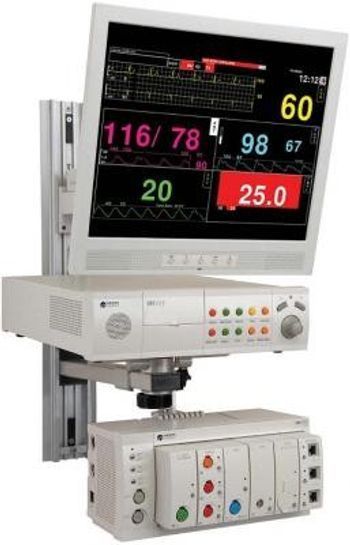
Mennen Medical EnvoyTM
 Mennen Medical · Model EnvoyTM
Full Disclosure Retrieves all ECG leads in full resolution and enables view of all arrhythmias during the entire monitoring period. Graphical Trend The trend panel shows graphical trends of up to eight vital signs with an up to one minute resolution. Provides a long-term view of changes in the patient's condition and their direction. Numerical Chart The table of numerical values of vital signs can be displayed in up to one minute resolution, including alarms and events marking. The chart format is user-defined and can be configured to suit the needs of each clinical environment. Arrhythmia Analysis Enables three optional configurations: none, basic or extended arrhythmia alarms. The ECG waveform is analyzed continuously, based on a dual lead QRS detection algorithm. QRS classification is included in the full disclosure files. ST Watch Enables review of ST data as a long-term graphic representation. ST Watch represents changes in the ST trend over time, displays trend presentation of calculated ST parameters and allows morphology comparisons. ST All-Lead Analysis Performs simultaneous and continuous ST analysis of all ECG leads with ST alarms. Data Management Calculations of Hemodynamic, Respiratory mechanics, Oxygenation and Renal parameters presented as graphical trends and tabular use-defined charts. HRV Heart Rate Variability of normal QRS complexes is calculated in the time domain and as a histogram. Results are reported as a numerical chart and graphic trends. All ECG Lead Display The "All ECG Leads" key provides temporary all lead display that will automatically revert to the main screen, following a specified time-out period. Drug Titration and Calculation Calculates drug concentrate, infusion rates and injection amounts based on clinically specified parameters. All medication charts are linked to full disclosure, overview and trends.
Key tips
- ·A no-signal/flatline alarm gets checked on the patient first, not the monitor - rule out a real clinical event before troubleshooting.
- ·Recalibrate NIBP against a reference manometer, not just a self-test pass.
- ·Reused patient cables (SpO2, ECG leads) are a common source of intermittent-fault complaints - swap the cable before the module.
Typical Failure Modes
Compiled for this model from its own documentation and established engineering knowledge for this equipment class - not from a verified service record. Confirm against the manufacturer's service manual.
A parameter drops out or reads wrong
HighSymptoms: ECG, IBP, SpO2, temperature, CO2 or CO intermittently drops or is implausible.
Root cause: Worn patient cable / sensor, or a parameter-module / input-board fault.
NIBP will not measure or is inaccurate
MediumSymptoms: NIBP times out, cuff will not inflate / hold, readings implausible.
Root cause: Internal NIBP pump or valve, a cuff / hose leak, or a pressure-transducer fault.
Module / parameter not recognised
MediumSymptoms: The host does not display a plugged-in module or a built-in parameter.
Root cause: Docking / connector fault or an internal board fault.
Display / touchscreen fault
MediumSymptoms: Blank, dim or distorted display; unresponsive touchscreen.
Root cause: Display, backlight, or controller fault.
Battery / power fault
MediumSymptoms: Short battery run time, will not hold charge, will not power on.
Root cause: Aged battery pack or a power-supply fault.
Network / central-station connectivity fault
LowSymptoms: Monitor not shown at the central station, admit fails, intermittent drop.
Root cause: Wired / Wi-Fi network configuration or a communication board.
Serviceable Parts & Consumables
Serviceable items for this model, compiled from its documentation and engineering knowledge for this equipment class. Service class and relative cost are estimates, not manufacturer figures; no part numbers are given. Confirm intervals and pricing against the manufacturer.
Patient cable set (ECG / IBP / SpO2 / temp)
Class Frequent wear itemRel. cost $$R&R Easy
NIBP cuff and hose
Class Frequent wear itemRel. cost $R&R Easy
Internal NIBP pump / valve
Class Major service partRel. cost $$$R&R Difficult
Parameter module / input board
Class Major service partRel. cost $$$R&R Difficult
Battery pack
Class Periodic replacementRel. cost $$R&R Fairly easy
Display / touchscreen assembly
Class Major service partRel. cost $$$R&R Moderate
| Part | Service class | Relative cost | R&R difficulty |
|---|---|---|---|
| Patient cable set (ECG / IBP / SpO2 / temp) | Frequent wear item | $$ | Easy |
| NIBP cuff and hose | Frequent wear item | $ | Easy |
| Internal NIBP pump / valve | Major service part | $$$ | Difficult |
| Parameter module / input board | Major service part | $$$ | Difficult |
| Battery pack | Periodic replacement | $$ | Fairly easy |
| Display / touchscreen assembly | Major service part | $$$ | Moderate |
Relative cost: $ lowest · $$$$ highest service-part cost for this equipment class. Not a price.
PM Checklist
Preventive-maintenance tasks typical of this equipment class. Perform to the manufacturer's procedure and your facility's policy - this is general reference, not a schedule for this specific unit.
- ·Routine cable and lead-wire inspection for fraying/wear
- ·Battery conditioning cycle
- ·NIBP calibration check against a reference manometer
- ·ECG / SpO2 accuracy verification against a patient simulator
- ·Annual electrical safety test
Troubleshooting Approach
A starting sequence for this model, compiled from its documentation and engineering knowledge for this equipment class. Follow the manufacturer's service documentation for the actual procedure.
Symptom: A parameter drops out
- Reseat the patient cable at the module / monitor.
- Swap in a known-good cable / sensor for that parameter.
- Dock the module on a different host / slot to isolate module vs host.
- Inspect the docking connector for bent pins.
- Replace the cable, or refer the module / input board if the fault stays with it.
Symptom: NIBP problem
- Leak-test the cuff and hose.
- Run the monitor's NIBP calibration verification.
- Check for a kinked hose or a positional patient limb.
- Verify NIBP against a reference / simulator.
- Refer the monitor for internal pump / valve service if it persists.
Typical Location
Where this class of equipment is typically deployed - general reference, not this unit's own placement record.
- ICU / CCU
- Emergency Department
- OR / PACU
- General med-surg floors
- Step-down units
- Telemetry units
Documents & Manuals
No documents available for this device yet.
Troubleshoot this device with Bio
Describe a symptom or error code. Bio answers from this device's own documented error codes, failure modes, parts, and guides.
Ask Bio