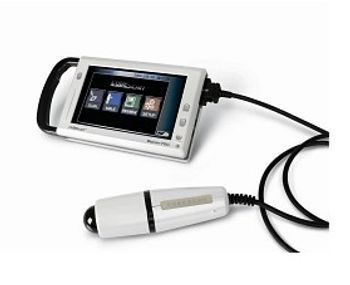
Medline BioCon CUBEscan 700
 Medline · Model BioCon CUBEscan 700
Compact and portable, the 3-D ultrasound device provides quick, safe and non-invasive measurements of bladder volume and post-void urinary retention (PVR). Real-time pre-scan helps improve accuracy, reduce improper scans and save time by viewing the bladder before performing the test. Built-in printer facilitates immediate documentation in the chart. 7" TFT-LCD (WVGA) full-color touch screen.
Key tips
- ·Never bypass a radiation interlock to "just get the image" - this is one of the few true zero-tolerance rules in BMET work.
- ·Trend image-quality phantom results over time - drift shows up before an outright failure does.
- ·Portable/mobile units take real physical abuse from transport - check wheel locks and cable strain reliefs more often than fixed units.
Typical Failure Modes
Compiled for this model from its own documentation and established engineering knowledge for this equipment class - not from a verified service record. Confirm against the manufacturer's service manual.
Will not scan / inaccurate volume
HighSymptoms: No scan on the button press, implausible bladder volume, aiming reticle unstable.
Root cause: Probe / transducer fault, a probe-cable fault, or a calibration issue.
Battery will not hold charge
MediumSymptoms: Short run time, will not turn on, will not charge in the cradle.
Root cause: Aged battery or a charging-contact / cradle fault.
Probe / cable fault
MediumSymptoms: Image drops out when the cable is moved, probe not detected.
Root cause: Broken conductors in the probe cable or a worn connector.
Display / console fault
MediumSymptoms: Blank or frozen display, touchscreen unresponsive.
Root cause: Display or console-board fault.
Printer fault (if fitted)
LowSymptoms: No or faint printout.
Root cause: Thermal printer or paper.
Serviceable Parts & Consumables
Serviceable items for this model, compiled from its documentation and engineering knowledge for this equipment class. Service class and relative cost are estimates, not manufacturer figures; no part numbers are given. Confirm intervals and pricing against the manufacturer.
Probe / transducer
Class Periodic replacementRel. cost $$$R&R Moderate
Battery
Class Periodic replacementRel. cost $$R&R Easy
Probe cable / connector
Class Periodic replacementRel. cost $$R&R Fairly easy
Display / console board
Class Major service partRel. cost $$$R&R Moderate
Thermal printer / paper
Class Periodic replacementRel. cost $R&R Fairly easy
| Part | Service class | Relative cost | R&R difficulty |
|---|---|---|---|
| Probe / transducer | Periodic replacement | $$$ | Moderate |
| Battery | Periodic replacement | $$ | Easy |
| Probe cable / connector | Periodic replacement | $$ | Fairly easy |
| Display / console board | Major service part | $$$ | Moderate |
| Thermal printer / paper | Periodic replacement | $ | Fairly easy |
Relative cost: $ lowest · $$$$ highest service-part cost for this equipment class. Not a price.
PM Checklist
Preventive-maintenance tasks typical of this equipment class. Perform to the manufacturer's procedure and your facility's policy - this is general reference, not a schedule for this specific unit.
- ·Daily QC per modality: image-quality phantom test
- ·Tube and detector inspection
- ·Annual state-required radiation safety survey
- ·Vendor-scheduled preventive maintenance
Troubleshooting Approach
A starting sequence for this model, compiled from its documentation and engineering knowledge for this equipment class. Follow the manufacturer's service documentation for the actual procedure.
Symptom: Will not scan or volume looks wrong
- Charge the device fully and retry.
- Confirm gel and probe placement over the bladder, pubic-bone below the probe.
- Verify against a bladder phantom if available.
- Swap the probe if the site has a spare.
- Return for calibration / probe service if volumes stay implausible.
Symptom: Short battery life
- Charge for the full recommended time and check the cradle contacts.
- Run a battery capacity check if the device supports one.
- Replace the battery.
- Confirm scan count per charge returns to normal.
- Clean and inspect the charging cradle.
Typical Location
Where this class of equipment is typically deployed - general reference, not this unit's own placement record.
- Radiology / Imaging department
- Emergency Department (portable units)
- Operating Room (C-arms)
- Cath lab
- Bedside ICU (portable X-ray)
Documents & Manuals
Troubleshoot this device with Bio
Describe a symptom or error code. Bio answers from this device's own documented error codes, failure modes, parts, and guides.
Ask Bio