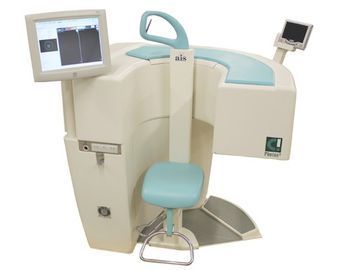
Mediso C! Photon2
 Mediso · Model C! Photon2
Ergonomic and Compact Design - features an open gantry that reduces patient anxiety, while occupying the smallest equipment footprint available today. Patient Entertainment System - minimizes patient motion and reduces patient anxiety by keeping the patient focused on the entertainment screen. Relaxed Forward -leaning Imaging Position - minimizes heart-to-detector distance while eliminating the need for arms-over-head positioning of the patient. Ultimate Patient Proximity - the minimal distance between the patient and the detectors provides better image quality and reduces patient motion. Solid Investment - affordably priced, the C! will easily fit into an 7' x 7' exam room. Simple operation and fast setup provides exceptional patient throughput, which translates into a higher revenue stream. Unique Chair Design - ensures easy patient access, provides effortless patient positioning, and allows easy accessibility for wheelchair patients. The solid design can hold large patients, weighing up to 500 lbs. Standard Connectivity - the C! supports DICOM 3.0 protocol, including DICOM storage, printing, and work-list Computer-controlled Front-end Electronics - provides superb image quality, evident by the C!’s excellent NEMA specifications. Touchscreen Technology - the intuitive user interface provides quick patient setup and acquisition monitoring. Concealed Detector Design - provides ultimate patient safety by eliminating any accessible detector movement.
Key tips
- ·Never bypass a radiation interlock to "just get the image" - this is one of the few true zero-tolerance rules in BMET work.
- ·Trend image-quality phantom results over time - drift shows up before an outright failure does.
- ·Portable/mobile units take real physical abuse from transport - check wheel locks and cable strain reliefs more often than fixed units.
Typical Failure Modes
Compiled for this model from its own documentation and established engineering knowledge for this equipment class - not from a verified service record. Confirm against the manufacturer's service manual.
Uniformity / energy-calibration drift
HighSymptoms: Failed daily uniformity or a visible non-uniformity, energy-peak drift, COR out of tolerance.
Root cause: PMT gain drift, a bad PMT, crystal hydration, or electronics drift - needs tuning / calibration.
Detector / PMT fault
HighSymptoms: A cold or hot region in the flood, a specific PMT flagged, count-rate errors.
Root cause: Failed photomultiplier tube or its preamp, or a light-guide / crystal problem.
Gantry / detector-motion fault
MediumSymptoms: Detectors will not rotate, radially track, or reach position; collision-sensor trips.
Root cause: Drive motor, encoder, belt, or the body-contour / collision sensors.
Patient table / pallet fault
MediumSymptoms: Table will not index, height or horizontal drive faults.
Root cause: Table drive or encoder fault.
Acquisition / processing computer fault
MediumSymptoms: Acquisition hangs, studies will not reconstruct or archive.
Root cause: Acquisition or processing computer, or the network.
Serviceable Parts & Consumables
Serviceable items for this model, compiled from its documentation and engineering knowledge for this equipment class. Service class and relative cost are estimates, not manufacturer figures; no part numbers are given. Confirm intervals and pricing against the manufacturer.
Photomultiplier tube / preamp
Class Major service partRel. cost $$$R&R Difficult
Detector-motion drive / encoder / belt
Class Major service partRel. cost $$$R&R Difficult
Table drive / encoder
Class Major service partRel. cost $$$R&R Difficult
Acquisition / processing computer
Class Major service partRel. cost $$$R&R Moderate
Collimator (handling cart / seals)
Class Major service partRel. cost $$R&R Moderate
| Part | Service class | Relative cost | R&R difficulty |
|---|---|---|---|
| Photomultiplier tube / preamp | Major service part | $$$ | Difficult |
| Detector-motion drive / encoder / belt | Major service part | $$$ | Difficult |
| Table drive / encoder | Major service part | $$$ | Difficult |
| Acquisition / processing computer | Major service part | $$$ | Moderate |
| Collimator (handling cart / seals) | Major service part | $$ | Moderate |
Relative cost: $ lowest · $$$$ highest service-part cost for this equipment class. Not a price.
PM Checklist
Preventive-maintenance tasks typical of this equipment class. Perform to the manufacturer's procedure and your facility's policy - this is general reference, not a schedule for this specific unit.
- ·Daily QC per modality: image-quality phantom test
- ·Tube and detector inspection
- ·Annual state-required radiation safety survey
- ·Vendor-scheduled preventive maintenance
Troubleshooting Approach
A starting sequence for this model, compiled from its documentation and engineering knowledge for this equipment class. Follow the manufacturer's service documentation for the actual procedure.
Symptom: Failed uniformity or peak drift
- Repeat the flood with a correct source and geometry.
- Auto-peak / re-tune the detectors per the service procedure.
- Run the full calibration set (uniformity, linearity, energy, COR).
- If a PMT region is persistently cold/hot, flag that PMT for replacement.
- Do not image patients until QC is back in tolerance.
Symptom: Detector or gantry motion fault
- Note the axis and any collision-sensor indication.
- Clear obstructions and check the body-contour / collision sensors.
- Run the motion self-test / calibration.
- Inspect the drive belt and encoder.
- Replace the drive component or refer as isolated.
Technical Specs
- Height
- 44.5 in top bare
- Length
- 42 in base
- Weight
- 1100 lbs
- Patient Weight Capacity
- 500 lbs
- Width
- 30.5 in base
Typical Location
Where this class of equipment is typically deployed - general reference, not this unit's own placement record.
- Radiology / Imaging department
- Emergency Department (portable units)
- Operating Room (C-arms)
- Cath lab
- Bedside ICU (portable X-ray)
Documents & Manuals
Troubleshoot this device with Bio
Describe a symptom or error code. Bio answers from this device's own documented error codes, failure modes, parts, and guides.
Ask Bio