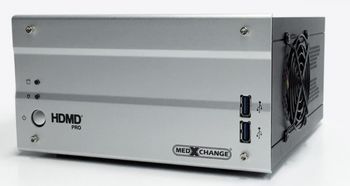
Med X Change HDMD Pro
 Med X Change · Model HDMD Pro
Medical recording system Captures High Definition video and images from two sources at up to 1080p 60fps, capture digital images without interruption of video capture, and store the captured media with patient information. It can duplicate captured videos and images to portable media, network storage, iOS and Android devices, and PACS (Picture Archiving and Communication Systems) for documentation, storage, and presentation.
Key tips
- ·When no category-specific guidance fits, default to the manufacturer's own service manual and the general troubleshooting method in the Engineer's Guide.
- ·Run an incoming and annual electrical safety test regardless of how niche the device is.
Typical Failure Modes
Compiled for this model from its own documentation and established engineering knowledge for this equipment class - not from a verified service record. Confirm against the manufacturer's service manual.
No or distorted recording / capture
HighSymptoms: Black or corrupt recorded video, no signal from the source, dropped frames.
Root cause: Input cable / format mismatch (SDI/HDMI/DVI), a capture-card fault, or the source not outputting.
Storage drive full or failing
MediumSymptoms: Cannot start a recording, slow operation, SMART / drive errors.
Root cause: Internal drive near capacity or degrading.
Optical / USB export fault
MediumSymptoms: Discs will not burn, USB media not recognised, export fails.
Root cause: Optical drive, USB port, or media fault.
No output to the room display
MediumSymptoms: Recorder runs but the wall / boom monitor shows nothing.
Root cause: Video-output port or cable.
Serviceable Parts & Consumables
Serviceable items for this model, compiled from its documentation and engineering knowledge for this equipment class. Service class and relative cost are estimates, not manufacturer figures; no part numbers are given. Confirm intervals and pricing against the manufacturer.
Capture card
Class Major service partRel. cost $$$R&R Moderate
Internal storage drive / SSD
Class Periodic replacementRel. cost $$R&R Moderate
Optical drive
Class Periodic replacementRel. cost $$R&R Fairly easy
Video I/O cables (SDI / HDMI / DVI)
Class Periodic replacementRel. cost $R&R Easy
| Part | Service class | Relative cost | R&R difficulty |
|---|---|---|---|
| Capture card | Major service part | $$$ | Moderate |
| Internal storage drive / SSD | Periodic replacement | $$ | Moderate |
| Optical drive | Periodic replacement | $$ | Fairly easy |
| Video I/O cables (SDI / HDMI / DVI) | Periodic replacement | $ | Easy |
Relative cost: $ lowest · $$$$ highest service-part cost for this equipment class. Not a price.
PM Checklist
Preventive-maintenance tasks typical of this equipment class. Perform to the manufacturer's procedure and your facility's policy - this is general reference, not a schedule for this specific unit.
- ·Follow the manufacturer's PM schedule
- ·Perform incoming and annual electrical safety testing per facility biomedical program
Troubleshooting Approach
A starting sequence for this model, compiled from its documentation and engineering knowledge for this equipment class. Follow the manufacturer's service documentation for the actual procedure.
Symptom: No or corrupt capture
- Confirm the source device is on and outputting the expected format / resolution.
- Reseat and, if possible, substitute the input cable.
- Try a known-good source.
- Check the recorder's input-status indicators.
- If input is confirmed good, suspect the capture card.
Symptom: Cannot record / export
- Check the internal drive free space and health.
- Delete or archive old studies.
- Try known-good optical or USB media.
- Replace the optical drive or storage drive as indicated.
- Verify a full record-and-export cycle.
Typical Location
Where this class of equipment is typically deployed - general reference, not this unit's own placement record.
- Varies by device - check the unit's own manual for facility placement guidance
Documents & Manuals
Troubleshoot this device with Bio
Describe a symptom or error code. Bio answers from this device's own documented error codes, failure modes, parts, and guides.
Ask Bio