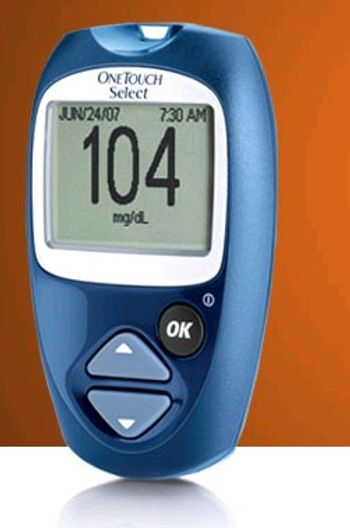
LifeScan OneTouch Select
 LifeScan · Model OneTouch Select
OneTouch Select Blood Glucose Meter (battery included). OneTouch Lancing Device and Lancets. OneTouch Owner’s Booklet and Starter Guide. Logbook. Carrying case. The OneTouch Select Meter uses OneTouch Select Test Strips and OneTouch®. Select Control Solutions, which are sold separately.
Typical Failure Modes
Compiled for this model from its own documentation and established engineering knowledge for this equipment class - not from a verified service record. Confirm against the manufacturer's service manual.
Inaccurate or questionable results
HighSymptoms: Result does not fit the clinical picture, poor agreement between duplicate strips, control solution out of range.
Root cause: Damaged, expired or wrong-lot strips, sample too small, or use outside the operating temperature range.
Meter error / strip problem message
MediumSymptoms: Error message on the display during or after a test.
Root cause: Faulty or mis-inserted strip, or a meter fault - repeat with a new strip.
Temperature out-of-range error
MediumSymptoms: Error stating the system is too hot or too cold.
Root cause: Meter and strips outside the specified operating range.
Will not power on / strip not detected
MediumSymptoms: No display on strip insertion, meter will not start a test.
Root cause: Depleted battery or worn / contaminated strip-port contacts.
Serviceable Parts & Consumables
Serviceable items for this model, compiled from its documentation and engineering knowledge for this equipment class. Service class and relative cost are estimates, not manufacturer figures; no part numbers are given. Confirm intervals and pricing against the manufacturer.
Battery
Class Frequent wear itemRel. cost $R&R Easy
Test strips
Single-use; observe the vial expiry and lot.
Class Frequent wear itemRel. cost $R&R Easy
Control solution
Class Frequent wear itemRel. cost $R&R Easy
Strip-port contact assembly
Class Periodic replacementRel. cost $$R&R Moderate
Lancing device
Class Periodic replacementRel. cost $R&R Easy
| Part | Service class | Relative cost | R&R difficulty |
|---|---|---|---|
| Battery | Frequent wear item | $ | Easy |
| Test strips Single-use; observe the vial expiry and lot. | Frequent wear item | $ | Easy |
| Control solution | Frequent wear item | $ | Easy |
| Strip-port contact assembly | Periodic replacement | $$ | Moderate |
| Lancing device | Periodic replacement | $ | Easy |
Relative cost: $ lowest · $$$$ highest service-part cost for this equipment class. Not a price.
Troubleshooting Approach
A starting sequence for this model, compiled from its documentation and engineering knowledge for this equipment class. Follow the manufacturer's service documentation for the actual procedure.
Symptom: Result looks wrong
- Repeat with a new strip and an adequate sample.
- Run the control solution and compare to the range on the vial / insert.
- Check the ambient temperature is within range.
- Inspect the strip port for dirt, blood or moisture.
- If controls are out of range, quarantine the strip lot; if controls pass but patient results still look wrong, refer the meter.
Symptom: Error message on the display
- Turn the meter off and repeat with a new strip.
- Move the meter and strips to a location within the operating temperature range.
- Inspect the strip port.
- Replace the battery.
- If the error recurs, contact customer service.
Technical Specs
- Height
- 3.54 in
- Length
- 0.85 in
- Weight
- 1.8 oz
- Width
- 2.19 in
Documents & Manuals
No documents available for this device yet.
Safety & Recalls
Synced live from the FDA openFDA API.
- RECALL
The Verio IQ meter will shut off and revert to set up mode at glucose values above 1023 instead of displaying EXTREME HIGH GLUCOSE.
- RECALL
When OneTouch Ultra and OneTouch Select test strips are tested with Ultra and Select control solution the meter may display a result outside the control solution test range printed on the strip vial label even though the system is working properly.
- RECALL
An error was discovered in the OneTouch IQ meter software so that the meter turns itself off when a user attempts to view results in the "Results Log" when the log has 256 or a multiple of 256 items to display.
- RECALL
Individuals attempting to remove a lancet from the OneTouch Delica lancing device without following instructions for use may experience an accidental needle stick.
- RECALL
Products may provide inaccurate results at readings over 400 mg/dL
- RECALL
Deformity in the test strip may result in insufficient blood transfer to reaction area, resulting in inaccurate test results.
- RECALL
Meter Temporarily Freezes-- A software compatibility issue may cause the blood glucose meter to cease operations and freeze temporarily.
- RECALL
Damaged Vials/Inaccurate test results: a manufacturing equipment problem on one of the packaging lines had the potential to puncture vials, causing a single hole in the side of the vial below the rim. This result of this defect may produce inaccurately high or low blood glucose test results or error message readings.
- RECALL
Inaccurage test results: testing may lead to no test results, error message or inaccurately low test results.
- RECALL
Product may be defective and may give low inaccurate glucose results.
- RECALL
Vials of OneTouch Ultra Test Strips marked with quantities of 25 per vial actually contain only 10 strips.
- RECALL
In some cases, the needles in the single use lancing device may not retract, causing a potential for needle sticks.
- RECALL
Users may inadvertently change units of measurement on demonstration kits of the OneTouch Ultra Blood Glucose Meters
- RECALL
The LCD of the OneTouch SureStep Meter may display incorrectly, resulting in missing segments on the display. This display failure may result in patients misreading the blood glucose result, or cause a delay in test interpretation, and could cause delays or mistreatment.
- RECALL
User may inadvertently change the Units of Measure from mg/dL to mmol/L and the blood glucose results could be misinterpreted. This may lead to under treatment and potential for hyperglycemia.
- RECALL
LifeScan brand OneTouch Ultra Meter - Owner's Booklets are missing instructions on how to set the Units of Measurement (UOM)--mg/dL versus mmol/L. This error has the potential to lead to acute hyperglycemic complications if the user fails to realize that 18mg/dL of glucose is equal to 1 (one) mmol/L.
- RECALL
A Control Solution range for the OneTouch Ultra Test Strip of 111-150 mg/dL was incorrectly labeled as 97-131 mg/dL.
- RECALL
The Test Strips have manufacturing errors, in that the 'Confirmation Dot' is off-center or split in half, and defective bottle Cap.
Troubleshoot this device with Bio
Describe a symptom or error code. Bio answers from this device's own documented error codes, failure modes, parts, and guides.
Ask Bio