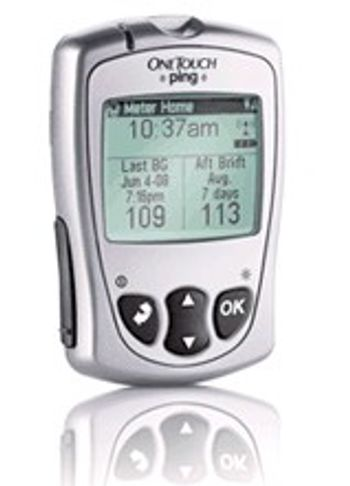
LifeScan OneTouch Ping
 LifeScan · Model OneTouch Ping
It matches your body's needs like no other pump system. OneTouch Ping gives you the smallest basal increment available (0.025 U/hr) for more precise basal dosing. The meter-remote can store the nutritional values of 500 of your favorite foods, via CalorieKing®, for easy and accurate carb counting on the go. Using ezManager® Max software, you can even customize the database or enter your own favorites (like Mom’s chicken soup). It's got beauty as well as brains. - The OneTouch Ping insulin pump has a flat panel color screen that uses the same screen technology as the latest televisions and digital cameras. Proven Waterproof. - The OneTouch Ping insulin pump is proven waterproof up to 12 feet for 24 hours so you can jump in the pool or get caught in the rain without worry.
Typical Failure Modes
Compiled for this model from its own documentation and established engineering knowledge for this equipment class - not from a verified service record. Confirm against the manufacturer's service manual.
Result / QC failure
HighSymptoms: Result flagged or biased, QC control out of range, strip / cartridge error code.
Root cause: Expired or mishandled strips / cartridges, a temperature / hematocrit interference, or an optics / electrode fault.
Strip / cartridge port fault
MediumSymptoms: Strip not detected, error on insertion, intermittent contact.
Root cause: Contaminated or worn strip-port contacts / optics.
Will not power on / battery fault
MediumSymptoms: Dead unit, short battery life, will not charge.
Root cause: Depleted or aged battery.
Barcode / connectivity fault
LowSymptoms: Operator / lot barcode will not scan, results not sent to the docking / LIS.
Root cause: Barcode reader or the docking-station / wireless link.
Display / button fault
LowSymptoms: Missing segments, unresponsive buttons.
Root cause: Display or keypad fault.
Serviceable Parts & Consumables
Serviceable items for this model, compiled from its documentation and engineering knowledge for this equipment class. Service class and relative cost are estimates, not manufacturer figures; no part numbers are given. Confirm intervals and pricing against the manufacturer.
Test strips / cartridges
Class Frequent wear itemRel. cost $$R&R Easy
QC control solutions
Class Frequent wear itemRel. cost $R&R Easy
Battery
Class Frequent wear itemRel. cost $R&R Easy
Strip-port contacts / optics module
Class Periodic replacementRel. cost $$R&R Moderate
Docking station / barcode reader
Class Periodic replacementRel. cost $$R&R Fairly easy
| Part | Service class | Relative cost | R&R difficulty |
|---|---|---|---|
| Test strips / cartridges | Frequent wear item | $$ | Easy |
| QC control solutions | Frequent wear item | $ | Easy |
| Battery | Frequent wear item | $ | Easy |
| Strip-port contacts / optics module | Periodic replacement | $$ | Moderate |
| Docking station / barcode reader | Periodic replacement | $$ | Fairly easy |
Relative cost: $ lowest · $$$$ highest service-part cost for this equipment class. Not a price.
Troubleshooting Approach
A starting sequence for this model, compiled from its documentation and engineering knowledge for this equipment class. Follow the manufacturer's service documentation for the actual procedure.
Symptom: Result or QC failure
- Repeat with a fresh strip / cartridge from a correctly stored, in-date vial.
- Run the QC control solutions at each level.
- Confirm the meter is coded / calibrated to the current strip lot.
- Clean the strip port per the manual.
- Quarantine the strip lot if QC fails; replace the meter if QC still fails with good strips.
Symptom: Strip not detected
- Inspect and clean the strip-port contacts / optics.
- Try several strips from a fresh vial.
- Check for physical damage to the port.
- Replace the battery.
- Replace the meter if it will not read good strips.
Documents & Manuals
No documents available for this device yet.
Safety & Recalls
Synced live from the FDA openFDA API.
- RECALL
The Verio IQ meter will shut off and revert to set up mode at glucose values above 1023 instead of displaying EXTREME HIGH GLUCOSE.
- RECALL
An error was discovered in the OneTouch IQ meter software so that the meter turns itself off when a user attempts to view results in the "Results Log" when the log has 256 or a multiple of 256 items to display.
- RECALL
Individuals attempting to remove a lancet from the OneTouch Delica lancing device without following instructions for use may experience an accidental needle stick.
- RECALL
Products may provide inaccurate results at readings over 400 mg/dL
- RECALL
Deformity in the test strip may result in insufficient blood transfer to reaction area, resulting in inaccurate test results.
- RECALL
Inaccurage test results: testing may lead to no test results, error message or inaccurately low test results.
- RECALL
In some cases, the needles in the single use lancing device may not retract, causing a potential for needle sticks.
- RECALL
The LCD of the OneTouch SureStep Meter may display incorrectly, resulting in missing segments on the display. This display failure may result in patients misreading the blood glucose result, or cause a delay in test interpretation, and could cause delays or mistreatment.
- RECALL
The Test Strips have manufacturing errors, in that the 'Confirmation Dot' is off-center or split in half, and defective bottle Cap.
Troubleshoot this device with Bio
Describe a symptom or error code. Bio answers from this device's own documented error codes, failure modes, parts, and guides.
Ask Bio