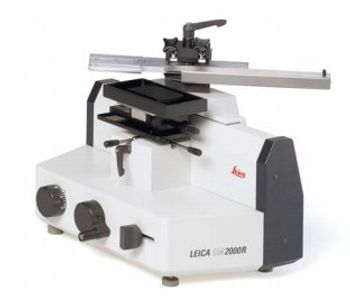
Leica Biosystems SM2000 R
 Leica Biosystems · Model SM2000 R
Easy-to-use knife holder The Leica SM2000 R knife holder is designed to accommodate both standard knives and disposable blades. A magnet on the back ensures safe and easy knife installation, and an integrated knife guard is provided for enhanced safety. The knife or disposable blade holder of this Leica microtome can be fixed in the holder with minimal time and effort. The clearance angle can be adjusted while the knife remains clamped. Innovative technology makes your work easier and safer The Leica SM2000 R has an automatic specimen advance feature that can be adjusted to the size of the sample. Operator safety is enhanced by fixing the sledge in the sectioning area before section removal using magnetic force or by positively locking the sledge in any position during section removal. Utmost flexibility The microtome, with quick release specimen clamping system, can be equipped with Supermega universalcassette clamp or standard clamp for paraffin blocks. Precise fine orientation allows samples to be accurately aligned with the knife. For critical samples, which usually require reduced cutting force, the knife can be positioned at an angle. An easy-to-clean section waste tray is available as an optional accessory. Equipped to suit individual working techniques The Leica SM2000 R sliding microtome has both automatic (up to 30 µm) and manual specimen feed via the coarse feed wheel to accommodate different individual needs. Ideal for biological and industrial applications, the Leica SM2000 R sliding microtome has both automatic and manual specimen feed via the coarse feed wheel to accommodate different individual needs. Efficient and rapid sectioning is at your disposal with the Leica SM2000 R microtome. Microtome with quick release specimen clamping system. Knife holder for both standard and disposable knives. Automatic specimen advance. Automatic and manual specimen feed. Wide variety of optional accessories.
Key tips
- ·Run QC controls before trusting any repair - an analyzer that passes self-test can still report clinically wrong results.
- ·Rule out a reagent lot change before opening the instrument - it can look exactly like a hardware fault.
- ·Centrifuge rotors have a hard retirement age/cycle limit regardless of visible condition - don't eyeball it.
Typical Failure Modes
Compiled for this model from its own documentation and established engineering knowledge for this equipment class - not from a verified service record. Confirm against the manufacturer's service manual.
Poor / uneven sections
HighSymptoms: Thick-thin sectioning, chatter, ribbons that will not form, scoring lines.
Root cause: Dull or nicked blade, incorrect clearance angle, a loose specimen / blade clamp, or worn feed mechanism.
Feed / advance mechanism fault
MediumSymptoms: Section thickness inconsistent or drifting, coarse feed will not advance / retract.
Root cause: Worn micro-feed mechanism, a stepper / clutch fault (motorised), or backlash.
Handwheel / drive fault
MediumSymptoms: Handwheel binds, the brake will not hold, or motorised sectioning stalls.
Root cause: Worn bearings, a brake fault, or the drive motor / belt (motorised).
Cryostat temperature / defrost fault (cryostat)
MediumSymptoms: Chamber or specimen head will not reach temperature, heavy frost.
Root cause: Refrigeration fault, a temperature-sensor fault, or a failed defrost cycle.
Specimen orientation / clamp fault
LowSymptoms: Block moves during sectioning, orientation will not lock.
Root cause: Worn specimen clamp or orientation mechanism.
Serviceable Parts & Consumables
Serviceable items for this model, compiled from its documentation and engineering knowledge for this equipment class. Service class and relative cost are estimates, not manufacturer figures; no part numbers are given. Confirm intervals and pricing against the manufacturer.
Blade holder / clamp assembly
Class Major service partRel. cost $$R&R Moderate
Micro-feed mechanism
Class Major service partRel. cost $$$R&R Difficult
Handwheel bearings / brake
Class Major service partRel. cost $$R&R Difficult
Cryostat refrigeration / temp sensor (cryostat)
Class Major service partRel. cost $$$R&R Difficult
Specimen clamp / orientation head
Class Major service partRel. cost $$R&R Moderate
| Part | Service class | Relative cost | R&R difficulty |
|---|---|---|---|
| Blade holder / clamp assembly | Major service part | $$ | Moderate |
| Micro-feed mechanism | Major service part | $$$ | Difficult |
| Handwheel bearings / brake | Major service part | $$ | Difficult |
| Cryostat refrigeration / temp sensor (cryostat) | Major service part | $$$ | Difficult |
| Specimen clamp / orientation head | Major service part | $$ | Moderate |
Relative cost: $ lowest · $$$$ highest service-part cost for this equipment class. Not a price.
PM Checklist
Preventive-maintenance tasks typical of this equipment class. Perform to the manufacturer's procedure and your facility's policy - this is general reference, not a schedule for this specific unit.
- ·Daily QC controls run and reviewed
- ·Calibration verification per assay
- ·Routine cleaning and decontamination
- ·Scheduled reagent-path and pump-tubing maintenance
Troubleshooting Approach
A starting sequence for this model, compiled from its documentation and engineering knowledge for this equipment class. Follow the manufacturer's service documentation for the actual procedure.
Symptom: Poor / uneven sections (thick-thin, chatter, scoring)
- Fit a fresh blade and set the correct clearance angle.
- Confirm the specimen clamp and the blade clamp are fully tight.
- Check the block is properly faced and cold enough (cryostat).
- Cut a range of thicknesses to check feed consistency.
- Service the micro-feed mechanism if thickness still drifts.
Symptom: Section thickness inconsistent / feed will not advance or retract
- Verify thickness with a set of test blocks / measured ribbons.
- Check for backlash in the feed mechanism.
- On motorised units, check the stepper / clutch and drive.
- Re-lubricate or replace the micro-feed mechanism.
- Confirm consistent thickness after service.
Symptom: Handwheel binds / brake will not hold / motorised sectioning stalls
- Check for debris or dried grease on the ways.
- Feel the handwheel bearings for roughness.
- Adjust or replace the brake.
- On motorised units, check the drive motor / belt.
- Re-lubricate and confirm smooth, safe operation with the brake holding.
Symptom: Cryostat will not reach temperature / heavy frost (cryostat)
- Check the refrigeration and the chamber / specimen-head temperature sensors.
- Confirm the defrost cycle completes.
- Inspect the door seal.
- Compare chamber temperature to an independent reference.
- Escalate a sealed-system refrigeration fault to a certified tech.
Technical Specs
- Height
- 13 in
- Length
- 15.5 in
- Weight
- 50 lbs
- Width
- 13.5 in
Typical Location
Where this class of equipment is typically deployed - general reference, not this unit's own placement record.
- Central / core laboratory
- Point-of-care testing stations
- Blood bank
- Microbiology lab
Documents & Manuals
Troubleshoot this device with Bio
Describe a symptom or error code. Bio answers from this device's own documented error codes, failure modes, parts, and guides.
Ask Bio