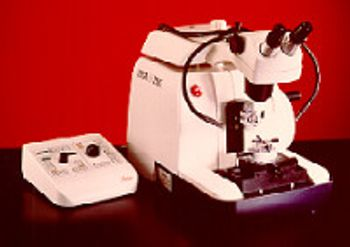
Leica Biosystems RM2165
 Leica Biosystems · Model RM2165
4 Sectioning modes: In the automated mode trimming and sectioning can be done with either a single or continuous stroke. In the manual mode trimming and sectioning uses either the conventional method of completing a full handwheel rotation or the rocking mode. In the rocking mode each change in rotation is electronically detected and automatically converted into an advance of retraction movement. The rocking mode is efficient and quick when trimming small specimens. In addition, it minimizes the risk of developing repetitive motion disorders, which are a typical threat to persons doing routine sectioning every day. All key microtome functions: section and trimming thickness; sectioning speed; coarse and fine specimen advance; sectioning window size; and sectioning mode are controlled by and displayed on the control panel. Programmable horizontal stop function moves the specimen to a preset feed position. Programmable sectioning window automatically reduces the speed of the specimen as it is sectioned then speeds up during the return function to increase productivity without compromising quality. Adjustable specimen stop can be set to upper or lower limit of stroke to facilitate specimen transfer. Section thickness setting from 0.25 to 60um. Trim step settings from 1 to 600um. RS232 port used to download and preset unique sectioning specifications for research projects. Optional low temperature sectioning system (Leica LN 21) is designed to convert the RM 2165 from ambient temperature sectioning to cryosectioning down to -150°C using tungsten carbide, glass or diamond knives.
Key tips
- ·Run QC controls before trusting any repair - an analyzer that passes self-test can still report clinically wrong results.
- ·Rule out a reagent lot change before opening the instrument - it can look exactly like a hardware fault.
- ·Centrifuge rotors have a hard retirement age/cycle limit regardless of visible condition - don't eyeball it.
Typical Failure Modes
Compiled for this model from its own documentation and established engineering knowledge for this equipment class - not from a verified service record. Confirm against the manufacturer's service manual.
Poor / uneven sections
HighSymptoms: Thick-thin sectioning, chatter, ribbons that will not form, scoring lines.
Root cause: Dull or nicked blade, incorrect clearance angle, a loose specimen / blade clamp, or worn feed mechanism.
Feed / advance mechanism fault
MediumSymptoms: Section thickness inconsistent or drifting, coarse feed will not advance / retract.
Root cause: Worn micro-feed mechanism, a stepper / clutch fault (motorised), or backlash.
Handwheel / drive fault
MediumSymptoms: Handwheel binds, the brake will not hold, or motorised sectioning stalls.
Root cause: Worn bearings, a brake fault, or the drive motor / belt (motorised).
Cryostat temperature / defrost fault (cryostat)
MediumSymptoms: Chamber or specimen head will not reach temperature, heavy frost.
Root cause: Refrigeration fault, a temperature-sensor fault, or a failed defrost cycle.
Specimen orientation / clamp fault
LowSymptoms: Block moves during sectioning, orientation will not lock.
Root cause: Worn specimen clamp or orientation mechanism.
Serviceable Parts & Consumables
Serviceable items for this model, compiled from its documentation and engineering knowledge for this equipment class. Service class and relative cost are estimates, not manufacturer figures; no part numbers are given. Confirm intervals and pricing against the manufacturer.
Blade holder / clamp assembly
Class Major service partRel. cost $$R&R Moderate
Micro-feed mechanism
Class Major service partRel. cost $$$R&R Difficult
Handwheel bearings / brake
Class Major service partRel. cost $$R&R Difficult
Cryostat refrigeration / temp sensor (cryostat)
Class Major service partRel. cost $$$R&R Difficult
Specimen clamp / orientation head
Class Major service partRel. cost $$R&R Moderate
| Part | Service class | Relative cost | R&R difficulty |
|---|---|---|---|
| Blade holder / clamp assembly | Major service part | $$ | Moderate |
| Micro-feed mechanism | Major service part | $$$ | Difficult |
| Handwheel bearings / brake | Major service part | $$ | Difficult |
| Cryostat refrigeration / temp sensor (cryostat) | Major service part | $$$ | Difficult |
| Specimen clamp / orientation head | Major service part | $$ | Moderate |
Relative cost: $ lowest · $$$$ highest service-part cost for this equipment class. Not a price.
PM Checklist
Preventive-maintenance tasks typical of this equipment class. Perform to the manufacturer's procedure and your facility's policy - this is general reference, not a schedule for this specific unit.
- ·Daily QC controls run and reviewed
- ·Calibration verification per assay
- ·Routine cleaning and decontamination
- ·Scheduled reagent-path and pump-tubing maintenance
Troubleshooting Approach
A starting sequence for this model, compiled from its documentation and engineering knowledge for this equipment class. Follow the manufacturer's service documentation for the actual procedure.
Symptom: Poor or uneven sections
- Fit a fresh blade and set the correct clearance angle.
- Check the specimen and blade clamps are fully tight.
- Confirm the block is properly faced and cold enough.
- Cut a range of thicknesses to check feed consistency.
- Service the micro-feed mechanism if thickness still drifts.
Symptom: Feed or thickness inconsistent
- Verify section thickness with a set of test blocks / measured ribbons.
- Check for backlash in the feed mechanism.
- On motorised units, check the stepper / clutch.
- Re-lubricate or replace the micro-feed mechanism.
- Confirm consistent thickness after service.
Typical Location
Where this class of equipment is typically deployed - general reference, not this unit's own placement record.
- Central / core laboratory
- Point-of-care testing stations
- Blood bank
- Microbiology lab
Documents & Manuals
No documents available for this device yet.
Troubleshoot this device with Bio
Describe a symptom or error code. Bio answers from this device's own documented error codes, failure modes, parts, and guides.
Ask Bio