KOPP Development Inc. FerrAlert™ SOLO
 KOPP Development Inc. · Model FerrAlert™ SOLO
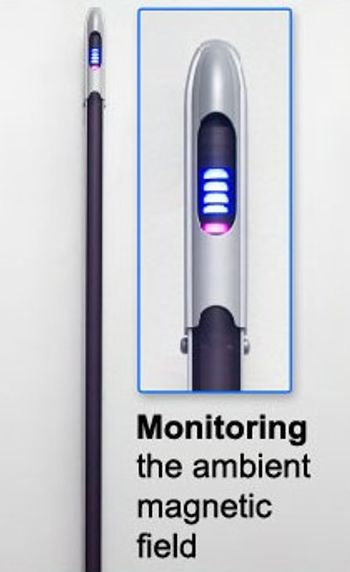
Instantly PINPOINTS location of the ferromagnetic object, allowing Technologist to quickly identify and remove the ferromagnetic threat – NO invasive PAT-DOWN required. Limits alarm fatigue – Patented technology suppresses irrelevant warnings and false positive alarms caused by hallway traffic. 12 location-accurate sensors for uniform sensitivity, reliability and usability. An intelligent pre-alarm indicator - Constantly monitors the ambient magnetic field and provides early visual warning of approaching ferrous objects. No-Touch Activation safeguards against cross-contamination. Consistent, unambiguous and simple Self-Screening or Supervised Screening. Elegant, Small Footprint Installation. Available as a portable, battery-powered system to suit any facility’s needs. Integrates easily into any established screening procedures. Inexpensive – affordable for any MRI facility. Conforms to ES60601-1-8 international standards for medical device alarms (Does not cause alarm fatigue. No RED alarm lights, as color RED must be used ONLY in life threatening situations). Conforms to IEC 60101-1:2005 medical device specification requirements (Ferromagnetic detectors are not considered to be medical devices; however, they are an integral part of the medical environment. As such, it is highly important that the power supply used in the detectors complies with standards for medical equipment used by the FDA, UL, as well as agencies around the world.).
Key tips
- ·Never bypass a radiation interlock to "just get the image" - this is one of the few true zero-tolerance rules in BMET work.
- ·Trend image-quality phantom results over time - drift shows up before an outright failure does.
- ·Portable/mobile units take real physical abuse from transport - check wheel locks and cable strain reliefs more often than fixed units.
Typical Failure Modes
Compiled for this model from its own documentation and established engineering knowledge for this equipment class - not from a verified service record. Confirm against the manufacturer's service manual.
Will not power on or unexpected shutdown
HighSymptoms: The medical imaging is dead, reboots, or shuts down mid-use.
Root cause: Mains lead / fuse, an aged battery, or a power-supply board fault.
Battery will not hold charge
MediumSymptoms: Short run time on battery; low-battery alarm soon after a full charge.
Root cause: Aged rechargeable battery pack or a charger fault.
Display / control-panel fault
MediumSymptoms: Blank, dim or distorted display; unresponsive keys or touchscreen.
Root cause: Display, backlight, or control-board fault.
Fails self-test or calibration
MediumSymptoms: Power-on self-test or the scheduled performance check fails or is out of tolerance.
Root cause: Sensor drift or an internal board fault; recalibration or repair needed.
Serviceable Parts & Consumables
Serviceable items for this model, compiled from its documentation and engineering knowledge for this equipment class. Service class and relative cost are estimates, not manufacturer figures; no part numbers are given. Confirm intervals and pricing against the manufacturer.
Rechargeable battery pack
Class Periodic replacementRel. cost $$R&R Fairly easy
Power supply / mains board
Class Major service partRel. cost $$$R&R Difficult
Display / control-panel assembly
Class Major service partRel. cost $$$R&R Moderate
Cooling fan
Class Major service partRel. cost $R&R Moderate
| Part | Service class | Relative cost | R&R difficulty |
|---|---|---|---|
| Rechargeable battery pack | Periodic replacement | $$ | Fairly easy |
| Power supply / mains board | Major service part | $$$ | Difficult |
| Display / control-panel assembly | Major service part | $$$ | Moderate |
| Cooling fan | Major service part | $ | Moderate |
Relative cost: $ lowest · $$$$ highest service-part cost for this equipment class. Not a price.
PM Checklist
Preventive-maintenance tasks typical of this equipment class. Perform to the manufacturer's procedure and your facility's policy - this is general reference, not a schedule for this specific unit.
- ·Daily QC per modality: image-quality phantom test
- ·Tube and detector inspection
- ·Annual state-required radiation safety survey
- ·Vendor-scheduled preventive maintenance
Troubleshooting Approach
A starting sequence for this model, compiled from its documentation and engineering knowledge for this equipment class. Follow the manufacturer's service documentation for the actual procedure.
Symptom: Will not power on
- Confirm the outlet, mains lead and fuse.
- Try on battery, then on mains only, to isolate the supply.
- Look for a power indicator or POST code.
- Replace the fuse / battery / power supply as isolated.
- Run the self-test after any repair.
Symptom: Fails self-test or calibration
- Note the exact failure message / code.
- Power-cycle and repeat the self-test.
- Verify against a reference / simulator where one applies.
- Recalibrate per the service manual.
- Refer the affected board for service if it will not hold calibration.
Typical Location
Where this class of equipment is typically deployed - general reference, not this unit's own placement record.
- Radiology / Imaging department
- Emergency Department (portable units)
- Operating Room (C-arms)
- Cath lab
- Bedside ICU (portable X-ray)
Documents & Manuals
No documents available for this device yet.
Troubleshoot this device with Bio
Describe a symptom or error code. Bio answers from this device's own documented error codes, failure modes, parts, and guides.
Ask Bio